Automatic migration migrates all the supported settings for all the supported products you have installed on your Windows, Mac, and Linux systems. This migration path requires minimal input from you.
Use automatic migration to migrate all the policies and client tasks for the legacy products on your Windows systems. It also migrates the entries in your legacy Host IPS Catalog to the new Trellix ENS Firewall Catalog. Optionally, you can migrate on-demand scan client tasks and some IPS rules for Linux, and on-access scan policy settings for Mac and Linux.
The Endpoint Migration Assistant creates and assigns the new Trellix ENS policies and client tasks automatically, based on your current product settings.
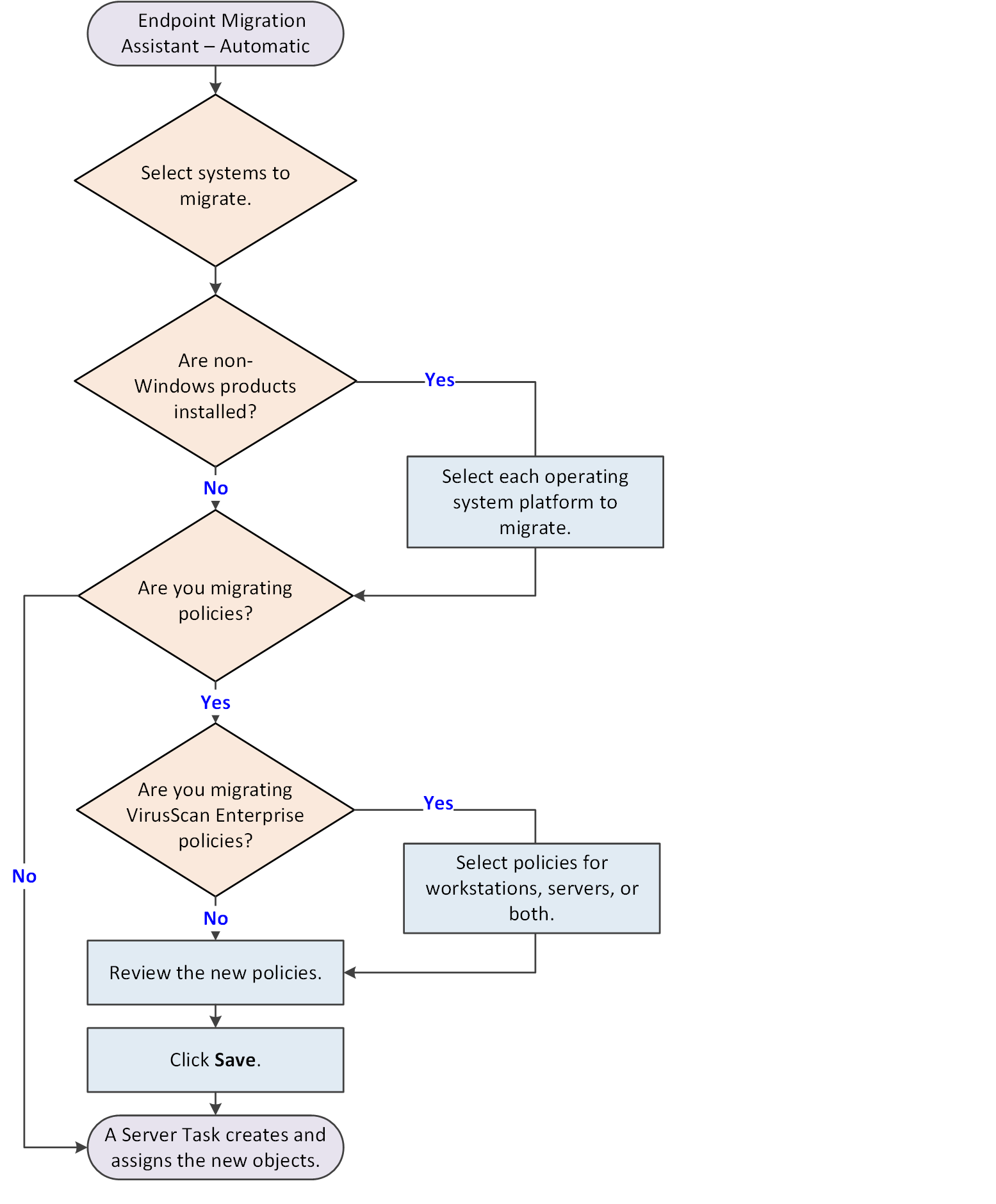
- Run the Endpoint Migration Assistant and select Automatic migration.
- Select the systems to migrate. You can migrate the entire System Tree or a single group and its subgroups.
- If Mac or Linux products are installed, specify whether to migrate them.
- If there are VirusScan Enterprise policies to migrate, specify whether to migrate policies for workstations, servers, or both.
- Preview and save the proposed policies.
A server task runs and completes the policy migration. It also migrates client tasks and the Host IPS Catalog.
Automatic migration retains assignments for migrated policies and client tasks. After automatic migration completes, you can deploy Trellix ENS to managed systems.
Tip
Best practice: Test migration by migrating a single System Tree group. View the migrated policies for a preview of how settings are merged and assigned. Migrate additional groups as needed, then migrate the entire System Tree when you are ready. Settings created for a group during previous automatic migrations are deleted when you migrate the group automatically again.
| For these objects... | The Migration Assistant... |
|---|---|
| Policies | Creates the new policies, adds them to the
Trellix ENS
Policy Catalog, and assigns them to the same managed systems. You can preview the new policies before they are created.
If you don't like the previewed policies, you can cancel the migration and begin a manual migration instead. |
| Client Tasks (Windows and Linux) | Creates new tasks, adds them to the
Trellix ENS
Client Task Catalog, and assigns them to the same managed systems.
|
| Host IPS Catalog | Migrates legacy catalog entries to the Trellix ENS Firewall Catalog. |