The HX 4600 appliance is typically deployed in tandem with an HX 4600D appliance. The HX 4600 appliance manages Endpoint Security Agents within the LAN. The HX 4600D appliance resides within a DMZ and manages remote endpoints. The diagram below illustrates the typical deployment of Endpoint Security appliances.
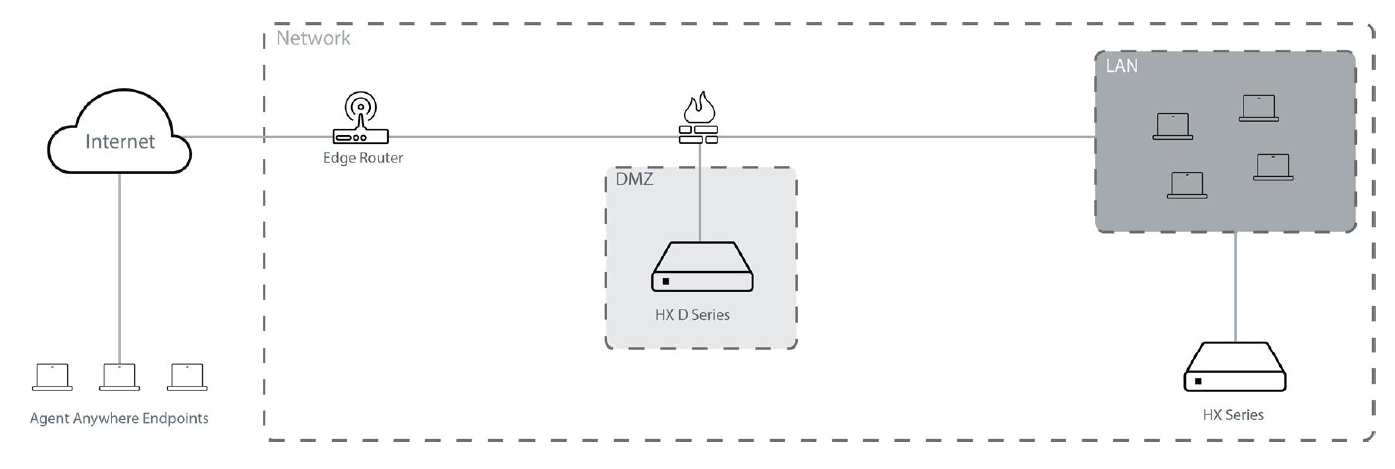
It is not a requirement to deploy the HX 4600D appliance in the same network as the HX 4600 appliance. The HX 4600D can be deployed in another network with its own Internet connection. As long as port HTTPS 6800 is open, the two Endpoint Security appliances will be able to communicate securely.
Prerequisites
Before connecting the HX 4600 and HX 4600D appliances to your network, ensure that your network device provides 10/100/1000BASE-T Ethernet output.
Cabling
To connect the HX 4600 appliance to your network:
Connect one end of an Ethernet cable to the HX 4600 appliance’s ether1 port.
Connect the other end of the Ethernet cable to your LAN-facing switch.
To connect the HX 4600D appliance to your network:
Connect one end of an Ethernet cable to the HX 4600D appliance’s ether1 port.
Connect the other end of the Ethernet cable to your Internet-and-LAN-facing firewall.