An AXXVRAIL rail set is shipped with each appliance so you can install it in a rack and place the appliance on it.
Verify the number of studs on the sides of the appliance and the number of slots on the rails. You might need to remove studs from the appliance.
The default rail set works in most racking systems. If the shipped rail set doesn't work, use one designed for your server cabinet.
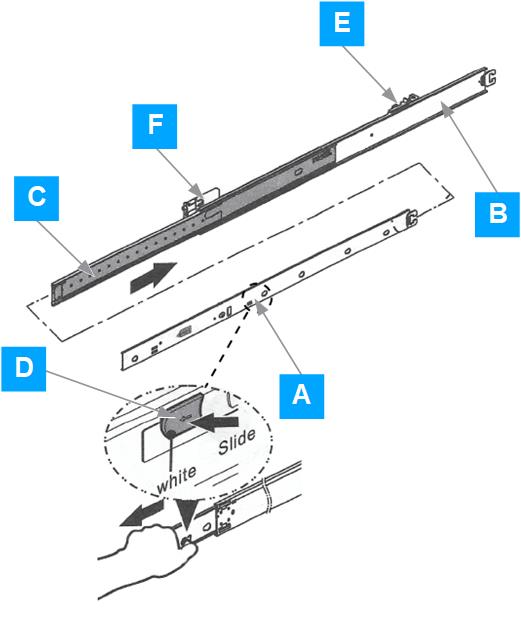
Install rails in the rack.
Extend the inner member (A) with the intermediate member (C) from the outer member (B).
Pull the release button (D) to remove the inner member from the slides.
Slide the intermediate member (C) back into the outer member (B).
Align the brackets to a vertical position on the rack, then insert the fasteners.
Move the ball retainer to the front of the slides.
Install the chassis.
Caution
Make sure that the ball retainer is locked on each intermediate rail member.
Align the inner member (A) key holes with the stand-offs on the chassis.
Lock the inner member (A).
Extend the intermediate member (C).
Carefully align and insert the inner member (A) with the chassis to the intermediate member (C), and push the chassis forward until it locks.
Pull the release tab on the inner member (A) and push the chassis into the rack.
Tighten the captive screws on the rack handle.