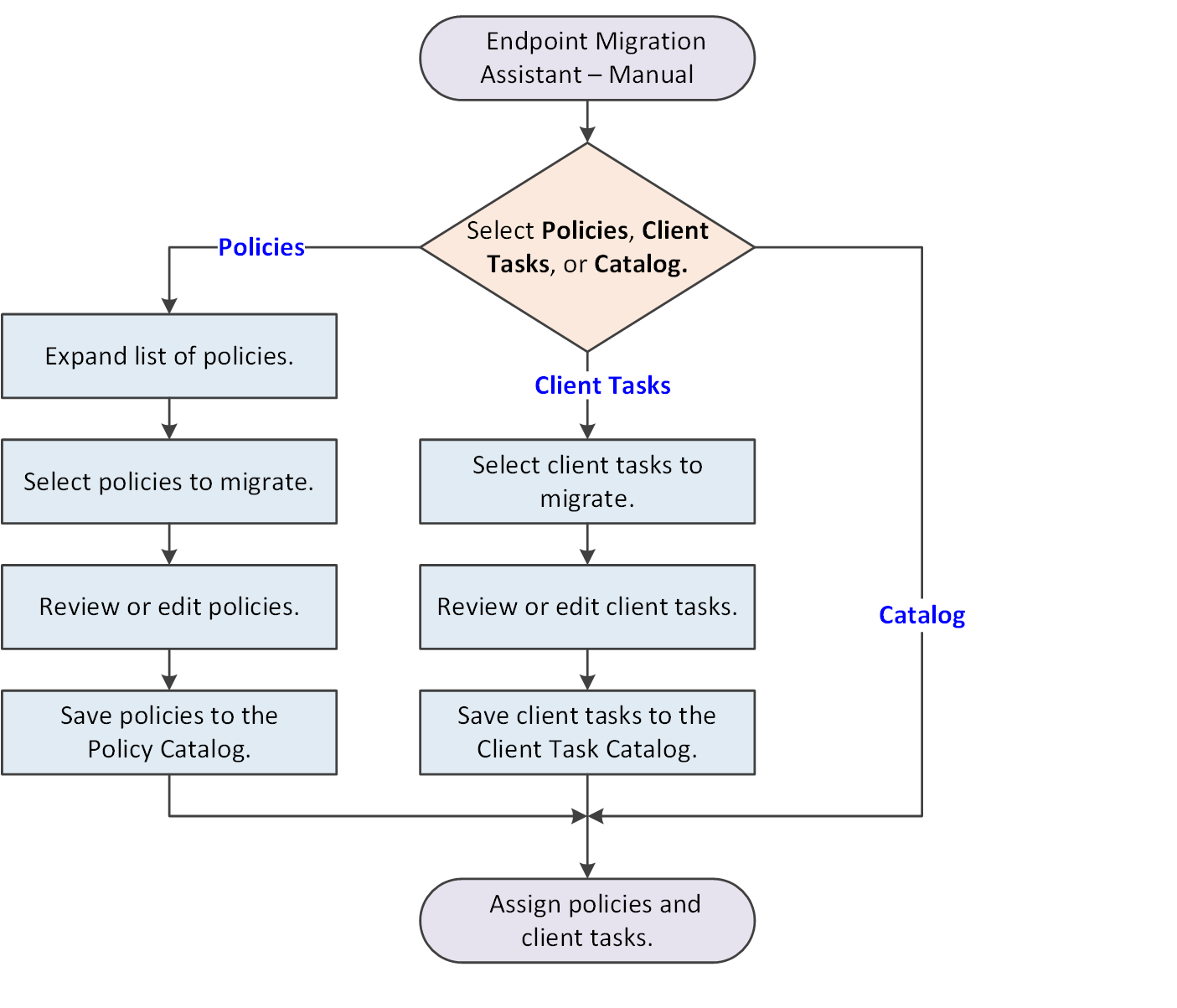
Manual migration migrates selected settings for the supported products you have installed on your Windows, Mac, and Linux systems. This is an interactive migration path that requires your input.
Use manual migration to migrate selected policies, client tasks, or the Host IPS Catalog for your legacy products. The Endpoint Migration Assistant lets you select specific objects to migrate and edit the policies if needed. Manual migration does not retain assignments for migrated objects.
- Run the Endpoint Migration Assistant and select Manual migration.
- Select the type of objects to migrate.
- If you select the Host IPS Catalog, a server task runs and completes the Catalog migration.
- If you select
Policies or
Client Tasks, select what you want to migrate from the categories, then save your selections.
You can edit policies, if needed. You can also edit notes for policies and client tasks. Your selections are migrated in the background.
Tip
Best practice: Migrate the Host IPS Catalog immediately before the McAfee Host IPS Firewall policies to ensure that they remain synchronized.
- Run the Migration Assistant again to migrate additional objects.
After manual migration, you must assign the new policies and client tasks to managed systems as part of product deployment. See the Trellix ePolicy Orchestrator - On-prem Installation Guide for more information.