---
title: "Merging Access Protection and Buffer Overflow Protection settings"
slug: "merging-access-protection-and-buffer-overflow-protection-settings"
tags: ["Migration", "ENS 10.7.x"]
updated: 2026-10-07T18:04:46Z
published: 2026-10-07T18:04:46Z
canonical: "docs.trellix.com/merging-access-protection-and-buffer-overflow-protection-settings"
---
> ## Documentation Index
> Fetch the complete documentation index at: https://docs.trellix.com/llms.txt
> Use this file to discover all available pages before exploring further.
# Merging Access Protection and Buffer Overflow Protection settings
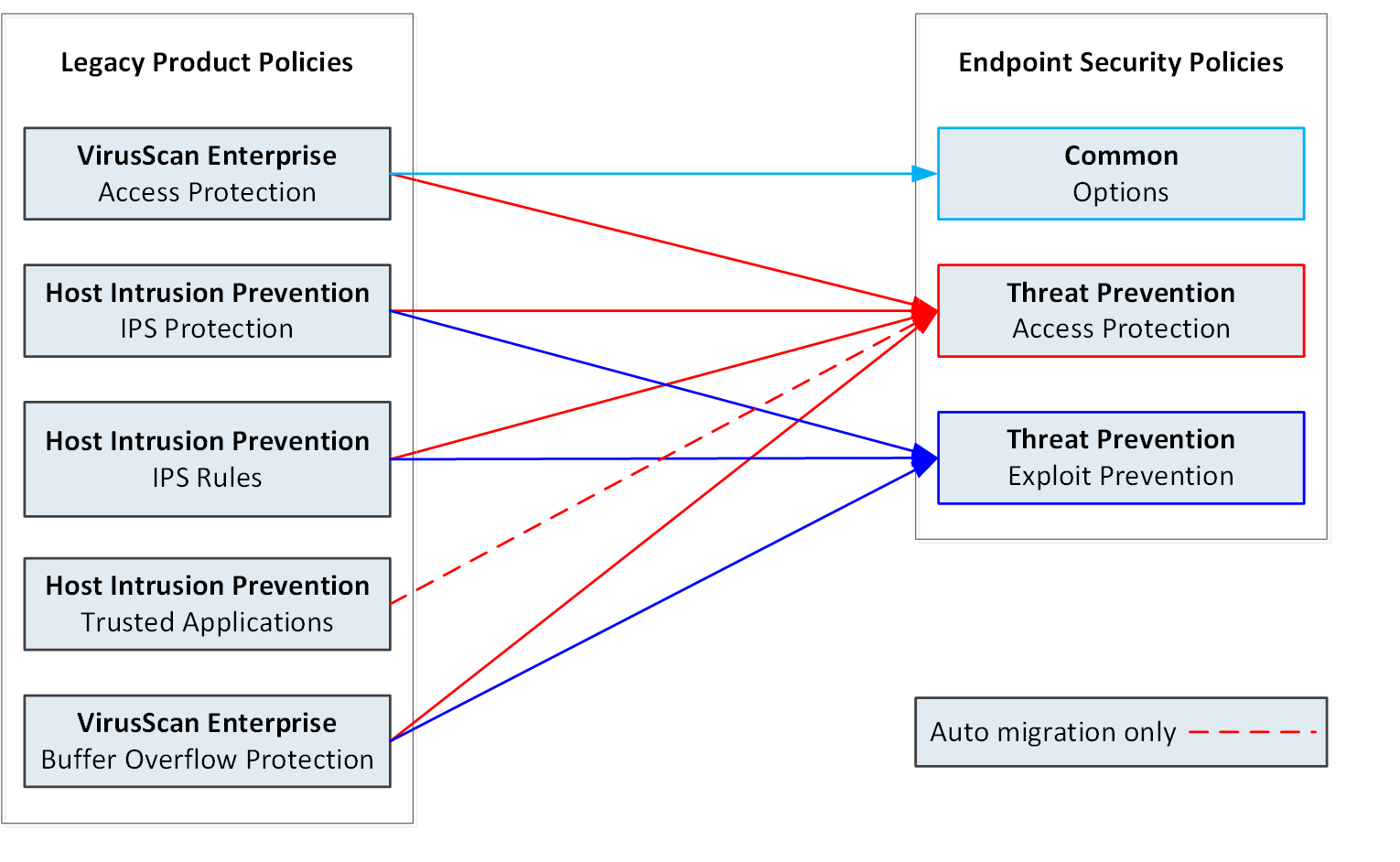
Access Protection, Buffer Overflow Protection, and IPS Rules policy settings from VirusScan Enterprise and McAfee Host IPS migrate to two Threat Prevention policies and the Trellix Endpoint Security (ENS) Common policy.
These policy types are migrated to the **Access Protection** policy in Threat Prevention:
- McAfee Host IPS —
**IPS Rules**
(Windows and Linux)
- McAfee Host IPS —
**Trusted Applications** (Automatic migration only)
(Windows and Linux)
- VirusScan Enterprise —
**Access Protection**
These policy types are migrated to the **Exploit Prevention** policy in Threat Prevention:
- McAfee Host IPS —
**IPS Rules**
(Windows and Linux)
- VirusScan Enterprise — Buffer Overflow Protection
The IPS Rules policy is a multiple-instance policy. All source instances of the IPS Rules policy are merged and migrated to a single **Access Protection** policy and a single **Exploit Prevention** policy in Threat Prevention.
For more information, see the IPS Rules migration and Changes to migrated settings appendixes.
Migrating Access Protection and Buffer Overflow Protection settings from legacy products
## Trusted Applications (Windows and Linux)
Automatic migration moves settings from **Trusted Applications** in the McAfee Host IPS **General** policies to the **Access Protection** policy in Threat Prevention.
- Trusted applications where
**Trusted for IPS** is enabled migrate.
- Trusted applications where
**Trusted for Firewall** is enabled do not migrate.
If you migrate settings manually, you need to add the settings from **Trusted Applications** to the migrated **Access Protection** policy.