Before you begin
- The Sensor must be set up and have established trust with a Manager server.
- The Sensor has a free port pair which can be deployed in inline Active Fail-Open mode.
- It is assumed that you have inserted necessary transceiver modules into the Sensor if you have completed cabling the Sensor and Active Fail-Open module.
When you set up a Sensor for the first time, its ports are disabled by default. The Sensor ports must be manually configured for inline Active Fail-Open operation.
Task
- In the Manager, go to Devices → <Admin_Domain_Name> → Devices → <Device_Name> → Setup → Physical Ports.
-
Double-click port one of the configurable ports, say
G2/1.
A configuration panel appears on the right side of the window.
-
Under
State, select
Enabled from the drop-down list.
You are asked whether you want to continue since this configuration also impacts port G2/2.
-
Select
Yes to continue.
This enables port G2/1-G2/2.
- Under Mode, select Inline Active Fail-Open – Active from the drop-down list.
-
Under
Placement, select
Inside Network or
Outside Network from the drop-down list, depending on how you want to configure your ports.
Trellix recommends choosing Gx/1 as Inside Network and Gx/2 as Outside Network.
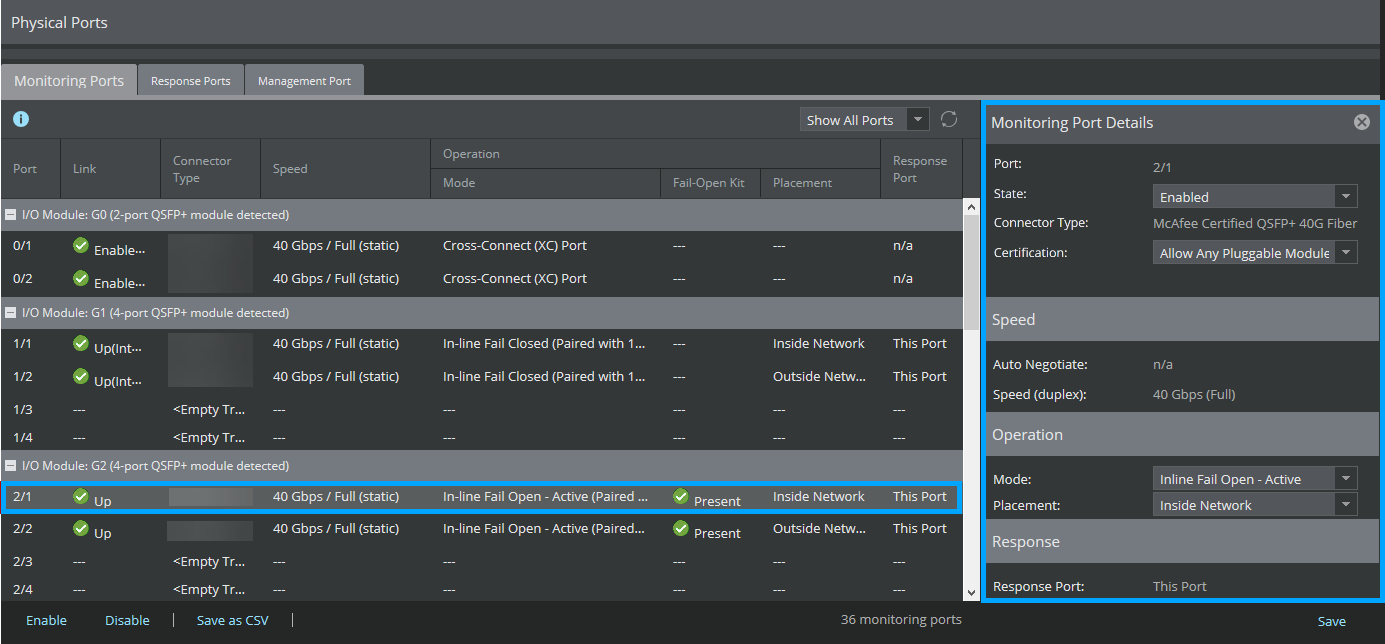
- Click Save.