Advanced Threat Intelligence (ATI) is a cloud-based data collection and threat intelligence distribution feature that provides actionable information about MVX-verified events on Network Security appliances. The threat intelligence tells you who is the threat actor behind an attack, what has been targeted or breached, and (if known) how to mitigate the threat. The Trellix Research Labs team continually uploads the latest threat intelligence to the Trellix Dynamic Threat Intelligence (DTI) cloud. When an MVX-verified event triggers an alert, the appliance queries the DTI server for threat intelligence and stores the additional information in its database. When you display an ATI alert, the alert details include the threat intelligence.
Threat Intelligence for Malware Object and Malware Callback Alerts
The following diagram illustrates the types of threat intelligence that ATI provides for malware object and malware callback alerts, which are triggered by MD5 checksum or URL matches on Network Security appliances:
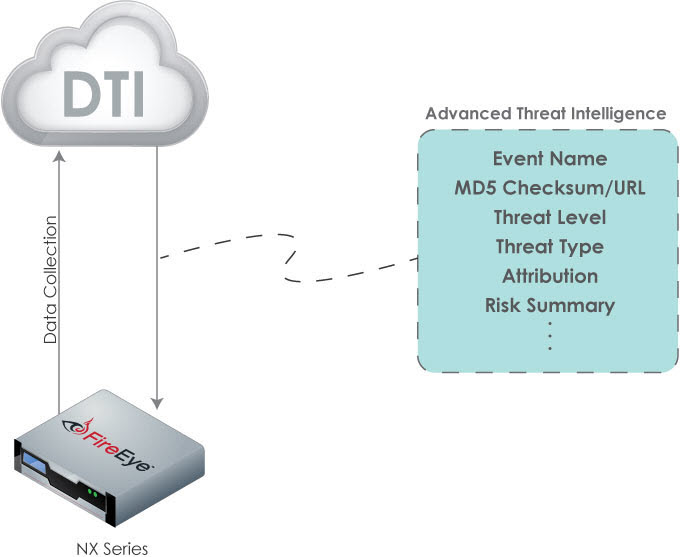
ATI for Standalone ADD Product Series
When an MD5 checksum or URL match triggers a malware object or malware callback alert on a Network Security appliance in standalone mode, the appliance fetches threat intelligence from the DTI cloud, stores the additional information in its database, and displays the threat intelligence with the alert details.
ATI support on a standalone appliance has the following requirements:
The Network Security appliance must have an All sharing license installed.
The Network Security appliance must have the ATI feature enabled. This is the default setting.
ATI for Managed Network Security Appliances
For malware object and malware callback alerts triggered on managed Network Security appliances, the Central Management System appliance aggregates the MD5 checksums or URLs that trigger the alerts, fetches threat intelligence from the DTI cloud, stores the information in the Central Management System appliance database only, and displays the threat intelligence with the alert details for the managed appliances or sensors.
Note
For managed ADD Product Series appliances, you configure ATI settings from the CLI of the Central Management System appliance.
After you add an ATI-enabled Network Security appliance to the management domain of a Central Management System appliance, the Alerts tab of the managed appliance continues to show threat intelligence that the appliance obtained while it was operating in standalone mode. Subsequently triggered ATI alerts, however, are visible only on the Central Management System appliance.
After you remove a Network Security appliance from the management domain of a Central Management System appliance, the Network Security
appliance queries the DTI server for ATI data when new ATI alerts trigger on the appliance.