Two Network Security appliances connected to a Central Management System appliance can be configured as a high-availability pair for detection redundancy. The Network Security HA pair operates in active-active mode. In active-active mode, both appliances are ready to receive and process all traffic. The two appliances in the pair communicate with each other continuously over a dedicated control link and a dedicated data link. The control link is used to exchange control messages. The data link is used to replicate the network traffic from the monitoring ports of one appliance to the other appliance.
Both appliances actively monitor the state of the network. The data link maintains exactly the same state between both appliances—every packet received on the monitoring ports is replicated to the peer appliance through the data port. Traffic received on the monitoring ports generates active alerts that are aggregated to the Central Management System appliance and displayed in the Web UI. Traffic received on the data ports generates standby alerts that are not aggregated or displayed. If one appliance fails, detection activity fails over to the peer appliance, which creates all new events and submissions as "active."
One appliance must have a full Network Security product license. The peer appliance can have either a full product license or a restricted product license. An appliance with a restricted license must be added to a Network Security HA pair within 90 days, or it will lose its detection functionality. For details, see Licensing requirements.
The Central Management System appliance manages the two Network Security appliances as a tightly coupled pair, which is represented as a single virtual appliance. The Central Management System appliance performs the following functions:
Creating and managing the HA pair
Synchronizing the configuration of both appliances in the HA pair
Aggregating events and generating alerts from both appliances in the HA pair
Monitoring the health of the HA pair
Deployment
Network Security HA must be deployed within a mesh topology in a single-site Local Area Network (LAN).
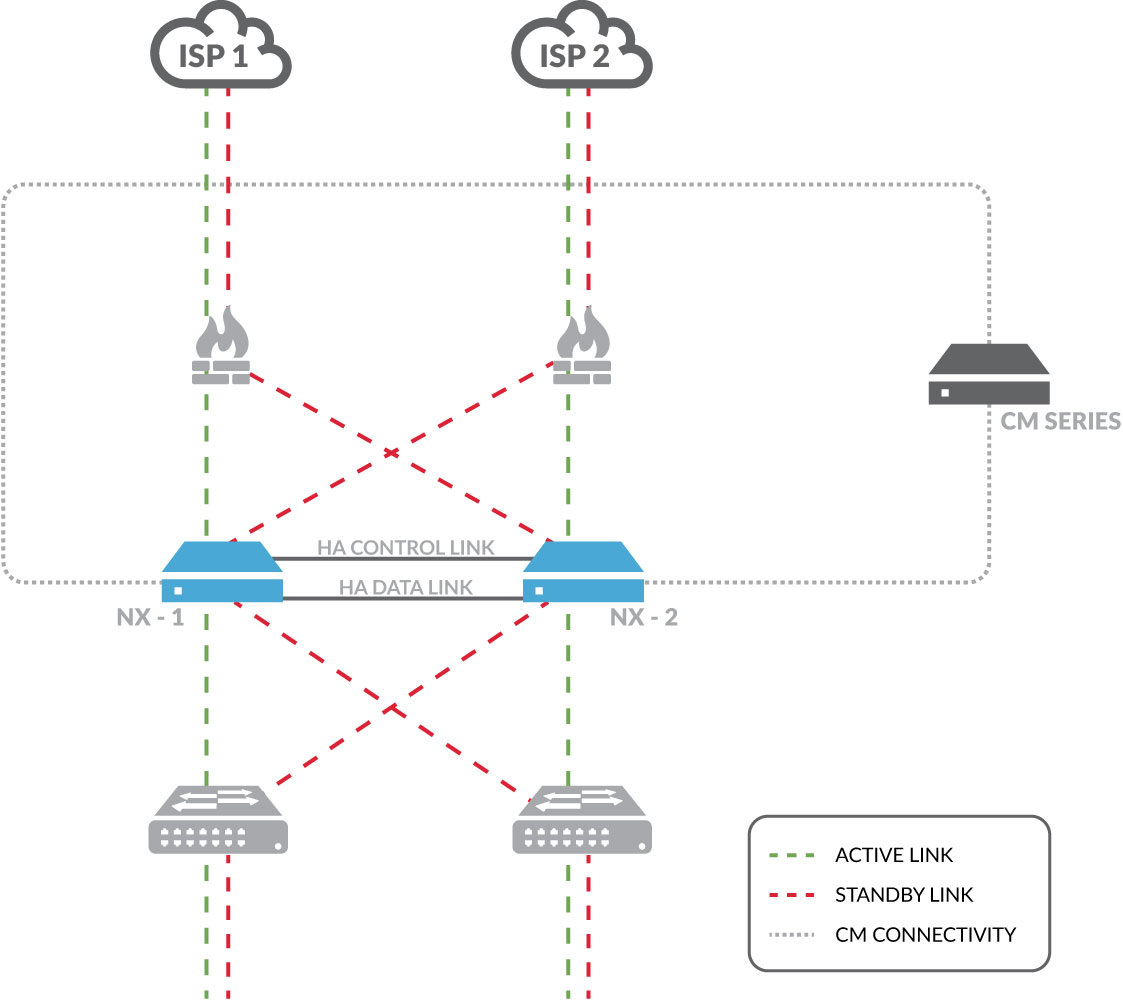
Detection failover. The two Network Security appliances are connected to each other with two cables. One cable connects the two HA control ports (pether9 in x5xx appliances and pether11 in x4xx appliances), which carry HA configuration information. The other cable connects the two HA data ports (pether10 in x5xx appliances and pether12 in x4xx appliances), which replicate network traffic from one appliance to the other.
Appliance failover. Malware detection is performed on the network-facing monitor ports. The mesh topology allows traffic to be switched to the other appliance when an appliance failure causes a monitor link to go down.
The following diagram shows a Network Security HA deployment in a full mesh topology.
Note
Because each Network Security appliance replicates its network traffic to the other appliance over the data link, detection over both symmetric and asymmetric routing in a mesh deployment is supported.
Configuration replication
Most of the configuration settings on the two appliances in a Network Security HA pair must be identical, because each appliance must be ready to take over detection activity if the other appliance fails. The Central Management System Web UI prevents you from changing such settings on an individual Network Security appliance that is a member of a Network Security HA pair.
A configuration mismatch could still happen in the following scenarios:
You form a new HA pair. A mismatch is possible even if both appliances are new, and you configure them the same way. This is because certain settings are automatically set for an appliance when it is manufactured, and are not the same on every appliance.
A Network Security administrator changes settings on one of the Network Security appliances. Changing the configuration of a managed appliance from the appliance instead of from the Central Management System appliance is generally not recommended, but should be especially avoided in a Network Security HA deployment.
For most settings, the Central Management System warns you when there is a mismatch and provides an easy way to synchronize the settings. For a list of the settings that must be identical, and for information about synchronizing mismatched settings, see Synchronizing configuration settings.
Alert aggregation
When a Network Security appliance detects malware, it generates an alert and saves artifacts (such as packet captures, binaries, and malware objects). The Central Management System appliance aggregates alerts from its managed appliances (but does not store the artifacts). In the case of a Network Security HA pair, the Central Management System appliance attributes the alerts it aggregates from each appliance to the pair, not to the individual appliances.
The alerts remain on the Central Management System appliance and remain attributed to the HA pair. This is the case even if the appliance is removed from the HA pair. New alerts will be attributed to the individual Network Security appliance after the appliance is no longer a member of the pair.
If you disconnect a member of a pair from the Central Management System appliance, the alerts it generated that were attributed to the pair are still displayed on the Alerts page of the Central Management System appliance. However, you cannot expand these alerts to view their details or click  to submit them to a managed Malware Analysis appliance for deeper forensic analysis.
If you subsequently reconnect the appliance to the same Central Management System appliance, all alerts (new alerts, and alerts that were generated by this appliance but attributed to the pair) are aggregated to the Central Management System appliance, and are attributed to the individual appliance.
If you delete an HA pair, the alerts that were attributed to the pair are no longer displayed on the Central Management System Web UI.
See Viewing alerts for more information.
Monitoring
The state of the Network Security HA components is monitored continuously, and detection failover occurs when specific conditions are met. You can view comprehensive Network Security HA status information from the Central Management System appliance, and from each appliance in the pair. For information about viewing status, see Viewing the Network Security HA status.
Notifications
Network Security HA events can generate the following types of notifications:
Email notifications
SNMP traps
Log messages saved in local log files or sent to a remote syslog server
See Working with notifications and logs for more information.
Note
You cannot configure a Network Security appliance both as a member of an HA pair and as a SPAN device, in which it forwards a copy of its network traffic from a mirror port to another analysis device. (For details about the port mirroring features, see the Network Security System Administration Guide.)