Use this file to discover all available pages before exploring further.
The new docs.trellix.com features a modernized UI and AI-powered conversational search. Content is currently available in English, with additional languages expected in early November 2026. We hope you enjoy the updated experience.
If you have configured an IPv4 address for your Active Fail-Open chassis, you have the option to manage it through a web interface.
Task
To access the Active Fail-Open module web interface, enter the IPv4 address of the Active Fail-Open chassis which you have configured through
https://x.x.x.x.
The Active Fail-Open module web interface appears on the login screen.
To log in, enter the default username and password,
Trellix00 and
Trellix00.
Results
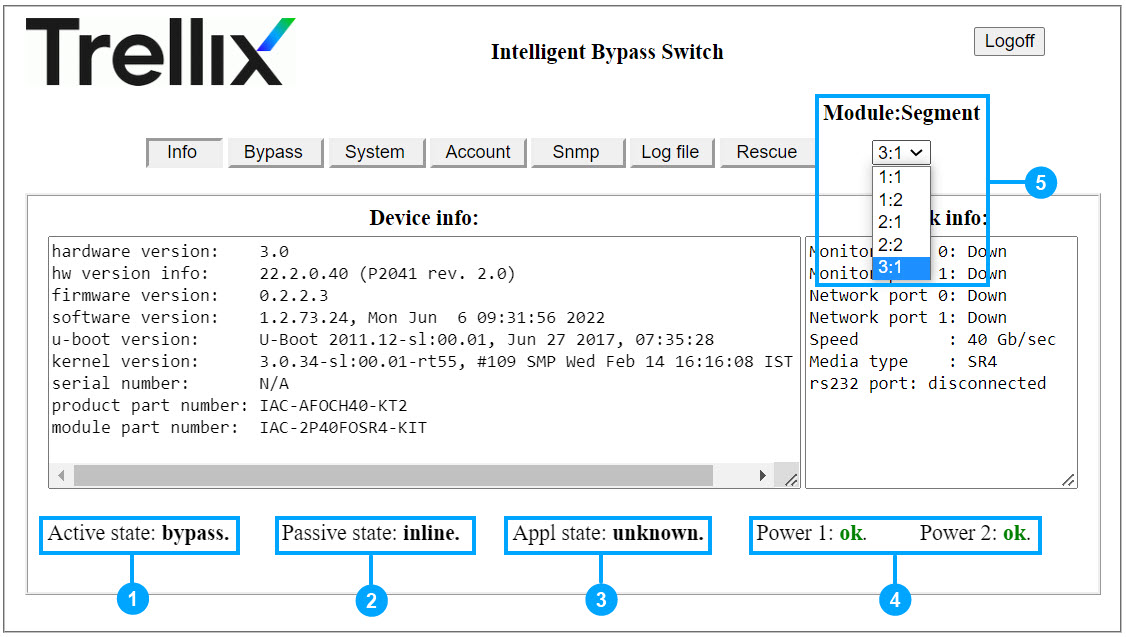
You are routed to the Active Fail-Open web interface landing page which shows you information about the present settings configured in the Active Fail-Open module. Configuration of necessary settings is explained in the relevant sections.
Callout
Description
1
Active State:
Inline - Sensor receives traffic and the fail-open module is operating in normal mode
Bypass - Sensor does not receive traffic and the fail-open module is not operating in inline mode
Tap - Fail-open module functioning like a TAP kit
2
Passive State:
Inline - Fail-open module operating in normal mode
Bypass - Sensor does not receive traffic and the fail-open module is not operating in inline mode
3
Appl (Application) state:
Active - Monitoring ports are up and the heartbeat packets are received
Fail - Monitoring ports are up, but the heartbeat packets are not received
Unknown - Monitoring ports are down
4
Power status:
Fail - No power provided to the power supply
Ok - The power supply is normal
5
The 40G Active Fail-Open chassis consists of 3 modules. Select the module from the
Module: Segment
drop-down list.