---
title: "Access the Active Fail-Open module web interface"
slug: "access-the-active-fail-open-module-web-interface"
tags: ["Product Usage", "IPS 10.1.10"]
updated: 2026-10-05T15:41:16Z
published: 2026-10-05T15:41:16Z
canonical: "docs.trellix.com/access-the-active-fail-open-module-web-interface"
---
> ## Documentation Index
> Fetch the complete documentation index at: https://docs.trellix.com/llms.txt
> Use this file to discover all available pages before exploring further.
# Access the Active Fail-Open module web interface
If you have configured an IPv4 address for your Active Fail-Open chassis, you have the option to manage it through a web interface.
## Task
1. To access the Active Fail-Open module web interface, enter the IPv4 address of the Active Fail-Open chassis which you have configured through
**https://x.x.x.x.**
The Active Fail-Open module web interface appears on the login screen.
2. To log in, enter the default username and password,
Trellix00 and
Trellix00.
## Results
You are routed to the Active Fail-Open web interface landing page which shows you information about the present settings configured in the Active Fail-Open module. Configuration of necessary settings is explained in the relevant sections.
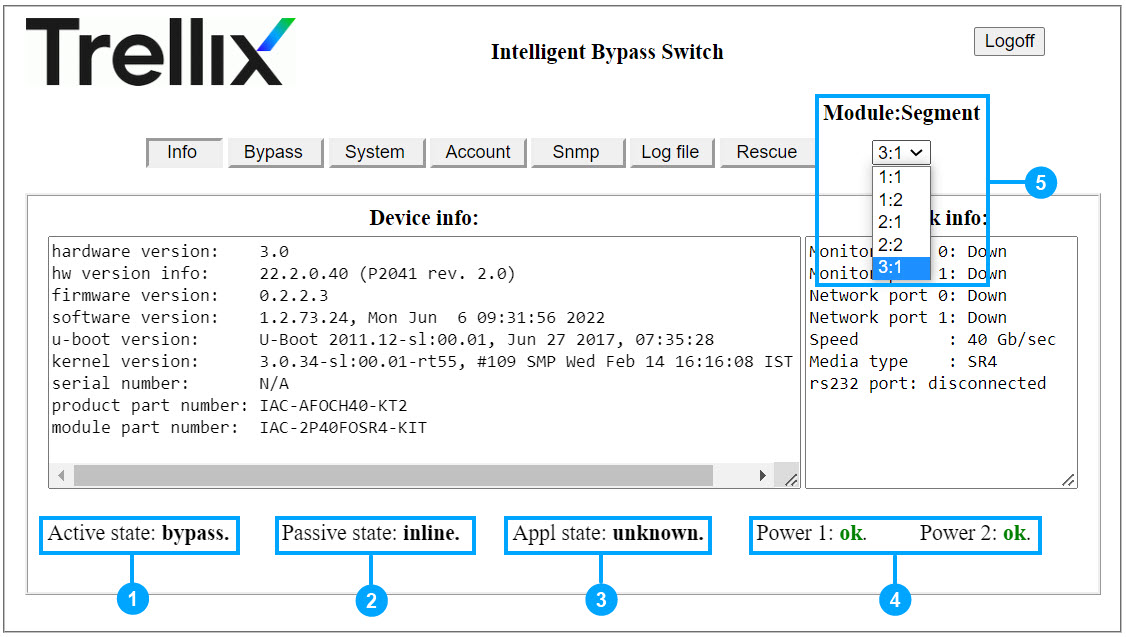
| Callout | Description |
| --- | --- |
| 1 | Active State: - Inline - Sensor receives traffic and the fail-open module is operating in normal mode - Bypass - Sensor does not receive traffic and the fail-open module is not operating in inline mode - Tap - Fail-open module functioning like a TAP kit |
| 2 | Passive State: - Inline - Fail-open module operating in normal mode - Bypass - Sensor does not receive traffic and the fail-open module is not operating in inline mode |
| 3 | Appl (Application) state: - Active - Monitoring ports are up and the heartbeat packets are received - Fail - Monitoring ports are up, but the heartbeat packets are not received - Unknown - Monitoring ports are down |
| 4 | Power status: - Fail - No power provided to the power supply - Ok - The power supply is normal |
| 5 | The 40G Active Fail-Open chassis consists of 3 modules. Select the module from the **Module: Segment** drop-down list. |