The new docs.trellix.com features a modernized UI and AI-powered conversational search. Content is currently available in English, with additional languages launching in early November 2026. We hope you enjoy the updated experience.

Appendix: Audit Log Records

Prev Next

This section describes the audit log records in relation to a user's activities. The general format of audit records is:

Time,Results,Category,Summary,Details,Domain,UserDate, Admin Domain, User, Attack Category, Action, Result, Description

An example of an audit record displayed in the GUI is:
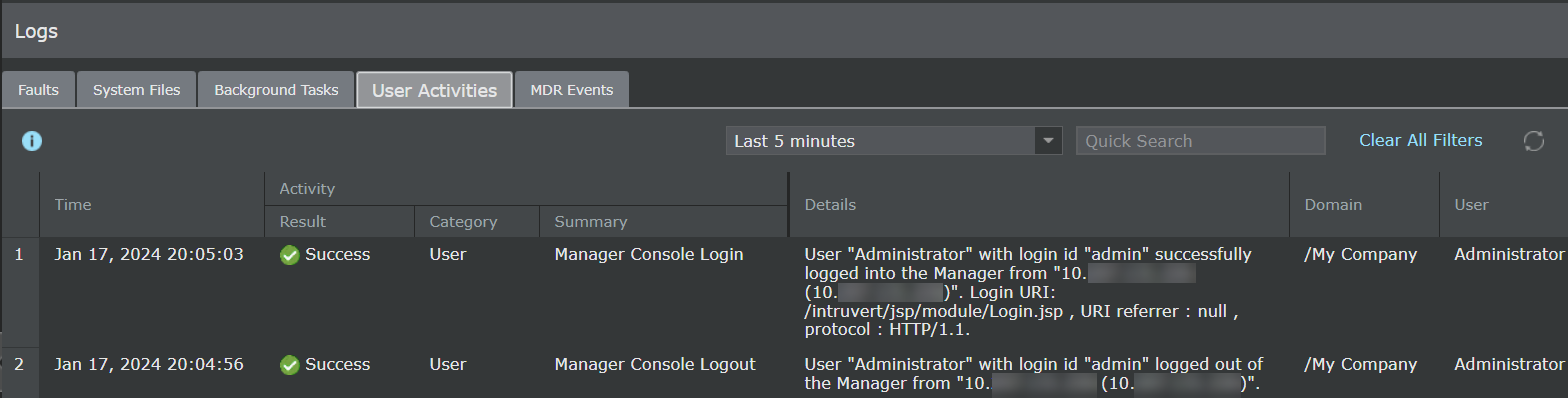
User_Activities.png

The following table documents the messages within audit log records generated by Trellix Intrusion Prevention System.

Audit Log Records

Action

Log Message

Changes to the system time by an Administrator

Time has been changed

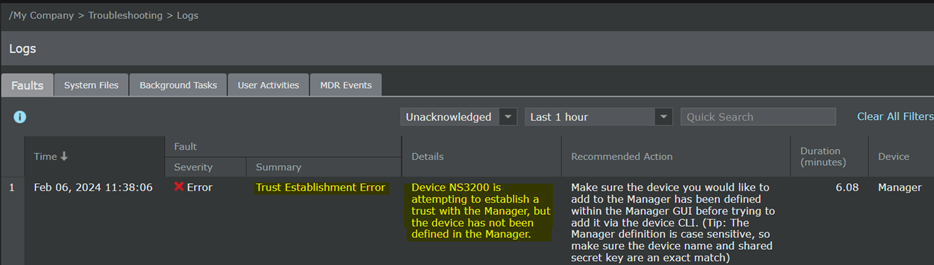
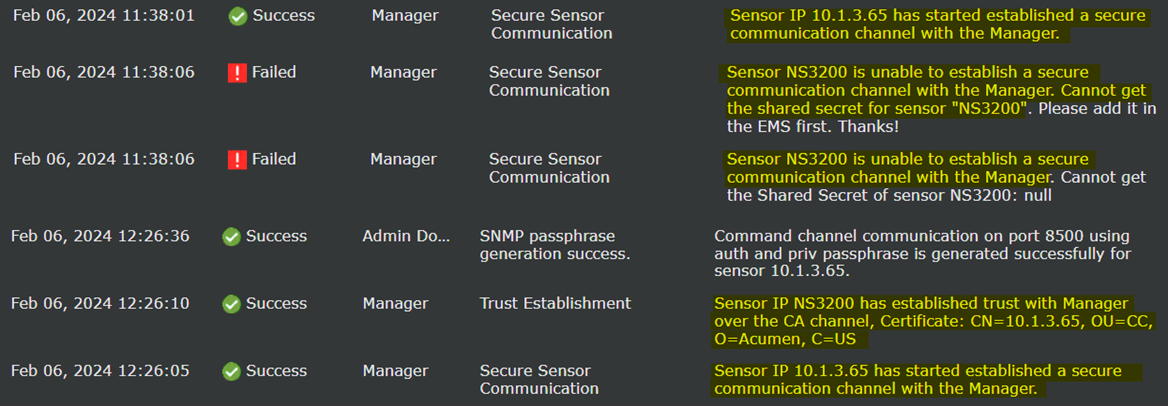
Communication between the Manager and Sensors

  • Enabling: Successfully added sensor "sensor_name"

  • Disabling: Successfully deleted sensor "sensor_name"

Failure to establish a TLS Session

  • Certificate having missing Extended keys

  • Mismatch between configured Server Name and Subject Alt Name in Imported certificate

  • The connection to syslog server IP_Address:port_number failed. Error: Syslog TCP connection failed.

Failure to establish an HTTPS Session

Mismatch between configured Server Name and Subject Alt Name in Imported certificate

Failure to establish an SSH session

  • Disconnecting: Too many authentication failures [preauth]

  • Unable to negotiate with IP_Address port port_number: no matching host key type found. Their offer: host_key_type [preauth]

  • Unable to negotiate with IP_Address port port_number: no matching key exchange method found. Their offer: key_exchange_method [preauth]

Management activities of system data

  • Read audit log

  • Successfully set Session Timeout

  • Logon Banner Configuration updated

  • Successfully set Password Content, Configuration is …

Trusted connections

  • Initiation:

    • Pktlog Channel back up. Clear the Pktlog Channel Down event of sensor sensor

    • Alert Channel back up. Clear the Alert Channel Down event of sensor sensor

    • Syslog Client - Added to Retry Q

    • Syslog Client - Flushing and Shutting down

    • Request for Authentication for User name=Username

  • Termination:

    • The link on Port: Port_identifier is Down Count: number. The link between this port and the external device to which it is connected is down.

    • Received disconnect from IP_Address port port_number: disconnected by user

    • User "User Name" with login id "Username" logged off Trellix IPS Manager from "Hostname (IP_Address)"

  • Failure:

    • Certificate having missing Extended keys

    • Mismatch between configured Server Name and Subject Alt Name in Imported certificate

    • Received fatal alert: handshake_failure

    • Connection refused (Connection refused)

    • Disconnecting: Too many authentication failures [preauth]

    • Unable to negotiate with IP_Address port port_number: no matching host key type found. Their offer: hostkey_type [preauth]

    • Unable to negotiate with IP_Address port port_number: no matching key exchange method found. Their offer: key_exchange_method [preauth]

Unsuccessful attempt to validate an X.509 certificate

  • Certificate having missing Extended keys

  • Mismatch between configured Server Name and Subject Alt Name in Imported certificate

Unsuccessful login attempts limit is met or exceeded

Login failed: Maximum allowable login attempts number have exceeded

Use of the identification and authentication mechanism

  • Postponed keyboard-interactive/pam for username from IP_Address port port_number ssh2 [preauth]

  • Postponed publickey for username from IP_Address port port_number ssh2 [preauth]

  • Accepted keyboard-interactive/pam for username from IP_Address port port_number ssh2

  • error: Could not load host key: path_to_hostkey_file

  • Failed keyboard-interactive/pam for username from IP_Address port port_number ssh2

  • Failed publickey for username from IP_Address port port_number ssh2: RSA SHA256:public_key_value

  • User "username" failed to log in to Trellix IPS Manager from "Hostname (IP_Address)". Login URI: /intruvert/jsp/module/Login.jsp. URI referrer : https://Hostname//intruvert/jsp/module/Login.jsp , protocol : HTTP/1.2

  • Unknown login ID "Username". Login failed from "Hostname (IP_Address)". Login URI: /intruvert/jsp/module/Login.jsp. URI referrer : https://Hostname//intruvert/jsp/module/Login.jsp , protocol : HTTP/1.2

  • Starting Session number of user Username

  • Trellix IPS Manager Login failed at timestamp

User session terminated

  • Removed session number

  • User "User Name" with login id "Username" logged out of the Manager from "Hostname (IP_Address)"

  • Close session: user Username from IP_Address port port_number id number


Manager FAU_GEN.1 Audit Records

Requirement

Auditable Events

Additional Audit Record Contents

Audit Logs

FAU_GEN.1

  • Start-up and shut-down of the audit functions

  • Auditable events for the not specified level of audit; and Administrative login and logout (name of user account shall be logged if individual user accounts are required for Administrators).

  • Changes to TSF data related to configuration changes (in addition to the information that a change occurred it shall be logged what has been changed).

  • Generating/import of, changing, or deleting of cryptographic keys (in addition to the action itself a unique key name or key reference shall be logged).

  • Resetting passwords (name of related user account shall be logged).

None

  • Start-up and shut-down of the audit functions

    Manager_FAU_GEN_1_1.png
  • Auditable events for the not specified level of audit; and Administrative login and logout (name of user account shall be logged if individual user accounts are required for Administrators).

    Manager_FAU_GEN_1_2.png
  • Changes to TSF data related to configuration changes (in addition to the information that a change occurred it shall be logged what has been changed).

    Manager_FAU_GEN_1_3.png
  • Generating/import of, changing, or deleting of cryptographic keys (in addition to the action itself a unique key name or key reference shall be logged).

    Manager_FAU_GEN_1_4.png
  • Resetting passwords (name of related user account shall be logged).

    Manager_FAU_GEN_1_5.png

FAU_GEN_EXT.1

None

None

-

FAU_GEN.2

None

None

-

FAU_STG_EXT.1

None

None

-

FCS_CKM.1

None

None

-

FCS_CKM.2

None

None

-

FCS_CKM.4

None

None

-

FCS_COP.1/DataEncryption

None

None

-

FCS_COP.1/SigGen

None

None

-

FCS_COP.1/Hash

None

None

-

FCS_COP.1/KeyedHash

None

None

-

FCS_RBG_EXT.1

None

None

-

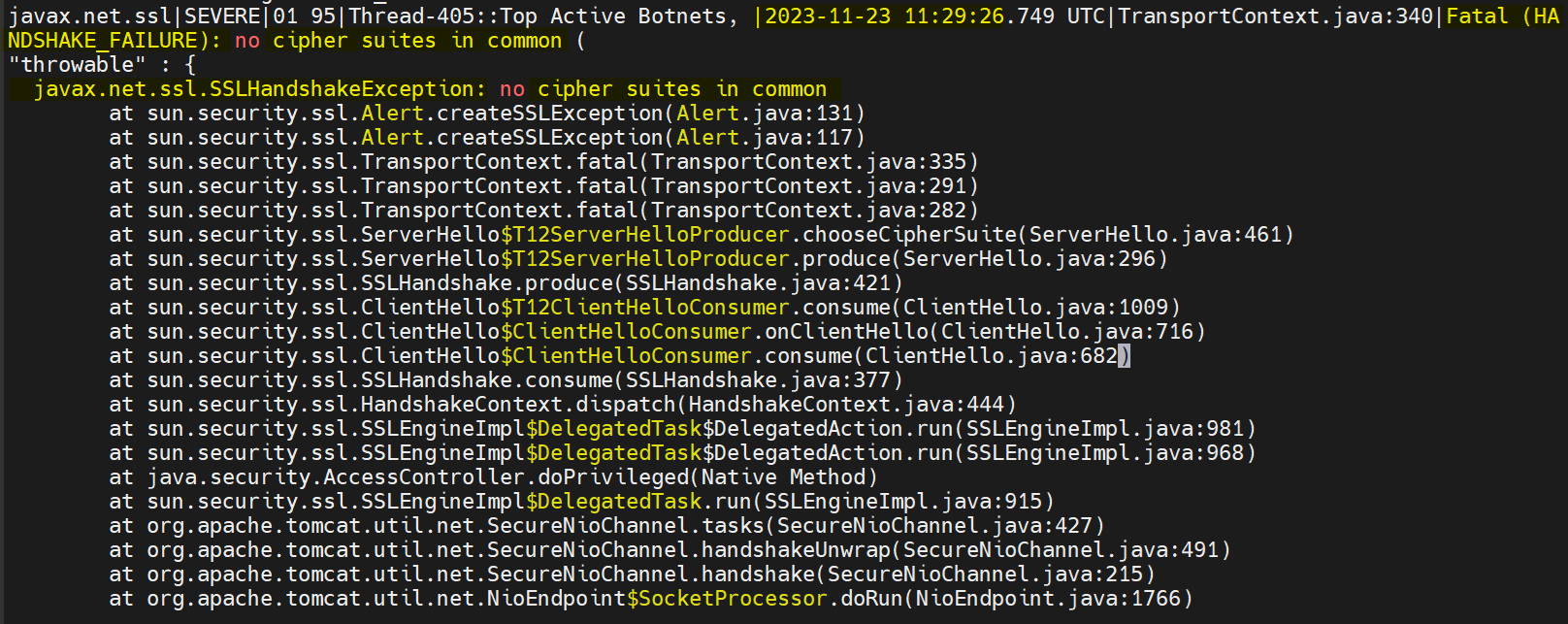
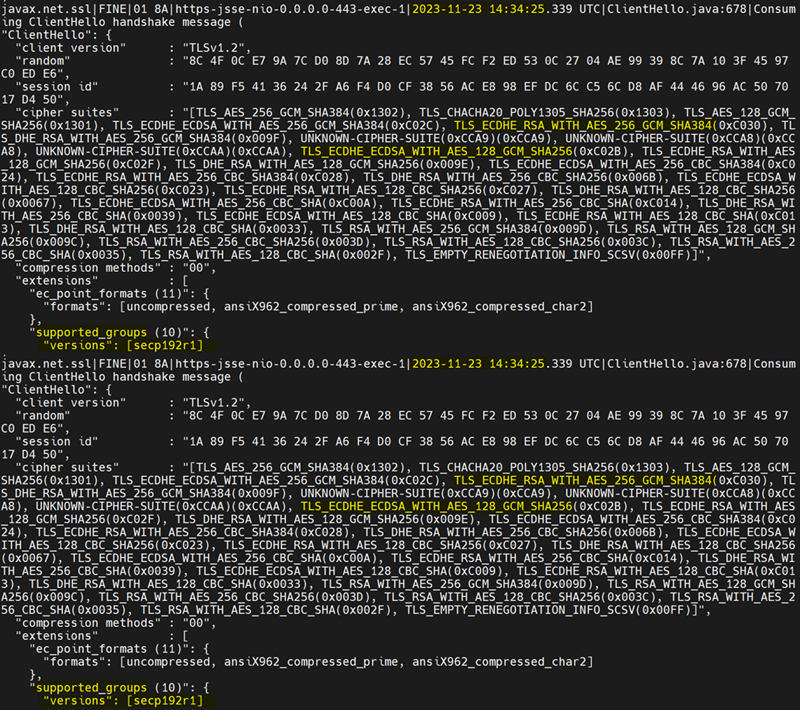
FCS_TLSC_EXT.1

Failure to establish a TLS Session

Reason for failure

Picture1.png

FCS_TLSS_EXT.1

Failure to establish a TLS Session

Reason for failure

Picture2.png

FCS_TLSS_EXT.2

Failure to establish a TLS Session

Reason for failure

Picture3.png

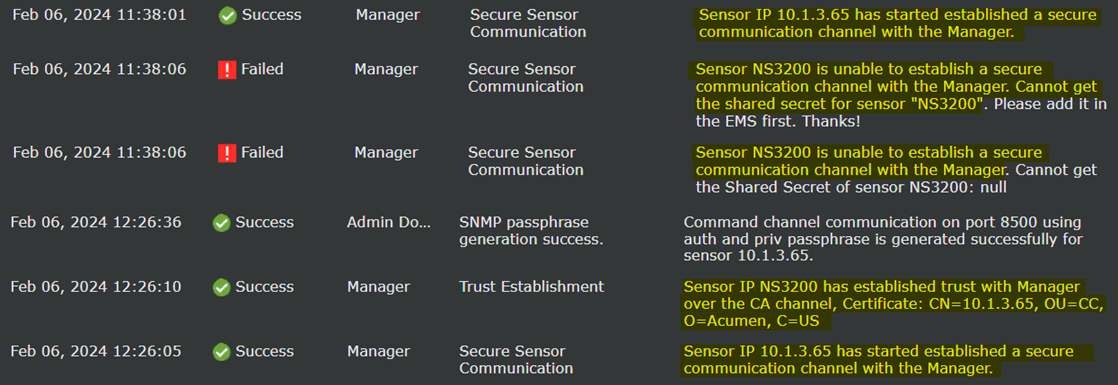
FCO_CPC_EXT.1

  • Enabling communications between a pair of components

  • Disabling communications between a pair of components

Identities of the endpoints pairs enabled or disabled

Enabling communications:

Picture4.png

Disabling communications:

Picture5.png

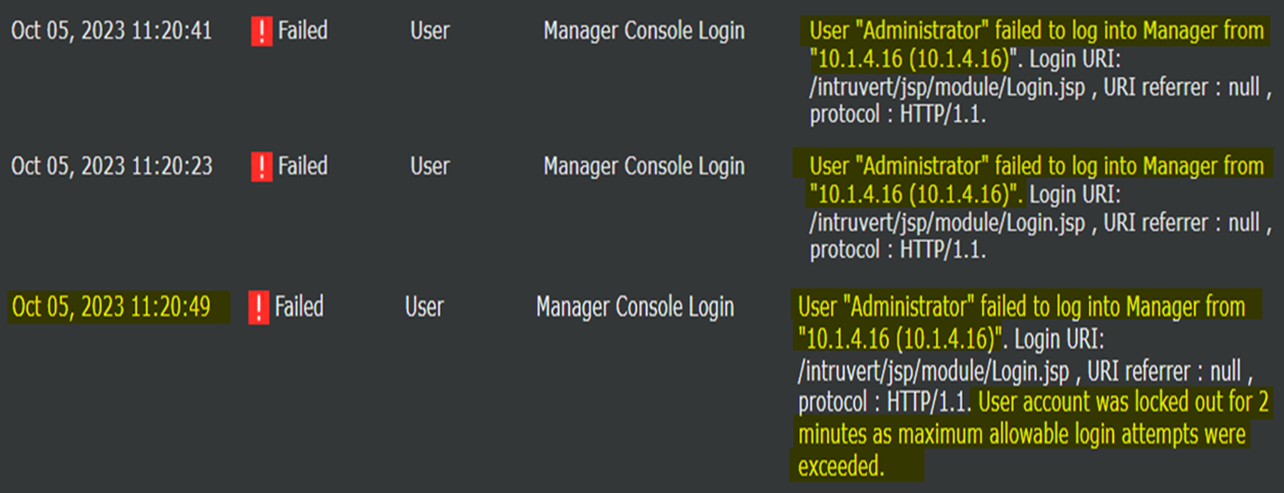
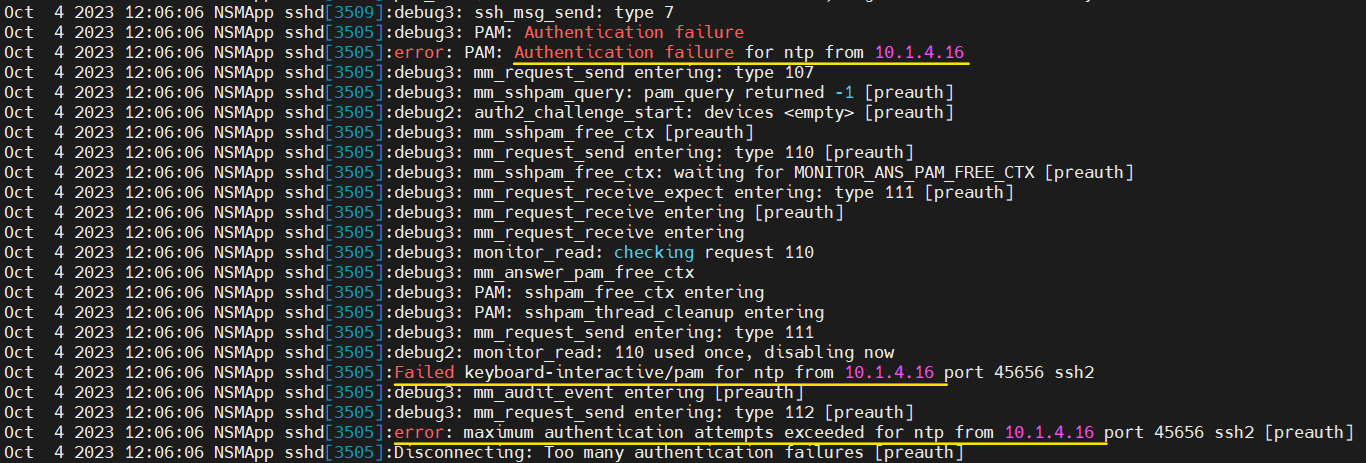
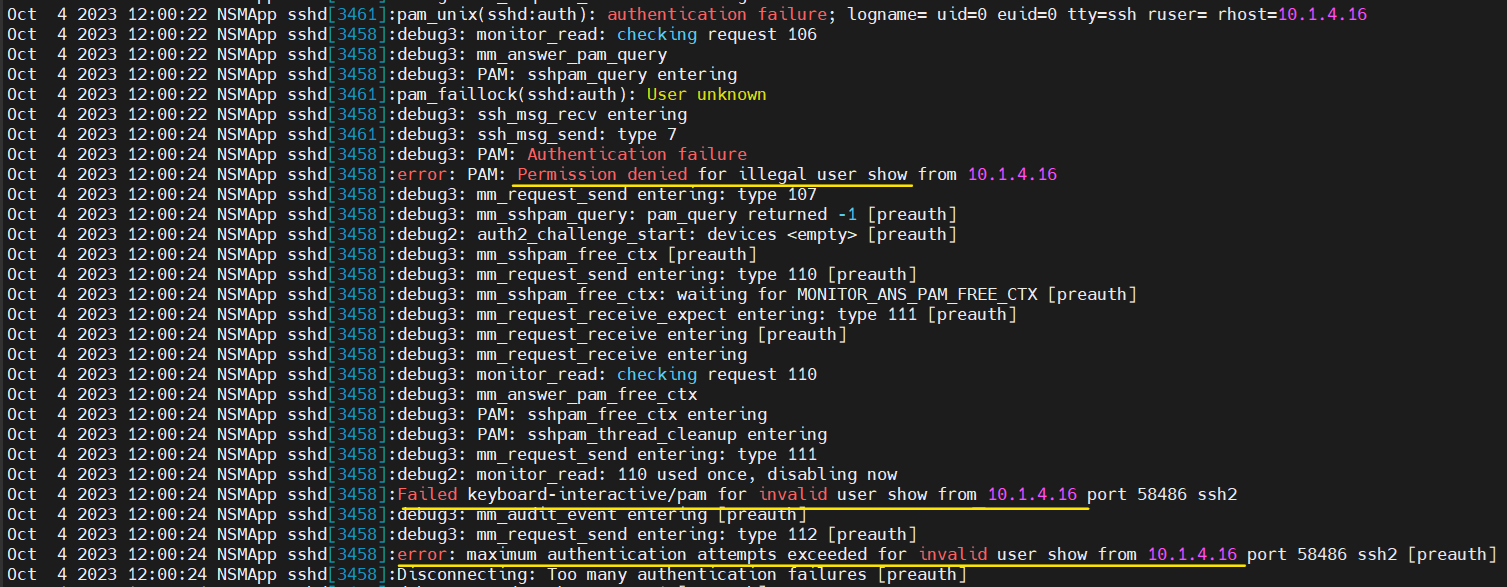
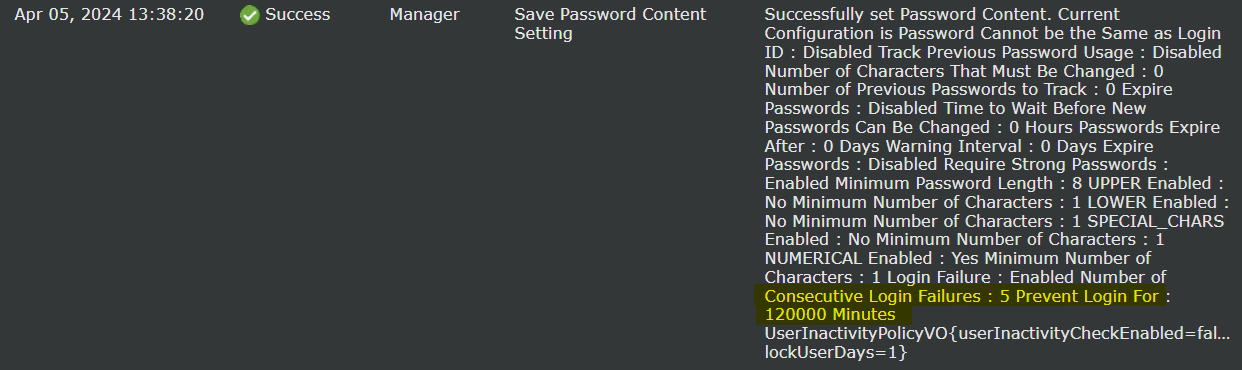
FIA_AFL.1

Unsuccessful login attempts limit is met or exceeded.

Origin of the attempt (e.g., IP address).

Web GUI:

Picture6.png

SSH:

Picture7.png
Picture8.png

FIA_PMG_EXT.1

None

None

-

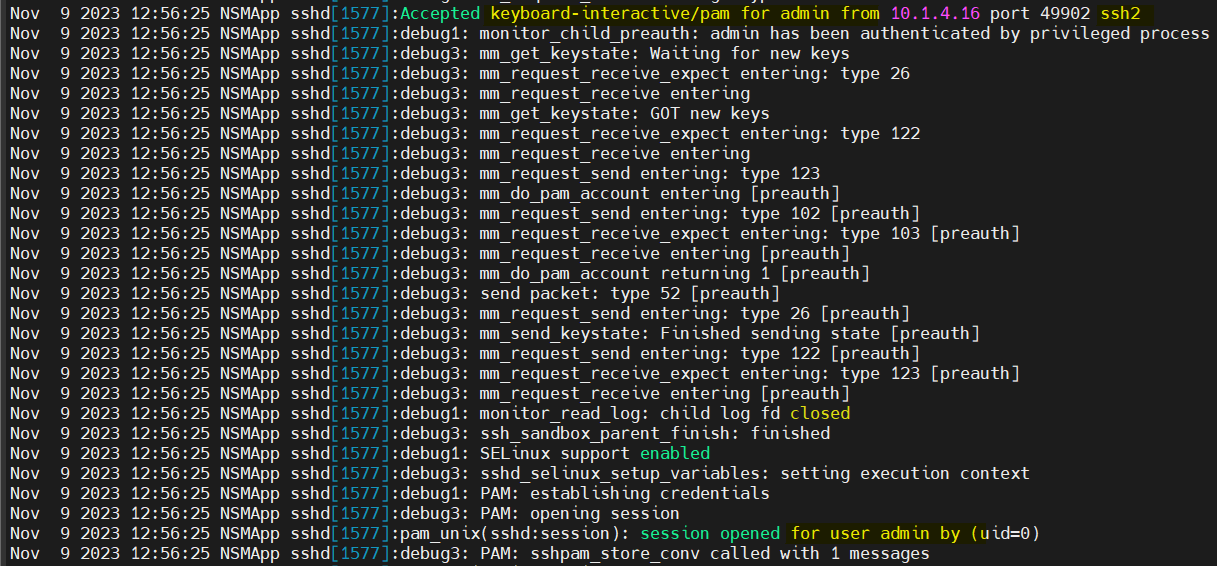
FIA_UIA_EXT.1

All use of the identification and authentication mechanism

Origin of the attempt (e.g., IP address)

Console:

Manager_FIA_UIA_EXT_1_1.png
Manager_FIA_UIA_EXT_1_2.png

SSH:

Manager_FIA_UIA_EXT_1_3.png
Manager_FIA_UIA_EXT_1_4.png

Web GUI:

Manager_FIA_UIA_EXT_1_5.png
Manager_FIA_UIA_EXT_1_6.png

FIA_UAU_EXT.2

All use of the identification and authentication mechanism

Origin of the attempt (e.g., IP address)

Console:

Manager_FIA_UAU_EXT_2_1.png
Manager_FIA_UAU_EXT_2_2.png

SSH:

Manager_FIA_UAU_EXT_2_3.png
Manager_FIA_UAU_EXT_2_4.png

Web GUI:

Manager_FIA_UAU_EXT_2_5.png
Manager_FIA_UAU_EXT_2_6.png

FIA_UAU.7

None

None

-

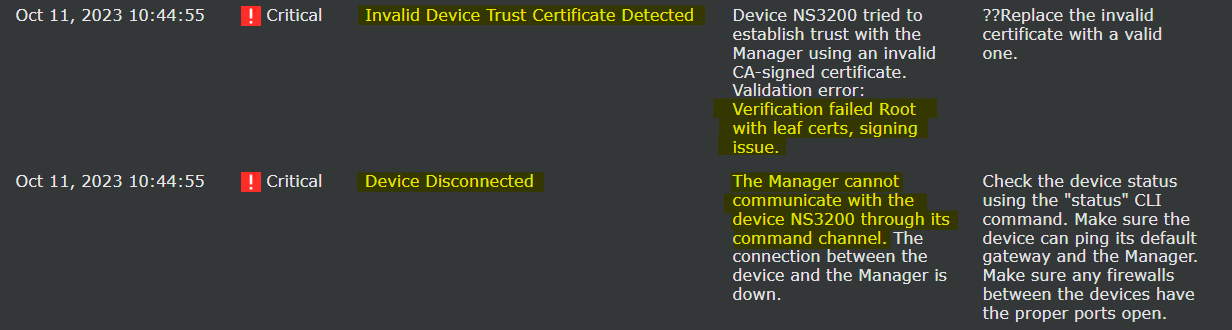
FIA_X509_EXT.1/Rev

Unsuccessful attempt to validate a certificate

Reason for failure

Picture15.png

FIA_X509_EXT.1/ITT

Unsuccessful attempt to validate a certificate

Reason for failure

Picture16.png

FIA_X509_EXT.2

None

None

-

FIA_X509_EXT.3

None

None

-

FMT_MOF.1/ManualUpdate

Any attempt to initiate a manual update

None

Picture17.png

FMT_MTD.1/CoreData

None

None

-

FMT_SMF.1

All management activities of TSF data.

None

Refer to the below table Manager Management Functions

FMT_SMR.2

None

None

-

FPT_APW_EXT.1

None

None

-

FPT_ITT.1

  • Initiation of the trusted channel

  • Termination of the trusted channel

  • Failure of the trusted channel functions

Identification of the initiator and target of failed trusted channels establishment attempt

Initiation of trusted channel:

Picture18.png

Termination of trusted channel:

Picture19.png

Failure of trusted channel functions:

Picture20.png

FPT_SKP_EXT.1

None

None

-

FPT_STM_EXT.1

Discontinuous changes to time - either Administrator actuated or changed via an automated process

For discontinuous changes to time: The old and new values for the time. Origin of the attempt to change time for success and failure (e.g., IP address)

Picture21.png

FPT_TST_EXT.1

None

None

-

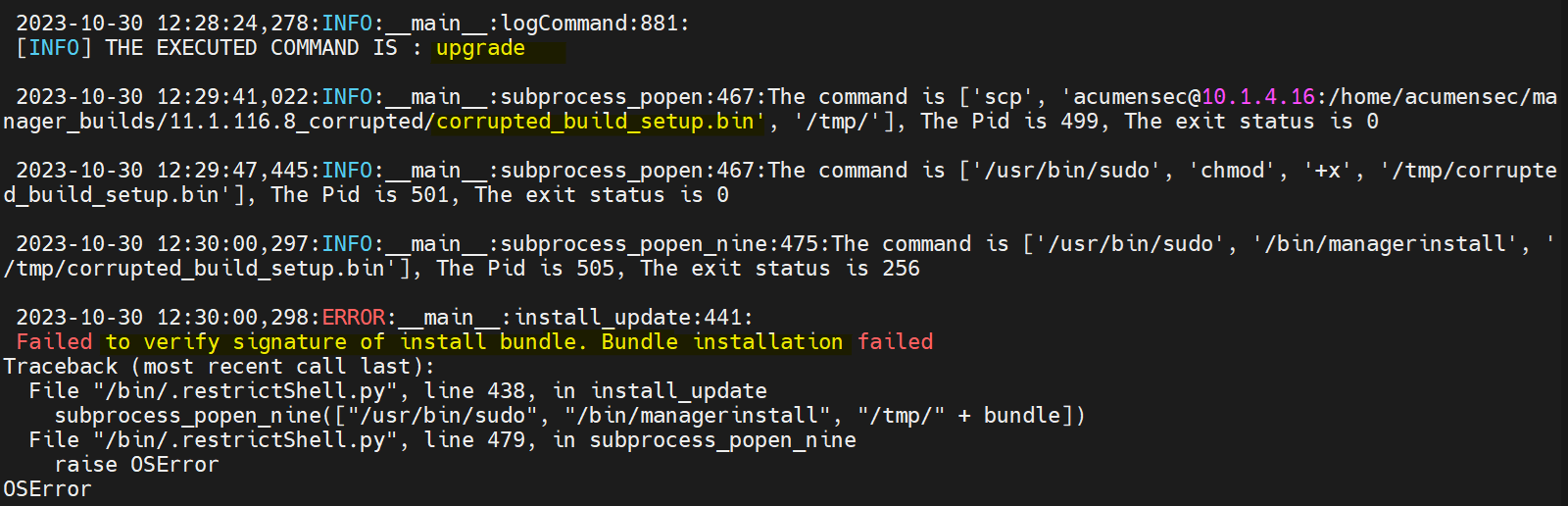
FPT_TUD_EXT.1

Initiation of update; result of the update attempt (success or failure)

None

Picture22.png

FTA_SSL_EXT.1

The termination of a local session by the session locking mechanism

None

Picture23.png

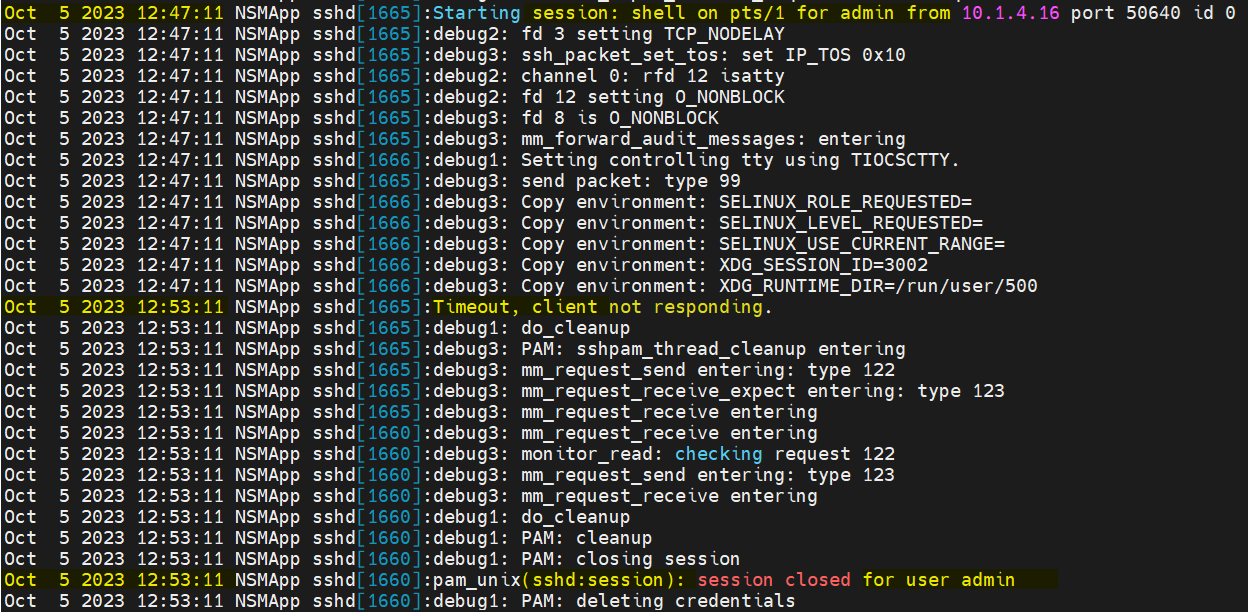
FTA_SSL.3

The termination of a remote session by the session locking mechanism

None

SSH:

Picture24.png

Web GUI:

Picture25.png

FTA_SSL.4

The termination of an interactive session

None

SSH:

Manager_FTA_SSL_4_1.png

WebGUI:

Manager_FTA_SSL_4_2.png

Console:

Manager_FTA_SSL_4_3.png

FTA_TAB.1

None

None

-

FTP_ITC.1

  • Initiation of the trusted channel

  • Termination of the trusted channel

  • Failure of the trusted channel functions

Identification of the initiator and target of failed trusted channels establishment attempt

Initiation of the trusted channel:

Picture27.png

Termination of the trusted channel:

Picture28.png

Failure of the trusted channel functions:

Picture29.png

FTP_TRP.1/Admin

  • Initiation of the trusted channel.

  • Termination of the trusted channel.

  • Failure of the trusted channel functions.

Identification of the claimed user identity.

Initiation of trusted channel

SSH:

Manager_FTP_TRP_1_Admin_1.png

Web GUI:

Manager_FTP_TRP_1_Admin_2.png

Termination of the trusted channel:

SSH:

Manager_FTP_TRP_1_Admin_3.png

Web GUI:

Manager_FTP_TRP_1_Admin_4.png

Failure of trusted channel functions:

SSH:

Manager_FTP_TRP_1_Admin_5.png

Web GUI:

Manager_FTP_TRP_1_Admin_6.png

FAU_STG_EXT.4

None

None

-

FCS_HTTPS_EXT.1

Failure to establish a HTTPS Session

Reason for failure

Manager_FCS_HTTPS_EXT_1.png

FCS_SSHS_EXT.1

Failure to establish an SSH session

Reason for failure

Manager_FCS_SSHS_EXT_1.png


Manager Management Functions

Management Functions

Test cases

Ability to administer the TOE locally and remotely

Console:

Manager_Managerment_function_1.png

SSH:

Manager_Managerment_function_2.png

WebGUI:

Manager_Managerment_function_3.png

Ability to configure the access banner

Manager_Managerment_function_4.png

Ability to configure the session inactivity time before session termination or locking

Manager_Managerment_function_5.png

Ability to update the TOE, and to verify the updates using digital signature capability prior to installing those updates

Positive update:

Manager_Managerment_function_6.png

Negative update:

Manager_Managerment_function_7.png

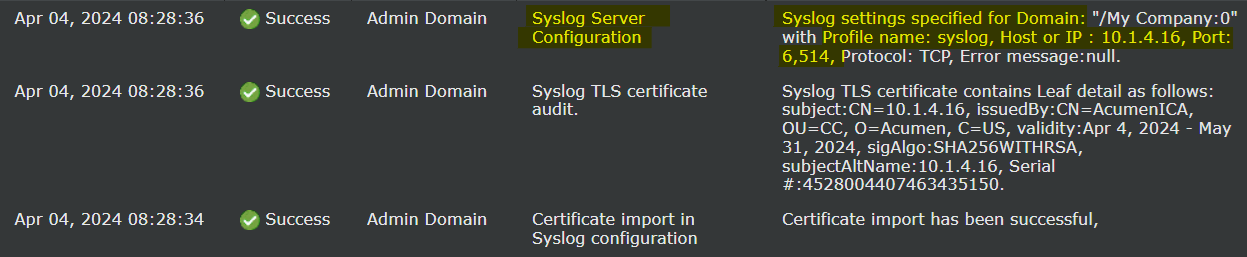
Ability to configure the authentication failure parameters for FIA_AFL.1

Manager_Managerment_function_8.png

Ability to configure audit behaviour (e.g. changes to storage locations for audit; changes to behaviour when local audit storage space is full);

Manager_Managerment_function_9.png
Manager_Managerment_function_10.png

Ability to modify the behaviour of the transmission of audit data to an external IT entity

Manager_Managerment_function_11.png

Ability to configure the cryptographic functionality

Manager_Managerment_function_12.png

Ability to import X.509v3 certificates to the TOE's trust store

Manager_Managerment_function_13.png

Ability to set the time which is used for timestamps

Manager_Managerment_function_14.png

Ability to re-enable an Administrator account

Manager_Managerment_function_15.png

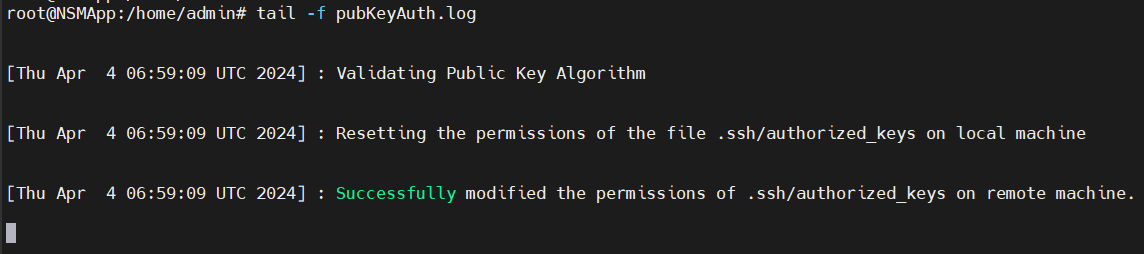
Ability to manage the trusted public keys database

Manager_Managerment_function_16.png

Ability to configure the interaction between TOE components

Manager_Managerment_function_17.png
Manager_Managerment_function_18.png


Sensor FAU_GEN.1 Audit Records

Requirement

Auditable Events

Additional Audit Record Contents

Audit Logs

FAU_GEN.1

  • Start-up and shut-down of the audit functions

  • Auditable events for the not specified level of audit; and Administrative login and logout (name of user account shall be logged if individual user accounts are required for Administrators).

  • Changes to TSF data related to configuration changes (in addition to the information that a change occurred it shall be logged what has been changed)

  • Generating/import of, changing, or deleting of cryptographic keys (in addition to the action itself a unique key name or key reference shall be logged)

  • Resetting passwords (name of related user account shall be logged)

None

  • Start-up and shut-down of the audit functions

    Sensor_FAU_GEN_1_1.png
  • Auditable events for the not specified level of audit; and Administrative login and logout (name of user account shall be logged if individual user accounts are required for Administrators).

    Sensor_FAU_GEN_1_2.png
  • Changes to TSF data related to configuration changes (in addition to the information that a change occurred it shall be logged what has been changed)

    Sensor_FAU_GEN_1_3.png
  • Generating/import of, changing, or deleting of cryptographic keys (in addition to the action itself a unique key name or key reference shall be logged)

    Sensor_FAU_GEN_1_4.png
  • Resetting passwords (name of related user account shall be logged)

    Sensor_FAU_GEN_1_5.png

FAU_GEN.1/IPS

None

None

-

FAU_GEN_EXT.1

None

None

-

FAU_GEN.2

None

None

-

FAU_STG_EXT.5

None

None

-

FCS_CKM.1

None

None

-

FCS_CKM.2

None

None

-

FCS_CKM.4

None

None

-

FCS_COP.1/DataEncryption

None

None

-

FCS_COP.1/SigGen

None

None

-

FCS_COP.1/Hash

None

None

-

FCS_COP.1/KeyedHash

None

None

-

FCS_RBG_EXT.1

None

None

-

FCS_SSHC_EXT.1

Failure to establish an SSH session

Reason for failure

Picture_Sensor_1.png

FCS_SSHS_EXT.1

Failure to establish an SSH session

Reason for failure

Picture_Sensor_2.png

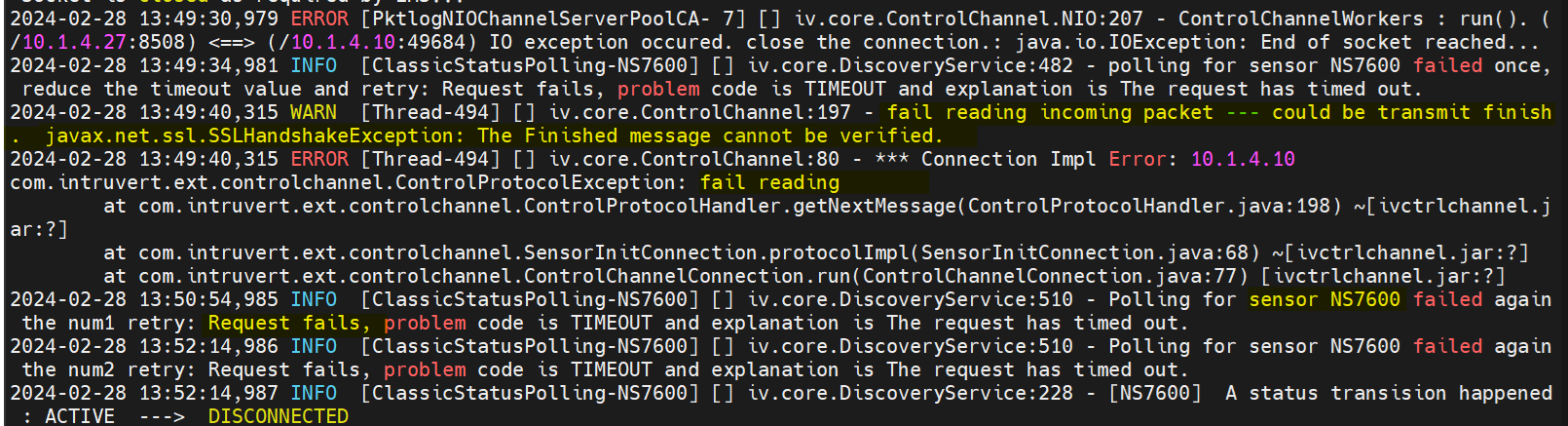
FCS_TLSC_EXT.2

Failure to establish a TLS Session

Reason for failure

Picture_Sensor_4.png

FCO_CPC_EXT.1

  • Enabling communications between a pair of components

  • Disabling communications between a pair of components

Identities of the endpoints pairs enabled or disabled

Enabling communications:

Picture_Sensor_5.png

Disabling communications:

Picture_Sensor_6.png
Picture_Sensor_7.png

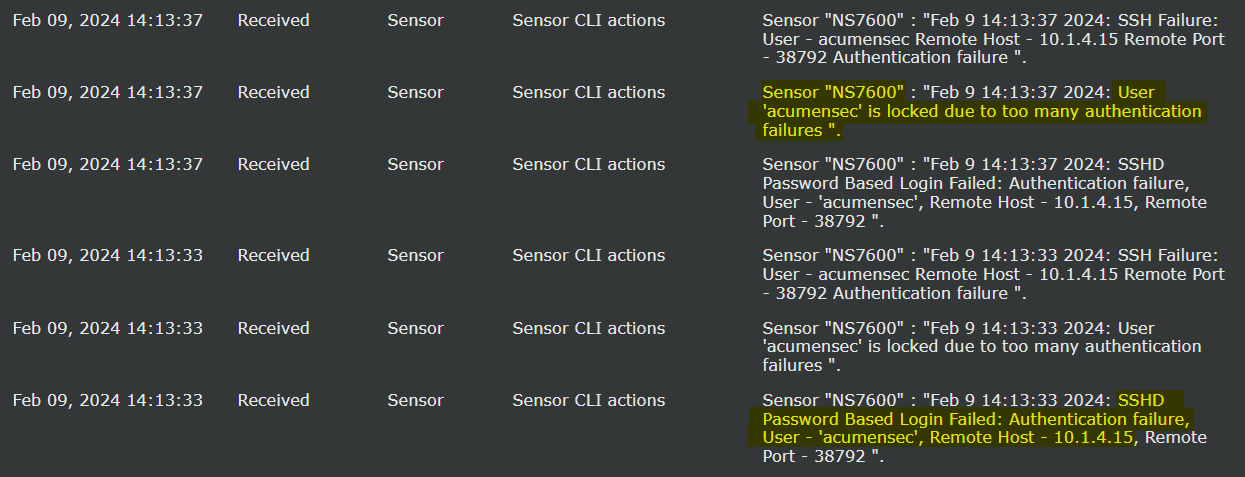
FIA_AFL.1

Unsuccessful login attempts limit is met or exceeded.

Origin of the attempt (e.g., IP address).

Picture_Sensor_8.png

FIA_PMG_EXT.1

None

None

-

FIA_UIA_EXT.1

All use of the identification and authentication mechanism

Origin of the attempt (e.g., IP address)

Console:

Sensor_FIA_UIA_EXT_1_1.png
Sensor_FIA_UIA_EXT_1_2.png

SSH:

Sensor_FIA_UIA_EXT_1_3.png
Sensor_FIA_UIA_EXT_1_4.png

FIA_UAU_EXT.2

All use of the identification and authentication mechanism

Origin of the attempt (e.g., IP address)

Console:

Sensor_FIA_UAU_EXT_2_1.png
Sensor_FIA_UAU_EXT_2_2.png

SSH:

Sensor_FIA_UAU_EXT_2_3.png
Sensor_FIA_UAU_EXT_2_4.png

FIA_UAU.7

None

None

-

FIA_X509_EXT.1/ITT

Unsuccessful attempt to validate a certificate

Reason for failure

Picture_Sensor_13.png

FIA_X509_EXT.3

None

None

-

FMT_MOF.1/ManualUpdate

Any attempt to initiate a manual update

None

Picture_Sensor_14.png

FMT_MTD.1/CoreData

None

None

-

FMT_SMF.1

All management activities of TSF data.

None

Refer to the below table Sensor Management Functions

FMT_SMR.2

None

None

-

FPT_APW_EXT.1

None

None

-

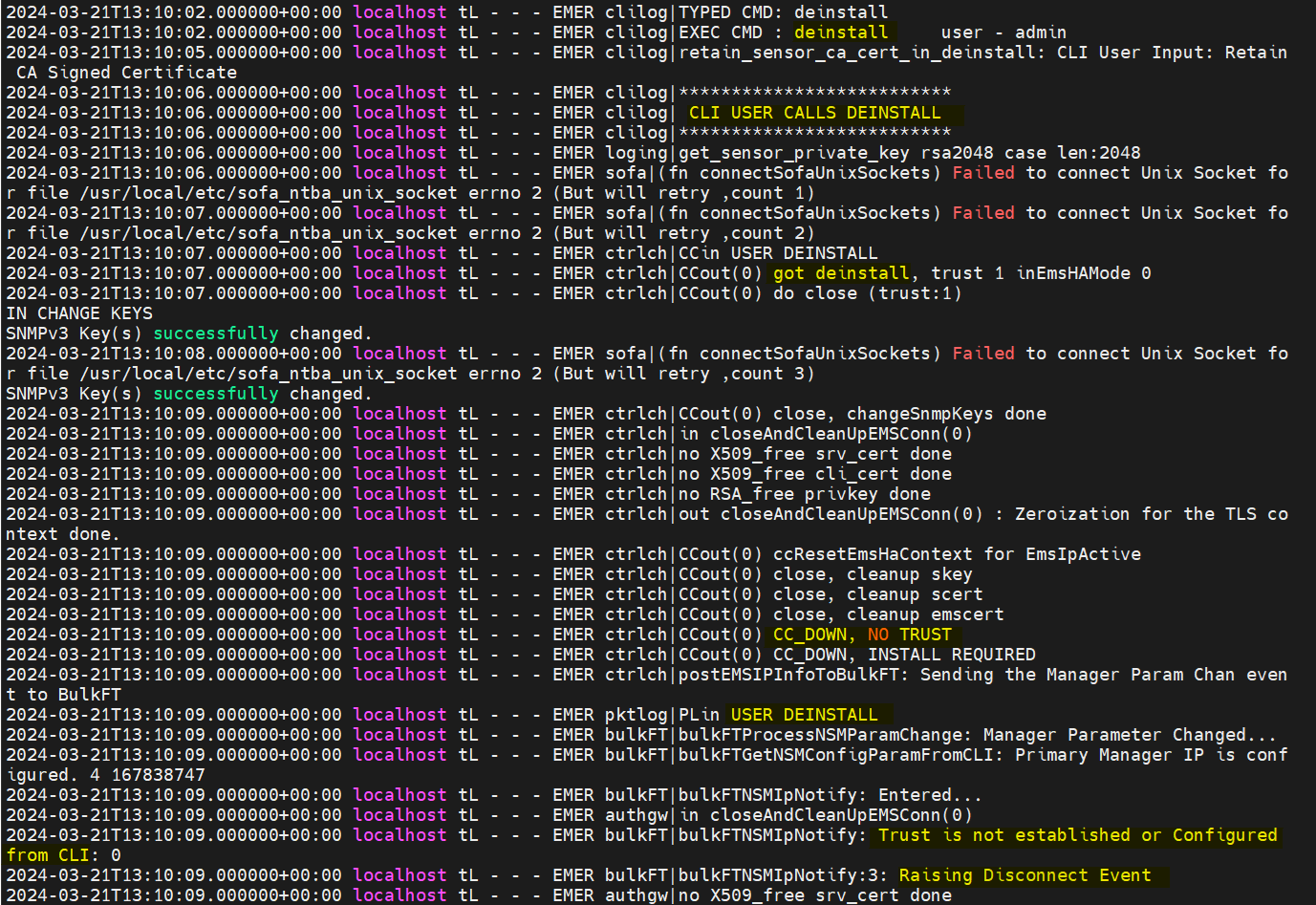
FPT_ITT.1

  • Initiation of the trusted channel

  • Termination of the trusted channel

  • Failure of the trusted channel functions

Identification of the initiator and target of failed trusted channels establishment attempt

Initiation of trusted channel:

Picture_Sensor_15.png

Termination of trusted channel:

Picture_Sensor_16.png

Failure of trusted channel functions:

Picture_Sensor_17.png

FPT_SKP_EXT.1

None

None

-

FPT_STM_EXT.1

Discontinuous changes to time - either Administrator actuated or changed via an automated process

For discontinuous changes to time: The old and new values for the time. Origin of the attempt to change time for success and failure (e.g., IP address)

Picture_Sensor_18.png

FPT_TST_EXT.1

None

None

-

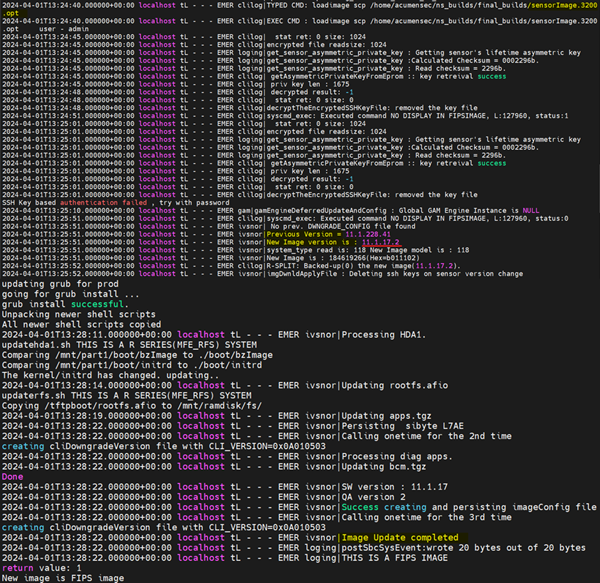
FPT_TUD_EXT.1

Initiation of update; result of the update attempt (success or failure)

None

Picture_Sensor_19.png

FTA_SSL_EXT.1

The termination of a local session by the session locking mechanism

None

Picture_Sensor_20.png

FTA_SSL.3

The termination of a remote session by the session locking mechanism

None

Picture_Sensor_21.png

FTA_SSL.4

The termination of an interactive session

None

SSH:

Sensor_FTA_SSL_4_1.png

Console:

Sensor_FTA_SSL_4_2.png

FTA_TAB.1

None

None

-

FTP_TRP.1/Admin

  • Initiation of the trusted channel

  • Termination of the trusted channel

  • Failure of the trusted channel functions

Identification of the claimed user identity

Initiation of the trusted channel:

Sensor_FTP_TRP_1_Admin_1.png

Termination of the trusted channel:

Sensor_FTP_TRP_1_Admin_2.png

Failure of the trusted channel functions:

Sensor_FTP_TRP_1_Admin_3.png

FMT_SMF.1/IPS

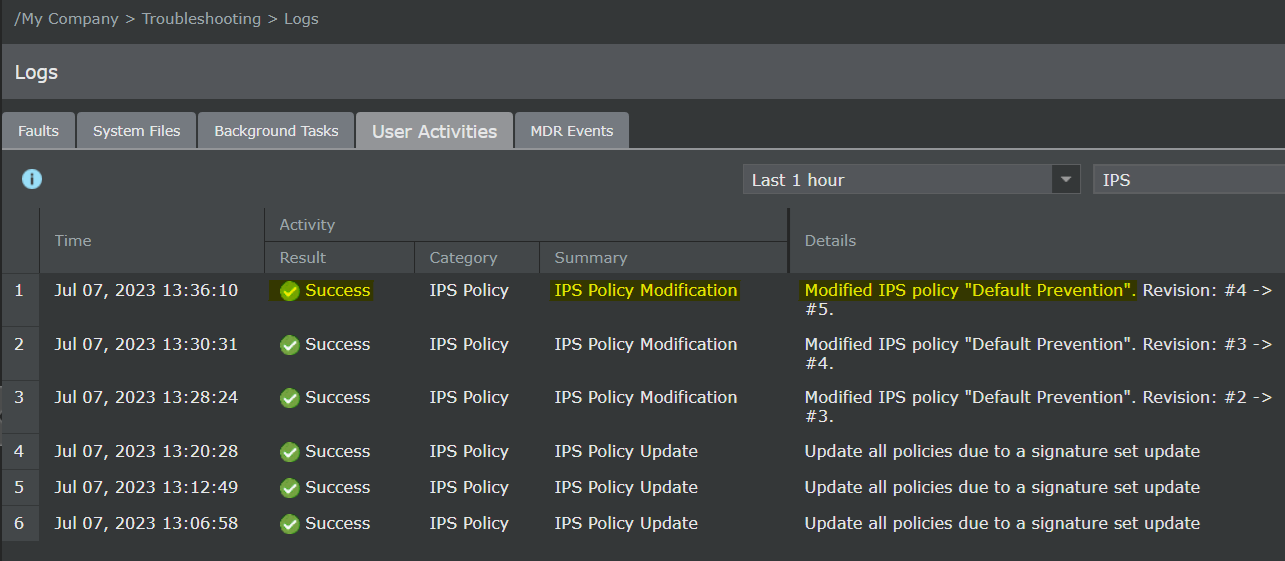
Modification of an IPS policy element

Identifier or name of the modified IPS policy element (e.g. which signature, baseline, or known-good/known-bad list was modified)

Sensor_FMT_SMF_1_IPS.png

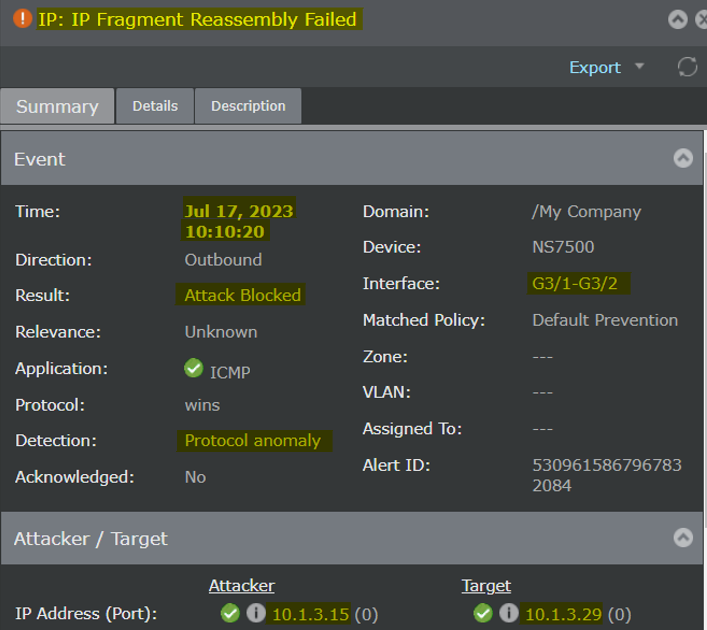
IPS_ABD_EXT.1

Inspected traffic matches an anomaly-based IPS policy

  • Source and destination IP addresses

  • The content of the header fields that were determined to match the policy

  • TOE interface that received the packet

  • Aspect of the anomaly-based IPS policy rule that triggered the event (e.g. throughput, time of day, frequency, etc.)

  • Network-based action by the TOE (e.g. allowed, blocked, sent reset to source IP, sent blocking notification to firewall)

Sensor_IPS_ABD_EXT_1.png

IPS_IPB_EXT.1

Inspected traffic matches a list of known-good or known-bad addresses applied to an IPS policy

  • Source and destination IP addresses (and, if applicable, indication of whether the source and/or destination address matched the list)

  • TOE interface that received the packet.

  • Network-based action by the TOE (e.g. allowed, blocked, sent reset)

Sensor_IPS_IPB_EXT_1.png

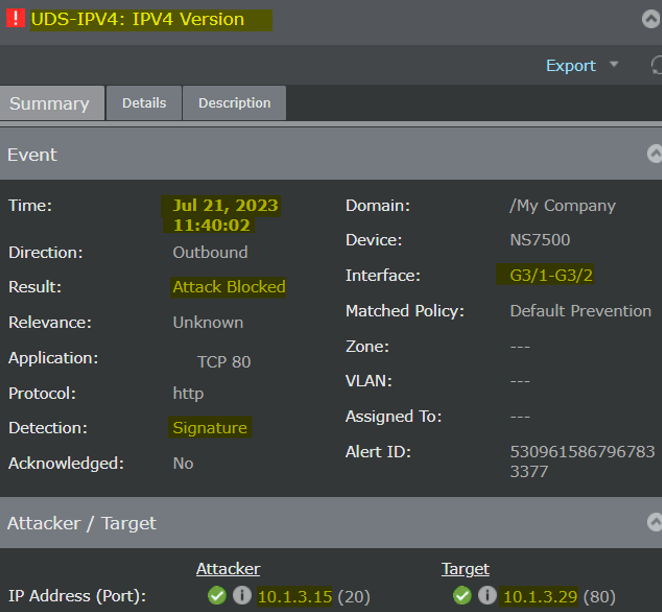
IPS_SBD_EXT.1

Inspected traffic matches a signature-based IPS rule with logging enabled

  • Name or identifier of the matched signature.

  • Source and destination IP addresses

  • The content of the header fields that were determined to match the signature

  • TOE interface that received the packet

  • Network-based action by the TOE (e.g. allowed, blocked, sent reset)

Sensor_IPS_SBD_EXT_1.png


Sensor Management Functions

Management Functions

Test cases

Ability to administer the TOE locally and remotely

SSH:

Sensor_Managerment_function_1.png

Console:

Sensor_Managerment_function_2.png

Ability to configure the access banner

Sensor_Managerment_function_3.png

Ability to configure the session inactivity time before session termination or locking

Sensor_Managerment_function_4.png

Ability to update the TOE, and to verify the updates using digital signature capability prior to installing those updates

Positive update:

Sensor_Managerment_function_5.png

Negative update:

Sensor_Managerment_function_6.png

Ability to configure the authentication failure parameters for FIA_AFL.1

Sensor_Managerment_function_7.png

Ability to configure audit behaviour (e.g. changes to storage locations for audit; changes to behaviour when local audit storage space is full);

Sensor_Managerment_function_8.png

Ability to modify the behaviour of the transmission of audit data to an external IT entity

Sensor_Managerment_function_9.png

Ability to configure the cryptographic functionality

Sensor_Managerment_function_10.png

Ability to import X.509v3 certificates to the TOE's trust store

Sensor_Managerment_function_11.png

Ability to set the time which is used for timestamps

Sensor_Managerment_function_12.png

Ability to re-enable an Administrator account

Sensor_Managerment_function_13.png

Ability to manage the trusted public keys database

Sensor_Managerment_function_14.png

Ability to configure the interaction between TOE components

Sensor_Managerment_function_15.png
Sensor_Managerment_function_16.png