To select the IPS rules that your platform uses to analyze traffic at a monitoring or a management interface, you apply an IPS policy to the interface. The rules engine detects IPS events by evaluating the selected rules against the monitored traffic.
To use the Web UI to apply an IPS policy to a monitoring or a management interface, use the IPS Configure page.
Prerequisites
Log in to the Web UI of the IPS platform as Operator or Admin.
(Optional) If you need more specific rule-selection criteria than are provided by the default IPS policies, configure custom IPS policies. For more information, see IPS policy configuration.
Procedure
To apply policy-selected IPS rules to the traffic at an interface:
Choose IPS > Configure.
Find the IPS policy that you want to apply to an interface.
Click Apply or Apply to another Interface (depending on whether the policy is already active on an interface).
You can apply the policy to one or more interfaces, depending on the number of ports on your Network Security appliance. The following example shows an Apply Policy dialog box for an appliance that has two interfaces.
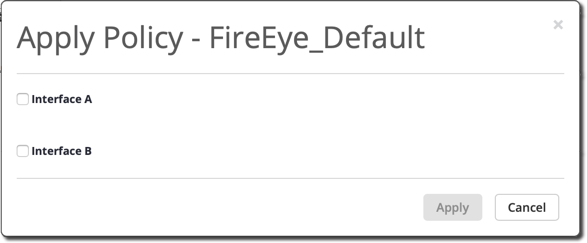
Select the interface to which you want to apply the policy. The following guidelines apply to this step:
If the IPS policy is already active, the dialog box shows the interface to which it is already applied.
You can apply only one IPS policy per interface.
If you apply an IPS policy to an interface that already has a policy, the system automatically removes the previous policy from the interface and applies the newly specified policy.
If your environment uses asymmetric routing, apply the same IPS policy to both the interfaces. If request and response packets traverse separate links to the two interfaces, the platform applies the same IPS rules to the upstream and downstream traffic.
To apply the selected IP policy now, click Apply, and then click OK.
The table shows the current status of the IPS policies defined on the appliance.