The NS3500 front and rear panel details are described below.
The NS3500 Sensor model

Power LED
Status LED
Compact Flash Memory LED
Speed LED for each ethernet port
Link LED for each ethernet port
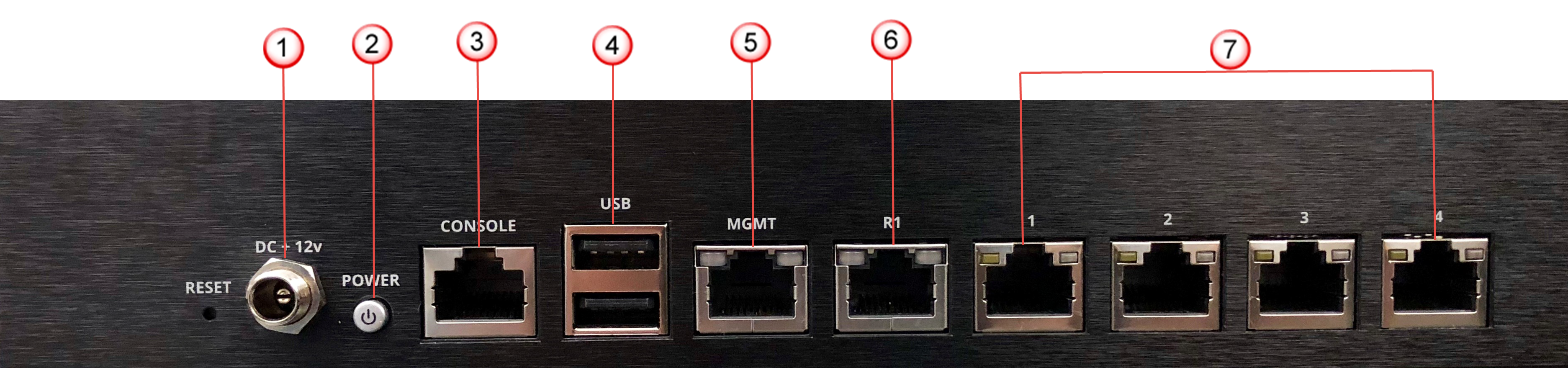
Power supply (12V DC IN)
Power switch
RJ-45 Console port (1)
USB ports (2)
RJ-45 10/100/1000 Management port (MGMT) (1)
RJ-45 10/100/1000 Response port (R1) (1 - currently not supported)
RJ-45 10/100/1000 Mbps Ethernet Monitoring ports (4)
The following table gives the details of the supported ports.
Ports | NS3500 |
|---|---|
Fixed RJ-45 ports (internal fail-open) | 4 (10/100/1000 Mbps) |
Console port | 1 |
Dedicated Management ports (RJ-45) | 1 (10/100/1000 Mbps) |
USB port | 2 |
Console port — Use to set up and configure the Sensor using the CLI.
RJ-45 10/100/1000 Mbps ethernet monitoring ports — Enables you to monitor four SPAN ports, two segments in-line, or a combination
External USB port — Use these in troubleshooting situations for system recovery purposes. You need to restart the Sensor through the USB storage device.
RJ-45 10/100/1000 Management port — Use for communication with the Manager server. You can assign an IP address to this port during installation.
Power Supply — Power supply is included with an NS3500 Sensor. The supply uses a 12V DC IN. Trellix provides 12V DC adapter with power cord. International customers must procure a country-appropriate power cable.
The NS-series Sensor does not have internal taps; you must use it with a third-party external tap to run it in tap mode.