The NS5x00 front and rear panel details are described below.
The NS5100/NS5200 Sensor model

Console port (1)
RJ-11 port (1) for fail-open control of two built-in SFP+ ports in slot G0. The RJ-11 ports support 1 Gbps (SFP) fiber and 10 Gbps (SFP+) (SR and LR). You can convert these ports to copper ports by using the copper SFP transceivers.
SFP/SFP+ 1/10 fiber Gigabit or SFP 1 Gbps copper Ethernet ports (2)
RJ-11 port (6) for external passive fail-open control of twelve SFP ports in slot G1. The RJ-11 ports support 1 Gbps (SFP) fiber (SR and LR). You can convert these ports to copper ports by using the copper SFP transceivers. The fail-open ports are internally wired to control the SFP ports. For example, port X1 controls monitoring ports G1/1 and G1/2; port X2 controls monitoring ports G1/3 and G1/4 and so on.
SFP 1 Gbps copper or fiber Gigabit Ethernet ports (12)
RJ-45 10/100/1000 Mbps Ethernet Monitoring ports (8)
The supported transceiver modules are SFP+ (MM and SM), SFP Fiber (MM and SM) and Copper SFP.

Power supply inlet (2)
USB ports (2)
RJ-45 10/100/1000 Management port (MGMT) (1)
RJ-45 10/100/1000 Response port (R1) (1)
The NS5x00 Sensors have four fan units on the top.
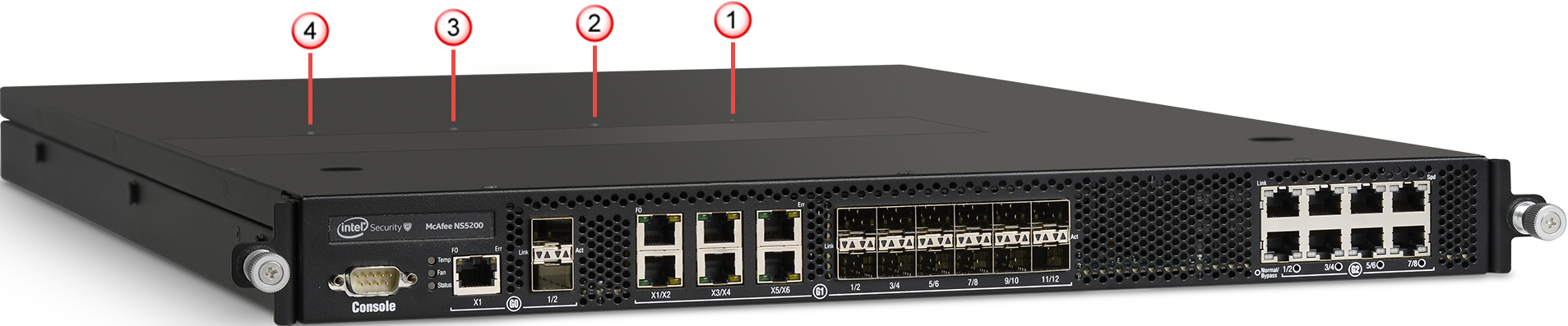
The direction of airflow in all the Sensors is front to back. Cold air enters through the front of the chassis.
Note
The fan units and power supplies are field replaceable.
The following table gives the details of the supported ports.
Ports | NS5100/NS5200 |
|---|---|
Fixed RJ-45 ports (internal fail-open) | 8 |
Fixed SFP 1 Gbps ports | 12 |
Fixed 10 GigE/1 GigE (SFP+/SFP) ports | 2 |
Fixed RJ-11 ports (external passive fail-open) | 6 |
Dedicated Response ports (RJ-45) | 1 (1G/100M/10M) |
Dedicated Management ports (RJ-45) | 1 (1G/100M/10M) |
Dedicated Auxiliary port (DB9) | 1 |
USB ports | 2 |
Console port — Use to set up and configure the Sensor using the CLI.
RJ-11 port — Controls the SFP/SFP+ 1/10 Gigabit Ethernet port pair in passive fail-open mode
SFP/SFP+ 1/10 gigabit ethernet ports — Enables you to monitor two SPAN ports or one in-line segment
RJ-45 10/100/1000 Mbps ethernet monitoring ports — Enables you to monitor eight SPAN ports, four segments in-line, or a combination
External USB ports — Use these in troubleshooting situations for system recovery purposes. You need to restart the Sensor through the USB storage device.
RJ-45 10/100/1000 Management port — Use for communication with the Manager server. You can assign an IP address to this port during installation.
RJ-45 10/100/1000 Response port — When you operate this port in SPAN or tap mode, it enables you to inject response packets back through a switch or a router.
Power Supply — Power supply is included with an NS5x00 Sensor. The supply uses a standard IEC port (IEC320-C13). Trellix provides a standard, 2 m NEMA 5-15P (US) power cable (3 wire). International customers must procure a country-appropriate power cable.
The NS-series Sensor does not have internal taps; you must use it with a third-party external tap to run it in tapped mode.