You can set auto-acknowledgement for all alerts or non-RfSB alerts based on their severity levels. This acknowledges the alerts automatically as and when the alerts are generated. Auto-Acknowledgement for alerts is disabled by default. You can view the acknowledged alerts in the Attack Log page. The auto-acknowledgement feature is available only at the root admin domain. You cannot set any auto-acknowledgement rules for alerts from the child domains.
Task
- Navigate to Policy → Intrusion Prevention → Exceptions → Auto-Acknowledgement.
-
Select the
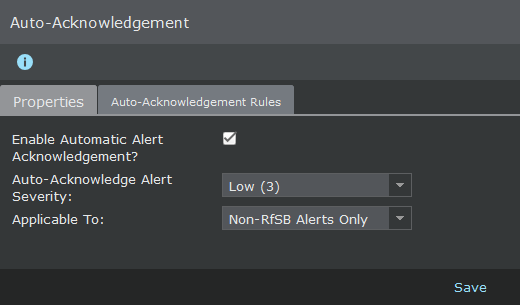
Enable Automatic Alert Acknowledgement? checkbox.
The Properties page is displayed.
- From the Auto-Acknowledge Alert Severity, select the severity level for the attacks.
-
Select the type of alerts to be auto-acknowledged from the
Applicable to drop-down list.
You can either set the auto-acknowledgement to non-RfSB alerts only or all the alerts generated which will include the RfSB alerts also.
- Click Save to save your settings.