To create custom attack definition for multiple attack correlations perform the following steps:
Task
-
Select
Policy → <Admin Domain Name> → Intrusion Prevention → Policy Types → IPS. Click
Custom Attacks.
The Custom Attack Editor opens with the existing Custom Attacks listed on the Native Trellix IPS Format tab.
-
Click
 .
The New Custom Attack interface opens.
.
The New Custom Attack interface opens. -
In the
Name field, type the new custom reconnaissance attack.
Note
The Trellix IPS ID is provided by the Manager when you save it in the Manager server.
-
Optionally type a
Description for your attack.
This area can be used for your notes or other specific information pertinent to your new attack.
- Select a severity for your attack by toggling the drop-down list. Choices are High (9, 8, 7), Medium (6, 5, 4), Low (3, 2, 1), and Informational (0).
- Select the most appropriate Protection Category for the attack.
- Select Custom Reconnaissance Attack (Correlation-Based) from the Detection Type drop-down menu for the attack.
- Click Next.
- If you wish to create a custom reconnaissance attack using multiple attacks correlation, select the Correlation Method as fingerprinting.
-
Use the
Add button to add multiple attacks as the component attacks for the custom attack that you are creating.
You must select a minimum of 2 component attacks for multiple attacks correlation.
Note
You can include a component attack in 10 custom reconnaissance attacks.
Custom Attack Definition for Multiple Attacks Correlation 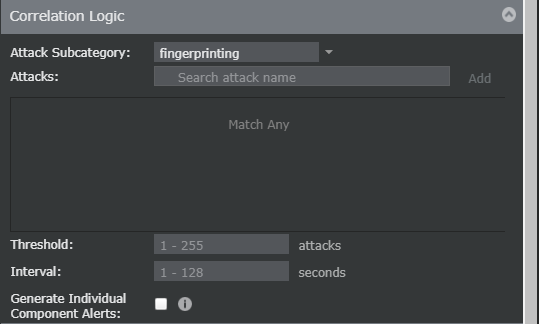
- Set the Threshold value between 1 and 255.
- Set the Interval in seconds between 1 and 65535.
- Select the Generate Individual Conponent Alerts check box.
- Click Add.
-
Review all the settings, and click
Save in the
Custom Attacks window.