First, you must configure MDR separately on both the Primary and Secondary Managers. To begin the configuration, follow the below steps:
In the Manager, select Manager → <Admin Domain Name> → Setup → MDR.
Note
IPv6 addresses for MDR in public cloud environments are not supported.
Note
The Manager supports a maximum of three IP addresses during MDR configuration. The Manager assumes that all the IP addresses are bound to the same hostname.
MDR Pair Creation page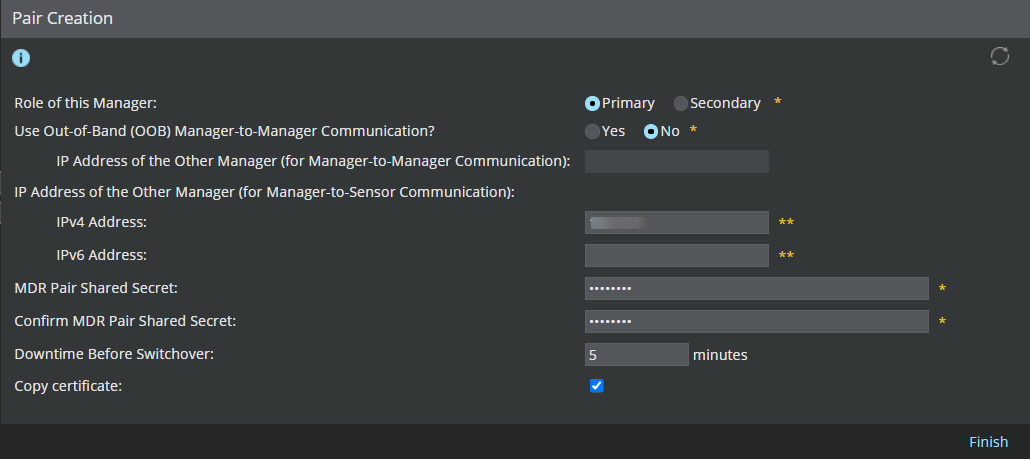
Fill in the following fields:
Option definitionsOption
Definition
Role of this Manager
Select Primary to use this Manager as the active Manager, or Secondary to use this Manager as the standby.
Use Out-of-Band (OOB) Manager-to-Manager Communication?
Yes to use separate interfaces for Manager-Manager and Manager-Sensor communication
No to use the same interface for Manager-Manager and Manager-Sensor communication
Peer IP for Manager-to-Manager Communication
This option appears if you selected the option Yes in Use Out-of-Band (OOB) Manager-to-Manager Communication? field. Enter the IP address of the Peer Manager that you want to use for Manager-Manager communication.
Note
If you set Use Out-of-Band (OOB) Manager-to-Manager Communication? to Yes in the Primary Manager, set this option as Yes in your Secondary Manager as well. A mismatch in this option setting between the Primary and Secondary Manager pair will result in an MDR configuration failure.
Peer IP for Manager-to-Sensor Communication
Enter the IP address of the peer Manager that is used for communication with the Sensor.
MDR Pair Shared Secret
The same shared secret key must be entered on both Managers for MDR creation to be successful. Enter a minimum of eight characters and use no special characters.
Confirm MDR Pair Shared Secret
Re-enter the same shared secret key.
Downtime Before Switchover
Enter the downtime in minutes before the switch to the Secondary Manager occurs. Downtime before switchover should be between 1-10 minutes. This field is disabled if the Role of this Manager of Manager is set to Secondary.
Click Finish to confirm your changes.
Note
The Primary and Secondary Managers in an MDR pair use the GUI login credentials of the primary Manager only.
Note
When you click Finish and your peer Manager's MDR settings are not yet configured, Trellix vIPS displays a warning to remind you to configure the peer Manager MDR settings.
You can configure only IPv4 address for Manager-Sensor communication as given in the following scenarios:
If a Sensor is connected to the Manager over an IPv4 network, or you want to add a Sensor from the IPv4 network to the Manager, you need to enter the IPv4 address of the peer Manager.
When Use Out-of-Band (OOB) Manager-to-Manager Communication is set to No, Peer IP for Manager-to-Sensor Communication is used for both Manager-Manager and Manager-Sensor communication.
When Use Out-of-Band (OOB) Manager-to-Manager Communication is set to Yes, Peer IP for Manager-to-Sensor Communication is used only for Manager-Sensor communication.
Important
You need to use the Peer IP for Manager-to-Sensor Communication while establishing trust between the Sensor and Manager. Ensure that your peer Manager is configured to use the same IP address as selected from the Dedicated Interface list during the Peer Manager installation. If misconfigured, Trellix vIPS generates an error message to prompt you to enter the correct IP address.