You can configure Simulated Blocking at the interface level.
Task
- Click the Devices tab.
- Select the domain from the Domain drop-down list.
- In the left pane, click the Devices tab.
- Select the device from the Device drop-down list.
-
Select
Setup → Advanced → Simulated Blocking.
By default, Simulated Blocking is disabled for the entire device.
Simulated Blocking dialog 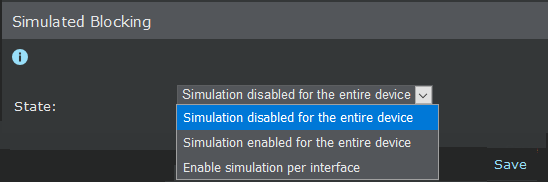
-
Select
Simulated Blocking for inbound/outbound traffic.
Note
Simulated Blocking is not supported separately for the traffic directions. If one is configured (enabled/disabled), the other is also configured similarly.
-
From the
State drop-down list, make a selection.
- To enable Simulated Blocking device wide, select Simulation enabled for the entire device.
- To disable Simulated Blocking device wide, select Simulation disabled for the entire device.
- To control Simulated Blocking per VIDS, select Enable simulation per interface.
-
Click
Save.
The device level settings override the interface level settings, that is, you cannot configure Simulated Blocking at the interface level if it is configured at the device level.