The TACACS+ action enables you to enable and disable TACACS+ authentication for the selected device.
Task
-
Select
Devices → <Admin Domain Name> → Devices → <Device_Name> → Setup → Remote Access → TACACS+.
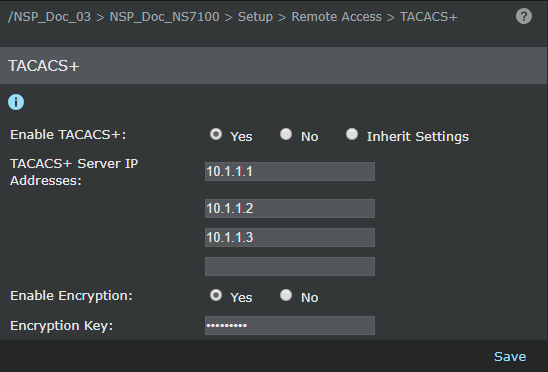
- Select Yes to enable TACACS+.
- Select Inherit from Parent Domain to use the TACACS+ settings in the parent domain.
- Enter the TACACS+ Server IP Address in the IP Address fields; you can enter up to four IP Addresses for the TACACS+ server. At least one IP Address is required if you enable TACACS+.
-
Select
Yes to
Enable Encryption.
When you enable encryption, you need to enter an encryption key in the Enable Encryption field. The maximum length of the key is 64 bytes.
- Click Save to save the configuration.