To pull the data from the Manager in Trellix ePO - On-prem, you need to create a user and assign the role ePO Dashboard Data Retriever to the user.
To create a user and assign the Data Retriever role in the Manager, do the following:
Task
- From the Manager, select Manager → <Admin Domain Name> → Users and Roles → Users.
-
To add the new user, click
.png) .
.
-
Enter the details of the user in
Add a User window.
Note that the Login ID and Password that you define in this window are to be entered in the Actions page, while configuring a Server Task in Trellix ePO - On-prem.
Users sub-tab 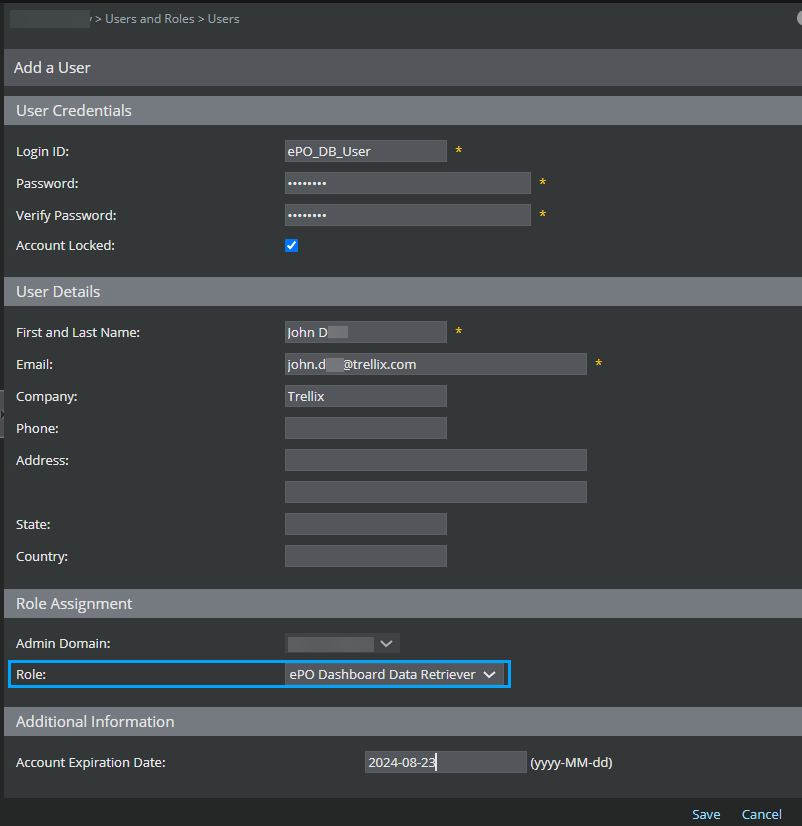
- Click Save, and a message pops up asking whether you need to assign a role to the user. To assign a role, click OK.
- Select the role ePO Dashboard Data Retriever, and click Save.
-
The user with the assigned role is displayed in the
Users tab, and
Role Assignments tab.
Note that the Login ID and Password that you define in this window are to be entered in the Actions page, while configuring a Server Task in Trellix ePO - On-prem.