You can assign the policies such as the Reconnaissance and Firewall policies at the Sensor level. These policies are applied to all the resources of that Sensor.
Task
- Click the Policy tab.
- Select the domain from the Domain drop-down list.
- In the left pane, click the Intrusion Prevention tab.
-
Click
Policy Manager. Select the
Devices tab.
List of Sensors configured are displayed.
Devices tab 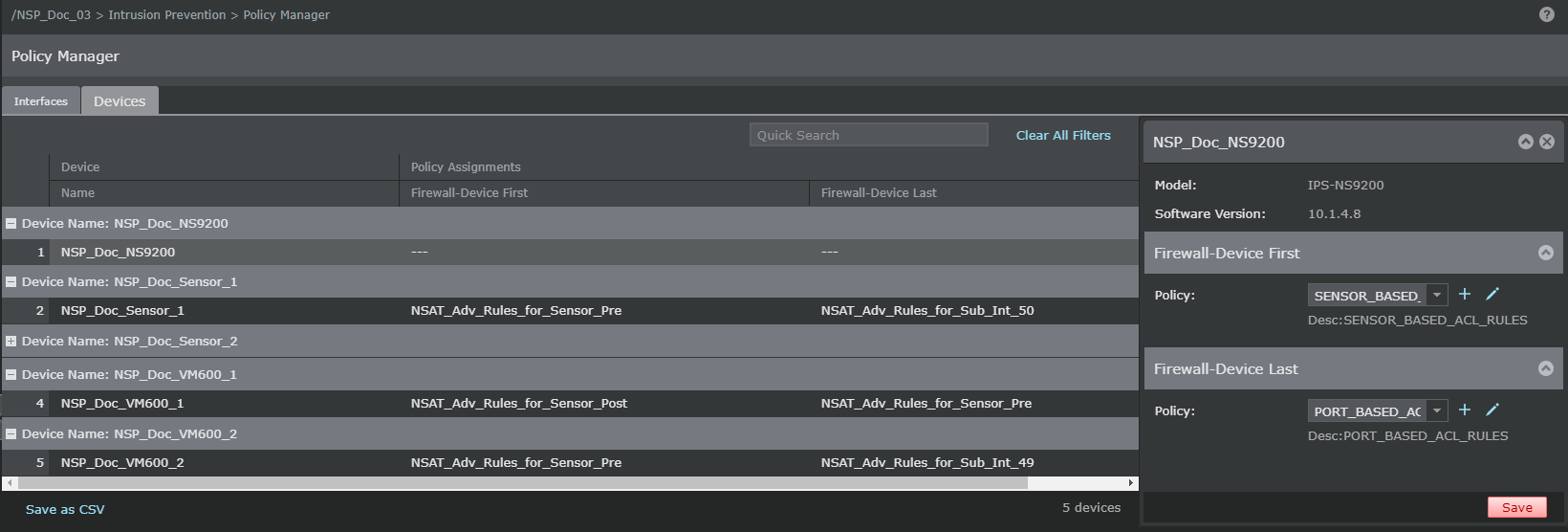
-
Double-click on the Sensor for which the policy has to be applied. The
<Device Name> window opens in the right panel.
For example if the device name is "Trellix —2050", the window name is displayed as 'Trellix —2050'.
-
Select the firewall policy in the
<Device Name> window from the
Policy drop-down list.
Click the
.png) to add a new policy. Click the
to add a new policy. Click the
.png) icon to edit the selected policy.
For information on these policies, see the corresponding sections.
icon to edit the selected policy.
For information on these policies, see the corresponding sections. - Click Save.
- Click OK, and then update the configuration change to the Sensor.