Users can be alerted through an executed script when an alert is generated that matches a chosen severity or customized attack setting.
Task
-
Select
Manager → <Admin Domain Name> → Setup → Notification → IPS/NTBA Events → Script.
The Script page is displayed.
-
Specify the options in the corresponding fields.
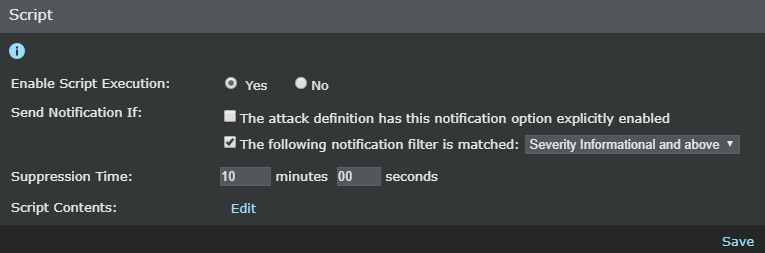
Field Description Enable Script Execution Select Yes to enable alert notification through an executed script. Send Notification If The attack definition has this notification option explicitly enabled — send notification for attacks that match customized policy notification settings, which you must set when editing attack responses within the policy editor. The following notification filter is matched:
- Severity Informational and above — Includes all alerts
- Severity Low and above — Includes low, medium, and high severity alerts
- Severity Medium and above — Includes both medium and high severity alerts
- Severity High — Includes only high severity alerts
Suppression Time Enter a Suppression Time for the notification. The suppression time is the amount of time (minutes and seconds) to wait after an alert has been generated before sending the notification. This will prevent alerts being sent through notification in the event an alert has been acknowledged or deleted through the Attack Log page within the suppression time. The default and minimum value is 10 minutes and 0 seconds. -
Click
Edit.
The Script Contents page is displayed.
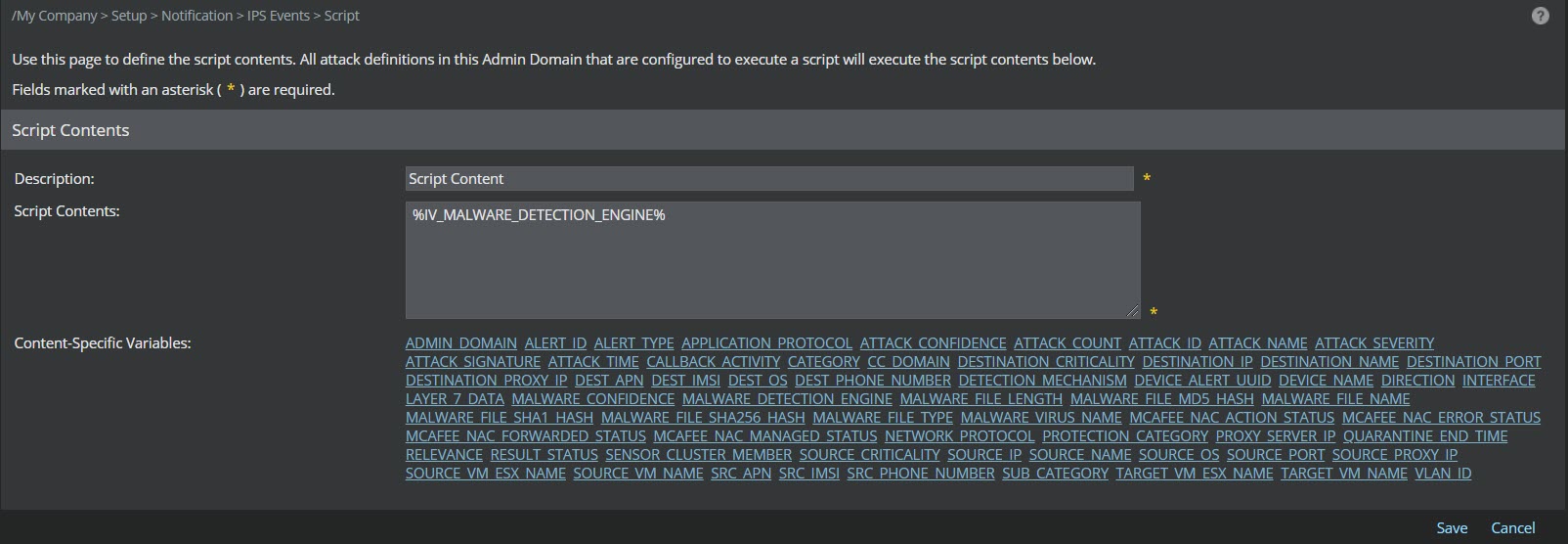
- Enter a description in the Description field.
- Enter the required text in the
Script Contents field. Click the links provided against
Content-Specific Variables to add variables in the
Script Contents field.
Note
Prior to Sensor software version 10.1.5.116, the variables $IV_MALWARE_FILE_SHA1_HASH$ and $IV_MALWARE_FILE_SHA256_HASH$ do not display the file hashes.
- Click Save to return to the Script page.
-
Click
Save to save your settings.
- The local system user needs to have permission to create the script output file on the Manager installation directory.
- Notifications are configured per admin domain.