You can enable Application Identification for the required ports of a Sensor. By default, this feature is disabled.
Note
Enabling Application Identification affects only the Top Application Summary dashboard and has no impact on the Firewall feature.
Important
Identifying applications is a resource-intensive process. If the Sensor performs application identification on the entire traffic, the Sensor throughput could be reduced by about 10%. The amount of actual throughput drop varies based on the type of traffic.
Task
-
Select
Devices → <Admin Domain Name> → Devices → <Device Name> → Setup → Application Identification.
The Application Identification page is displayed.
-
Select
Enable Application Identification?
All the monitoring ports that are currently enabled and up are listed under Selected Ports. This means the Application Identification feature is enabled at these ports.
Enabling Application Identification for specific ports 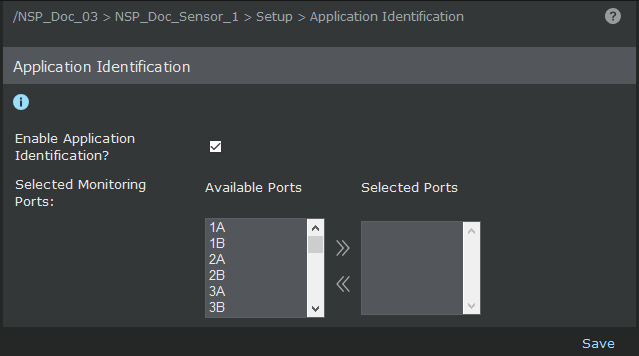
-
Use the arrow marks to move the items between
Available Ports and
Selected Ports.
Make sure only those ports for which you want to enable the Application Identification feature are listed under Selected Ports.
- Click Save.
- Do a configuration update to the Sensor.