---
title: "Enable layer 2 settings"
slug: "enable-layer-2-settings"
tags: ["Product Usage", "IPS 10.1.10"]
updated: 2026-09-06T12:31:39Z
published: 2026-10-05T15:41:20Z
canonical: "docs.trellix.com/enable-layer-2-settings"
---
> ## Documentation Index
> Fetch the complete documentation index at: https://docs.trellix.com/llms.txt
> Use this file to discover all available pages before exploring further.
# Enable layer 2 settings
Enabling the **Layer 2 Settings** action provides permission for the device to go into layer 2 pass-through mode, or fail-open mode, when there are multiple occurrences of critical device faults in a specified period of time. This feature provides another measure for preventing a bottleneck at the device when deployed in High Availability networks.
> [!NOTE]
> Note
>
> The **Layer 2 Settings** mode is on (enabled) by default.
By default, if the device experiences a critical operating error, such as a suspended task or "hung" processor, it reboots. If a device continues to experience critical errors, a reboot is initiated for every critical error. If the device is not closely monitored, the constant rebooting can create a bottleneck at the device. Also, in the case of External Tap and SPAN or Hub monitoring modes, passing traffic is not being inspected.
The **Layer 2 Pass-Through** mode enables you to set a threshold on the number of critical failures within a configured period of time that the device can experience before being forced into fail-open mode. For example, you configure **Layer 2 Pass-Through** mode to enable if there are three critical faults in any 10-minute period. At minutes one, three, and seven, faults occur; the Layer 2 Pass-Through Mode is enabled. Here is another scenario: at minutes one, four, eleven, and thirteen, faults occur. In this case, the last three faults occurred within 10 minutes of each other, thus the device enters Layer 2 Pass-Through mode.
Device reboot may take a few minutes to complete. This downtime is not counted against the Layer 2 duration; only device uptime is counted.
> [!NOTE]
> Note
>
> The **Layer 2 Pass-Through** mode is off (not enabled) by default. This option enables fail-open operation for critical faults between Layer 3 and Layer 7 only; failures at Layer 1 and Layer 2 continue to cause a reboot of the device.
> [!NOTE]
> Note
>
> The Manager provides the capability to allow Layer 2 bypassing to a Sensor directly from the Manager interface, rather than having to do it from the CLI. The modes **Assert** and **Deassert** could now be set from the Manager interface. For more details on enabling the modes, refer to [Enable Layer 2 Modes](/network-and-platform/docs/enable-layer-2-modes).
The following occurs when Layer 2 Pass-Through Mode is activated:
- Processing of traffic on all monitoring ports of the affected device ceases.
- The device sends a fault message to the Manager indicating that it is now in Layer 2 Pass-Through mode.
## Task
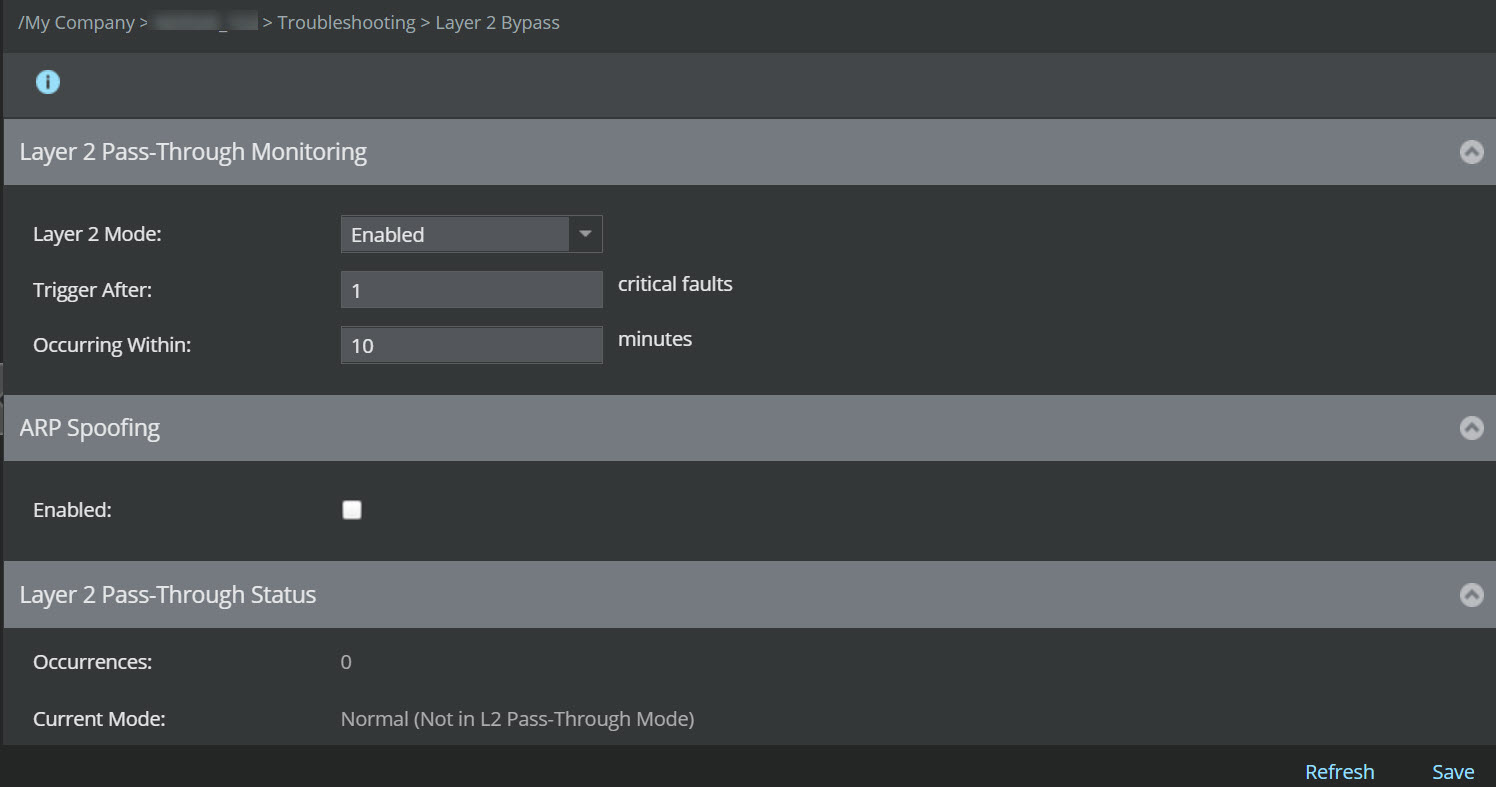
1. For a standalone Sensor, click
**Devices** → **** → **Devices** → **** → **Troubleshooting** → **Layer 2 Bypass**.
For Sensors in a stack, Click
**Devices** → **** → **Devices** → **** → **Member Sensors** → **** → **Troubleshooting** → **Layer 2 Bypass**.
2. Select
**Yes** to enable
**Layer 2 Pass-Through Monitoring**.
3. Enter a
**Trigger After** value.
The threshold determines the number of critical failures within the
**Occurring Within** time before switching to pass-through mode.
4. Enter an
**Occurring Within** time.
This time represents the number of minutes within which the
**Trigger After** value must be met to switch into pass-through mode.
Layer 2 Settings window
5. Select yes to enable
**ARP Spoofing** on the device.
6. Click
**Save**.
Once applied, you can view the number of critical faults and current mode in the
**Layer 2 Pass-Through Status** dialog at the bottom of the screen.
Layer 2 Pass-Through Status dialog

Note the following status fields:
- **Occurrences**: current number of threshold-breaching events.
- **Current Mode**: current mode of the device.
**Normal** means that Layer 2 pass-through mode is not enabled in the device.
**L2 Pass-Through Mode** means pass-through mode is enabled.