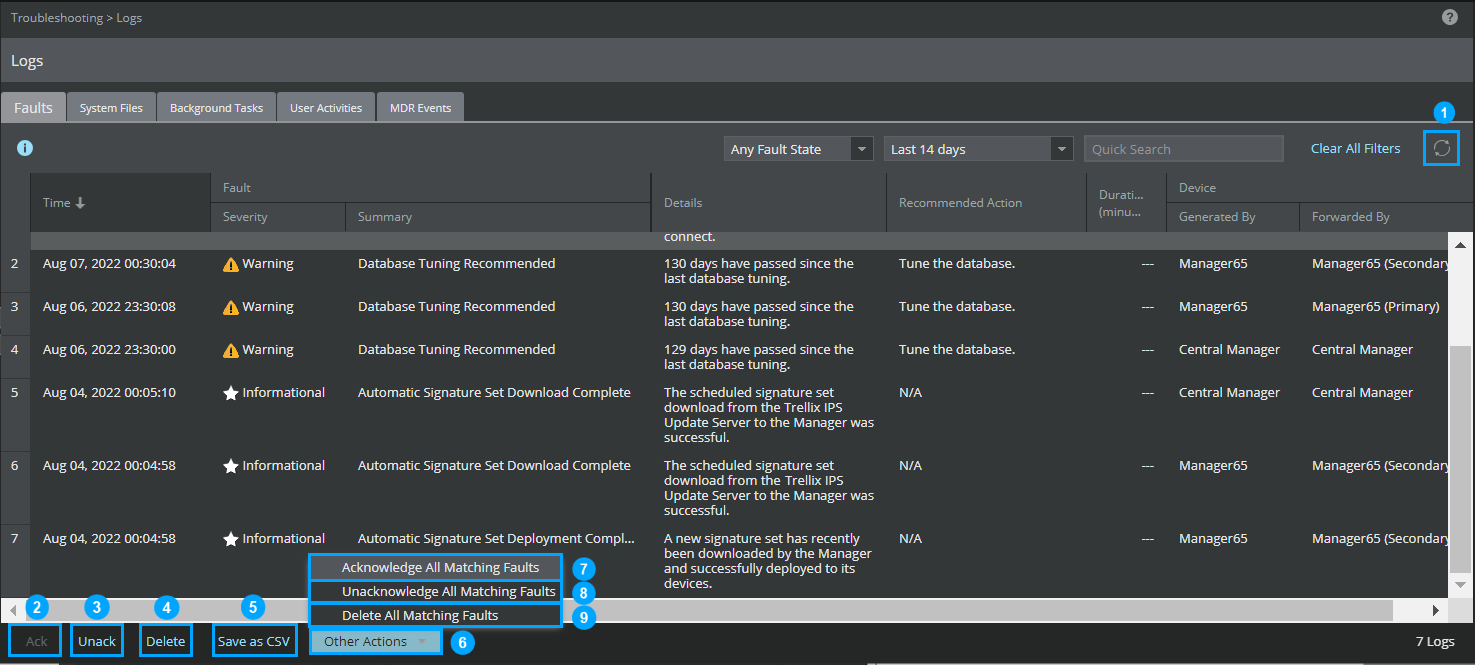
The following action buttons are available in the Faults tab:
| Callout | Action button |
|---|---|
| 1 | Refresh—Updates the Manager faults log with new faults from the database. |
| 2 | Acknowledge— Marks the fault as acknowledged/read. Acknowledging a fault means that you are aware of its existence and plan to take appropriate action. To acknowledge a fault, select the fault and click the
Ack button.
When you acknowledge a fault, the fault will still be available in the Central Manager which can be used for analysis later. |
| 3 | Unacknowledge— Marks the fault as unrecognized. By default all faults are unacknowledged. You can unacknowledge an acknowledged fault. To unacknowledge a fault, select the fault and click the Unack button. |
| 4 | Delete— Deletes the selected faults from the Central Manager. |
| 5 | Save as CSV— Saves a copy of the faults displayed with filters applied. |
| 6 | Other Actions— You can perform further actions on the faults using the option available under
Other Actions. The
Other Actions has the following options:
|
| 7 | Acknowledge All Matching Faults— Acknowledges all faults of the same type for the selected filter range. |
| 8 | Unacknowledge All Matching Faults— Unacknowledges all faults of the same type for the selected filter range. |
| 9 | Delete All Matching Faults— Deletes all faults of the same type for the selected filter range. |
For a complete listing of system fault messages and their interpretation, see System fault messages in the Trellix Intrusion Prevention System Product Guide.