Use the Generate Report page to generate a consolidated Infected Hosts Trend report.
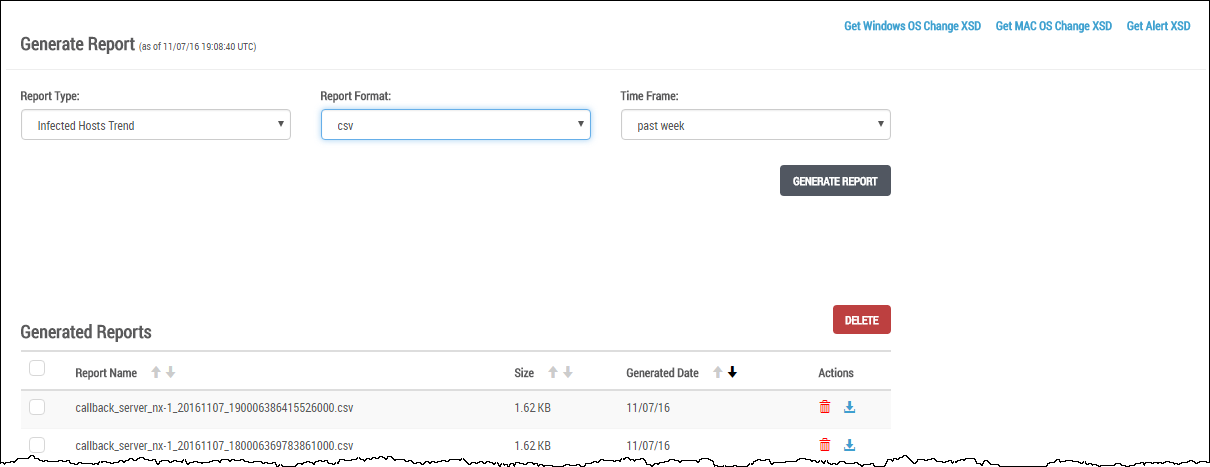
When the report generation is complete, the generated report appears in the Generated Reports table.
In the Web UI, choose Reports > Reports.
In the Report Type drop-down menu, select Infected Hosts Trend.
In the Report Format drop-down menu, select the csv output format to write the report to a CSV file.
In the Time Frame drop-down menu, select the time period for this report generation:
past week—Report covers analysis generated during the past 7 days.
past month—Report covers analysis generated during the past 1 month.
past 3 months—Report covers analysis generated during the past 3 months.
between—Report covers analysis generated between the specified From date and time and the specified To date and time.
Click Generate Report. The generated report is added to the top of the generated report list.
(Optional) Export the XSD files. These files describe the structure of an Infected Hosts Trend report.
To export the Windows OS Change XSD, click the Get Windows OS Change XSD link at the top right side of the page.
To export the MAC OS Change XSD, click the Get MAC OS Change XSD link at the top right side of the page.
To export the Alert XSD, click the Get Alert XSD link at the top right side of the page.
In the Web UI, choose Reports > Reports.
In the Generated Reports table, locate a generated Infected Hosts Trend report you want to delete.
Click the Delete (red trash can) icon.
Click OK.
An Infected Hosts Trend report is removed. The following message appears:

Close the message.