We assume that your VPCs and Availability Zones are configured in line with your organization's requirements. The Virtual IPS Sensor can be installed in the same VPC as your Manager. Before installing the Manager, ensure that you have selected the appropriate region in the AWS console.
For recommendations on the various deployment options, see the topic Use case scenarios.
This section provides the high-level steps for deploying individual Trellix vIPS components in the AWS environment.
Note
For an existing deployment, you can deploy the GWLB-based solution after meeting the prerequisites. Any upgrade from Probe to GWLB is not supported. All the routes for protected VM have to be added to forward the traffic to GWLBe.
Recommendation for deployment:
It is recommended that you follow the steps below to configure Trellix vIPS in the AWS environment. After installing the Manager, you can deploy any of the remaining components.
For each account you wish to secure, Trellix recommends you create a separate protected group for different accounts. In the event of an attack, this will help in identifying the account that was attacked.
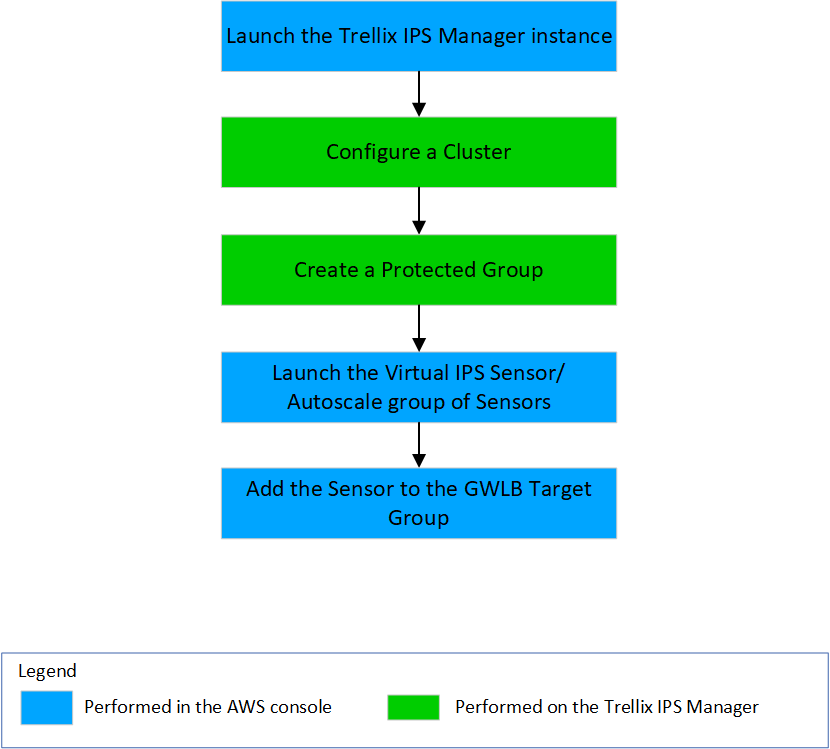
Launch the Trellix IPS Manager. For more information, see Install the Trellix Intrusion Prevention System Manager.
Configure a Cluster for a Protected Group with GWLB traffic source. For more information, see Create a Cluster in the Manager for AWS using GWLB-based solution.
Create Protected Groups for instance. For more information, see Create a Protected Group for AWS cloud using GWLB-based solution.
(Optional) Configure a Local controller with an IAM role, if autoscaling is needed. Also, configure a Cloud Account in Controller for AWS Cloud Discovery. For more information, see Configure a Controller in the Manager.
Launch the Virtual IPS Sensor instance/Autoscale group of Sensors with GWLB traffic source. For more information, see Launch the Virtual IPS Sensor AMI instance using GWLB-based solution.
Once the Sensor instance is active, add it to the Target Group on the AWS console. For more information, see Create a Target group.
Launch the protected VM in the workload VPC for the associate traffic inspection to GWLBe.