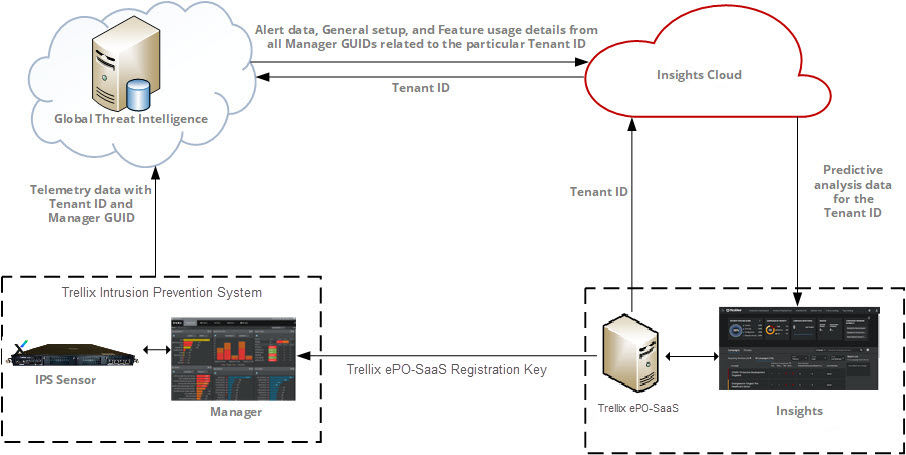
This integration provides a registration workflow that enables Trellix IPS as an additional source of threat information for Trellix Insights. After successful integration, Trellix IPS sends the telemetry data to the GTI server and TITAN which is used by Insights for predictive analysis. The integration works in three phases:
Trellix IPS registration with Trellix ePolicy Orchestrator - SaaS
On registering the Manager with Trellix ePolicy Orchestrator - SaaS, the following unique identifiers are sent as part of the telemetry data:
- Tenant ID: Unique identifier assigned to the MVISION account at the time of creation
- Manager GUID: Identifier for the Manager generated during the Manager installation
If you have two Managers registered with Trellix ePO - SaaS using the same MVISION account, both the Managers will have the same Tenant ID but individual Manager GUID.
The telemetry data from Trellix IPS is identified by Trellix Insights through the Tenant ID and the Manager GUID.
Integration with Trellix Insights
Once the Manager is registered with the Trellix ePO - SaaS, integration with Insights is disabled by default until the user enables it. Insights then collects the attack information from Trellix IPS telemetry data which includes alert data and feature configuration. Insights uses the Tenant ID to identify all the Managers in that network. The collected information is then processed by the engine residing in Trellix Insights to perform predictive analysis.
Analysis of the processed data
The processed data is available in Trellix Insights page hosted on the Trellix ePO - SaaS console. This page includes analytics like security posture score, campaigns detected in your network, vulnerable devices, etc. The data is segregated and displayed based on features defined within the server for data analysis. This helps prioritize threats, predict methods to detect threats, and prescribe better ways to improvize attack detection in Trellix IPS.