Before you begin
Make sure the XML file containing the exported policies is not open or is being imported by some other user.
You can import the XML file containing the exported IPS and reconnaissance policies into a Manager.
Notes:
- The version of the Manager from which you exported the policies and the current version of the Manager must be an exact match.
- You should not have modified contents or the properties of the XML file.
- If the same policy exists in the Manager, you can import only if there is a difference and only at the admin domain of the existing policy. The Manager checks if the same policy exists based on the policy name mentioned inside the XML file and not based on the name of the XML file.
Task
- In the Manager, click Policy and select the required Domain.
- Select Intrusion Prevention → Advanced → Policy Import → IPS.
- Click Choose File to locate the XML file you want to import.
-
Click
Next to download the file to the Manager.
View the differences and import the policy 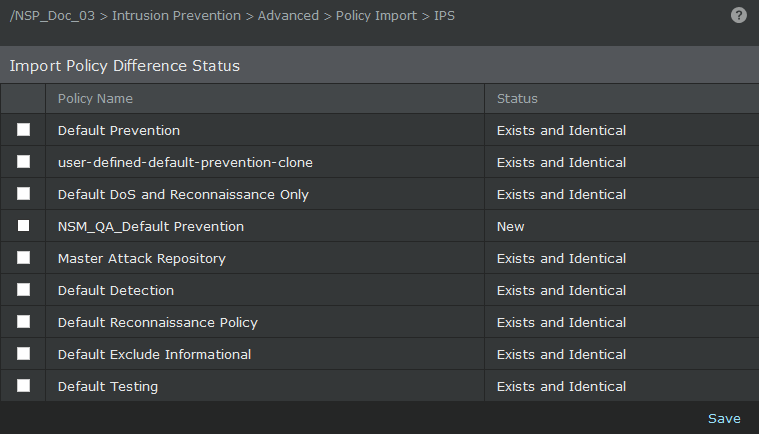
-
Select the policies that you want to import and click
Save.
The imported policies are listed in the IPS page.
- Click Manager and select the required Domain.
- Navigate to Troubleshooting → Manager Policy Cache.
-
Click
Clear Caches.
You will get a confirmation massage stating Note: Cleared policy caches from Web tier successfully. This action reloads the policy cache and brings the imported IPS policies into effect.
Note
Alternatively, you can schedule a signature set update which will reload the cache automatically.