This URL imports rule members from a CSV file.
Note
This API is applicable only for the following rule object types — IPv4 Endpoint, IPv4 Network, IPv6 Endpoint and IPv6 Network.
Resource URL to import rule members to a new or existing rule object
POST ruleobject/importROMembers?importOption=<importOption_id>
This API request involves you to upload a CSV file to Postman and then, enter json code to import rule members from the uploaded file.
Follow these steps to upload a CSV file and import rule members from the file:
- Enter the resource URL and navigate to Body → form-data.
- In the first cell under the KEY column, hover the mouse cursor so you can see a drop-down. Select File from the drop-down. Name the key as ruleObjectMembersFile.
- Select Files button appears for the newly added key under the VALUE column. Use this option to upload the CSV file.
- Enter the CONTENT TYPE for this key as multipart/form-data.
- Create a new
Text key named
roPropertiesJson. Enter json payload as the VALUE for this key.
An example of payload to import IPv4 address list:
{ "RuleObjDef": { "domain": 0, "visibleToChild": true, "description": "try", "ruleobjId": 0, "name": "test_SDK6", "HostIPv4": { "hostIPv4AddressList": [] }, "ruleobjType": "HOST_IPV_4" } }Note
If the ruleobjId is set to 0, a new rule object is created and all the entries are imported from the CSV file.
Note
If you are specifying an existing rule object's ID in ruleobjId, the specified rule object would be modified and the rule members will be appended or replaced based on the value set for importOption_id.
An alternate method to import rule members to an existing rule object is demonstrated in Resource URL to import rule members to an existing rule object. You may refer to these steps for an easier way of importing rule members to specific rule object.
- Enter the
CONTENT TYPE for this key as
application/json.
The added keys appear in Postman as shown below:
POST request to create a new rule object 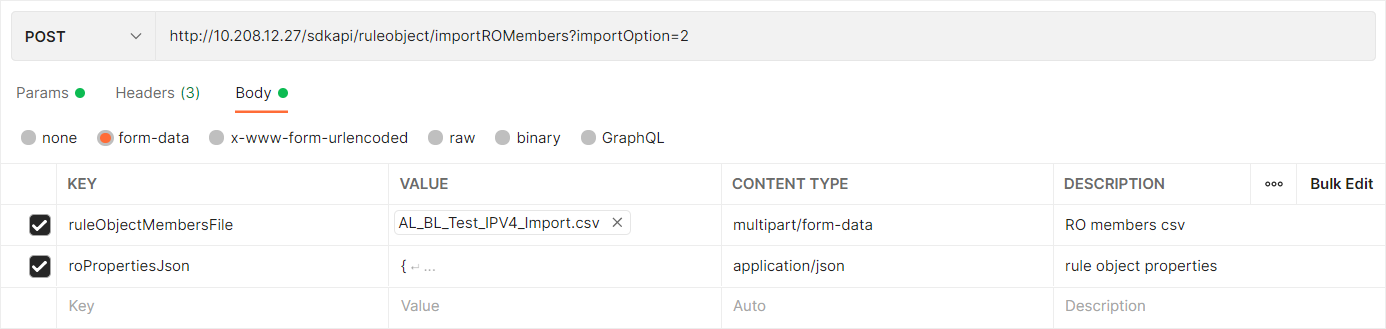
Resource URL to import rule members to an existing rule object
POST ruleobject/importROMembers?importOption=<importOption_id>&ruleObjId=<ruleobject_id>
This API request involves you to upload a CSV file to Postman and then, enter json code to import rule members from the uploaded file.
Follow these steps to import rule members to an existing rule object. This is the recommended procedure to append or replace rule members from a CSV file into an existing rule object:
- Enter the resource URL and navigate to Body → form-data.
- In the first cell under the KEY column, hover the mouse cursor so you can see a drop-down. Select File from the drop-down. Name the key as ruleObjectMembersFile.
- Select Files button appears for the newly added key under the VALUE column. Use this option to upload the CSV file.
- Enter the
CONTENT TYPE for this key as
multipart/form-data.
The added keys appear in Postman as shown below:
POST request to edit an existing rule object 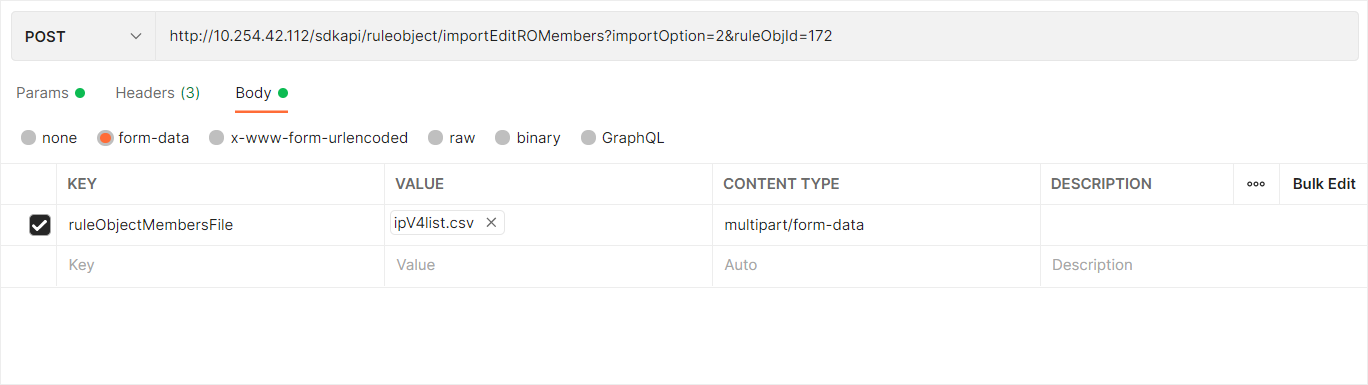
Note
If the importOption is set to 1, entries in the CSV file will be appended to the existing list of rule members. If the importOption is set to 2, entries in the CSV file will replace the existing list of rule members. When you append or replace the IP addresses, the Manager ignores any duplicate entries.
Request Parameters
URL Parameters
| Field Name | Description | Data Type | Mandatory |
|---|---|---|---|
| importOption_id | Import option ID, should be 1 to append and 2 to replace the existing rule members. | Number | Yes |
| ruleobject_id | Rule object ID | Number | Yes (If you are editing an existing rule object) |
Payload Parameters
| Field Name | Description | Data Type | Mandatory |
|---|---|---|---|
| ruleobjId | Rule object ID | Number | Yes |
| ruleobjType | Rule object type | String | Yes |
| name | Rule object name | String | Yes |
| description | Description | String | Yes |
| domain | ID of domain in which the rule object is defined | Number | Yes |
| visibleToChild | Is rule object visible to child | Boolean | Yes |
| HostIPv4 | Host IPv4 address object, should be defined if ruleobjType is "HOST_IPV_4" | Object | No |
| HostIPv6 | Host IPv6 address object, should be defined if ruleobjType is "HOST_IPV_6" | Object | No |
| NetworkIPv4 | IPv4 network object, should be defined if ruleobjType is "NETWORK_IPV_4" | Object | No |
| NetworkIPv6 | IPv6 network object, should be defined if ruleobjType is "NETWORK_IPV_6" | Object | No |
Details of HostIPv4:
| Field Name | Description | Data Type | Mandatory |
|---|---|---|---|
| hostIPv4AddressList | List of IPv4 host address | Object | Yes |
Details of HostIPv6:
| Field Name | Description | Data Type | Mandatory |
|---|---|---|---|
| hostIPv6AddressList | List of IPv6 host address | Object | Yes |
Details of NetworkIPv4:
| Field Name | Description | Data Type | Mandatory |
|---|---|---|---|
| networkIPV4List | List of network IPv4 addresses | Object | Yes |
Details of NetworkIPv6:
| Field Name | Description | Data Type | Mandatory |
|---|---|---|---|
| networkIPV6List | List of network IPv6 addresses | Object | Yes |
Response Parameters
Following fields are returned if the request parameters are correct, otherwise error details are returned.
| Field Name | Description | Data Type |
|---|---|---|
| success | Is file import is successful | Boolean |
| ruleObjectId | Rule object ID | String |
| errorCode | ID of the SDK API error | Number |
| errorMsg | Message displayed based on the status of the file import | String |
| invalidEntriesExist | If there are any invalid entries in the uploaded CSV file. If this is true, a CSV file with invalid entries is downloaded. If it is false, an error is displayed stating "Internal Error - File Not Found !!!". | Boolean |
Example
Request
GET https://%3CNSM_IP%3E/sdkapi/ruleobject/importROMembers?importOption=2
Response for successful file import
{
"success": true,
"ruleObjectId": 238,
"errorCode": 0,
"errorMsg": null,
"invalidEntriesExist": true
} Response for failed file import
{
"success": false,
"ruleObjectId": 0,
"errorCode": 1001,
"errorMsg": "Rule Object Members are more than Supported limit. Supported Count : 140000 Total Rule Object Members Count : 140001",
"invalidEntriesExist": false
} Error Information
Following error codes are returned by this URL:
| S.No | HTTP Error Code | SDK API errorId | SDK API errorMessage |
|---|---|---|---|
| 1 | 200 | 1000 | Invalid file format. Import supported for CSV files only. |
| 2 | 200 | 1001 | Rule object members are more than supported limit |
| 3 | 200 | 1002 | A Rule Object with same name already exists |
| 4 | 200 | 1003 | Rule object is used in one or more policies assigned to sensors with older software version. Rule object member count cannot be more than 10 |
| 5 | 200 | 1004 | All Rule Object Members in the imported file are invalid for the selected type. |
| 6 | 200 | 1005 | Imported CSV file is empty |