To install the extension for Trellix IPS in Trellix ePO - On-prem, do the following:
Task
- Log onto the Manager.
-
Navigate to
Manager → <Admin Domain Name> → Integration → ePO → ePO Integration.
The Enable ePO Integration page is displayed.
-
Enable the required options for
Trellix ePO - On-prem integration.
(Optional) Select the checkbox for the Enable Endpoint Lookup? option.(Optional) Select the checkbox for the Enable Endpoint Tagging? option.
This option enables you to assign tags created in Trellix ePO - On-prem to managed endpoints.
Note
At least one of the above options has to be selected for Trellix ePO - On-prem integration.
Enable ePO Integration area 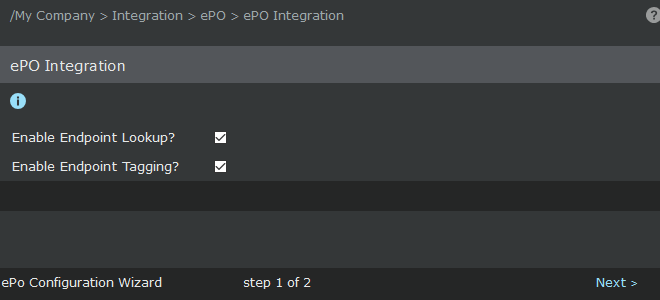
-
Click
Next to view
ePO Server Settings page.
ePO Server Settings area 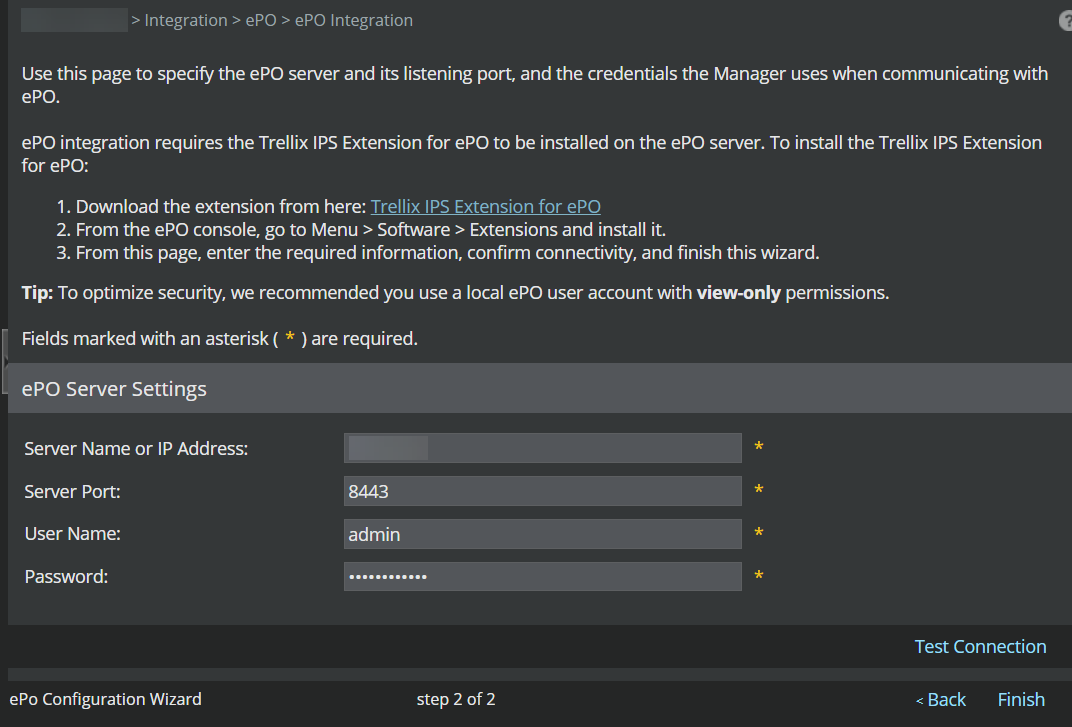
-
Click
Trellix IPS Extension for ePO link to download the
TrellixIPSExtension.zip file.
Note
If this is an existing deployment using an obsolete version of the extension, you are prompted to update to the minimum required version.
-
Save
TrellixIPSExtension.zip in a convenient location.
You can also copy the product extension zip file from Manager installation folder in the following location: %programfiles%\Trellix\IPS Manager\App\EPOExtension
-
Log onto the
Trellix ePO - On-prem console.
The Trellix ePO - On-prem console Home page is displayed.
-
Click
 , and navigate to
Software → Extensions page.
, and navigate to
Software → Extensions page.
- Click Install Extension at the top of the page.
-
Browse and select
TrellixIPSExtension.zip from the location mentioned in step 5.
Once installed, the Manager is listed under the Extensions list. For more details on installation procedure for extension files, refer to Trellix ePO - On-prem documentation.