Two log files specifically related to Manager/Central Manager installation and upgrade are available:
- mgrVersion.properties: Every fresh installation or upgrade of the Central Manager or Manager is logged to this file. Each entry contains the version of the Central Manager or Manager that you installed or upgraded to. It also contains the date and time of when you performed this action. This can help you troubleshoot issues. For example, you can go through this log to correlate an issue with a specific Manager upgrade. This file is stored at <Central Manager or Manager install directory>\App\config.
- dbconsistency.log: When you upgrade the Central Manager or Manager, the installed database schema is compared against the actual schema of the version you are upgrading to. The purpose of this comparison is to check for any inconsistencies. The details of this comparison are logged to this file as error, warning, and informational messages. This file is stored at <Central Manager or Manager install directory>\App\logs. You can verify this log to check if any database inconsistency is the cause of an issue. This file is updated whenever you upgrade the Central Manager or Manager.
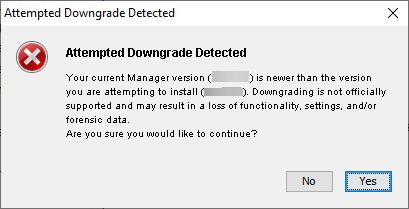
Warning message during downgrade
Downgrade of Central Manager or Manager is not supported on both Windows based Manager and Linux based Manager. To revert to an earlier version, you must uninstall your current version, install the older version, and restore the database backup from that older version. There can be instances when you may inadvertently attempt to install an older version of the Central Manager or Manager when a later version is already installed. In such cases, the Installation Wizard displays the following warning message for Windows based Manager.