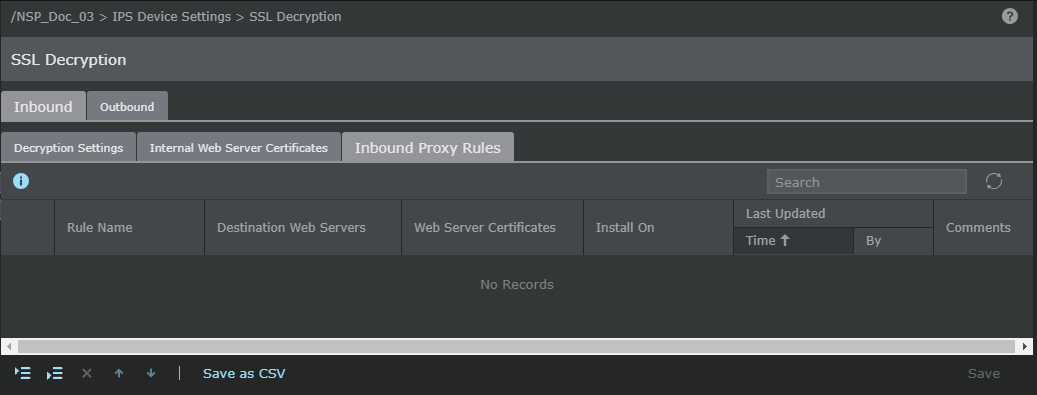
When using proxy mode, you need to configure a proxy rule for the web server you wish to protect and their certificate and key. Trellix IPS Manager supports PKCS12 keys with file suffixes ".pkcs12", ".p12", or ".pfx". This can be configured on the Internal Web Server Certificates tab of the SSL Decryption page. Proxy rules are used by the Sensor to identify the web servers that are to be protected. The rule contains the IP address and the web certificate of the server. When the sensor detects SSL traffic which contains the IP address of a server that has a proxy rule defined, then the Sensor intercepts and decrypts the traffic.
To manage a proxy rule, perform the following steps:
Task
- Select Devices → <Admin Domain Name> → Global → IPS Device Settings → SSL Decryption.
-
In the
Inbound tab, select
Inbound Proxy Rules tab.
Inbound Proxy Rules tab contains the following:
Option Definition Rule Name Name of the proxy rule Destination Web Servers Specifies the IPv4 CIDR of the destination web server Web Server Certificates SSL certificates of the corresponding web servers Installed On The Sensor that has the certificate Last Updated Time - Specifies the time when the exception was last modified By - Displays the user who modified the exception
Comments Additional comment specified for the exception 
Add rule before the selected rule. 
Add rule after the selected rule. .png)
Delete the selected rule. 
Move the selected rule up. 
Move the selected rule down. Save as CSV Export the proxy rules in CSV format.