Points for considerations:
Consider the following points before you use this offline utility:
- Download the offline signature set downloader from the Trellix Download Server.
- Make sure Java is installed in your machine.
- Internet connection is required to download the latest signature set to the client machine.
OfflineSigSetDownloader is an offline utility used to download the latest signature sets from the Trellix IPS Update Server. It displays the 5 latest signature sets available to download. The downloaded file will be available within the sigsetdownloader folder. In an air-gap network, the downloaded signature set file can be copied from a remote machine with internet connection to the Manager server.
Note
The downloaded signature set file can be uploaded into any Manager version (9.1, 9.2, and 10.1).
To download the latest signature set from Trellix IPS Update Server, perform the following steps:
- Go to <filepath>\OfflineSigSetDownloader
- Run
OfflineSigSetDownloader.bat for a Windows client.
Run OfflineSigSetDownloader.sh for a RedHat Linux like CentOS client.
- Enter "y" if you want to configure proxy details and "n" if not.
If yes (y), enter the proxy server IP address or hostname, port number, and user credentials (optional) details when prompted.
- Enter the signature set version that you want to download from the list of latest signature sets available.
Note
You can press Enter to download the latest version by default.
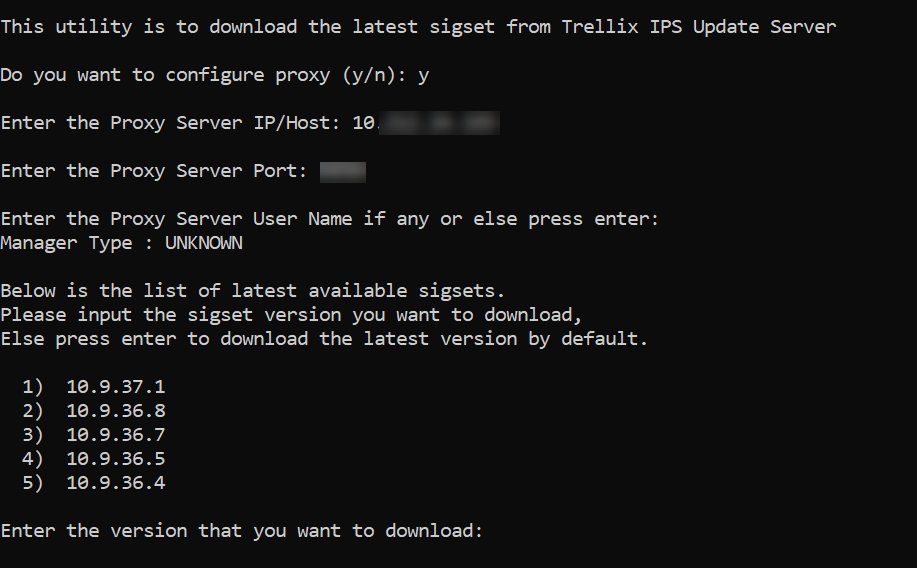
The signature set file (.ivu) gets downloaded to folder sigsets. The sigsets folder gets created within the sigsetdownloader folder.