Use this file to discover all available pages before exploring further.
The new docs.trellix.com features a modernized UI and AI-powered conversational search. Content is currently available in English, with additional languages expected in early November 2026. We hope you enjoy the updated experience.
When an endpoint is infected, that endpoint can be quarantined so that the traffic is blocked. This will prevent further infection of endpoints in the network.
Trellix IPS provides the option to quarantine an endpoint for specific time periods. This provides time to fix the endpoint. You can either quarantine the source IP or the destination IP which blocks the traffic.
Note
If the source IP is behind a proxy server, the proxy server IP is quarantined. Consequently, all traffic through the proxy server gets quarantined.
Note
Quarantine endpoint is not applicable for the Central Manager.
Task
Navigate to
Analysis → <Admin Domain Name> → Attack Log.
Select the alert whose IP has to be quarantined.
Click
Other Actions, and select
Quarantine Endpoint. Click the endpoint IP address you want to quarantine.
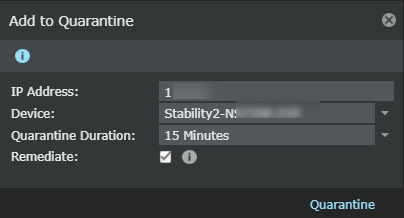
Add to quarantine If the endpoint is added to the list of quarantined endpoints, a message is displayed that quarantine is successful. If the endpoint is already quarantined, a message displays that the endpoint IP is already present in the
Quarantine list.
The
Add to Quarantine pop-up opens.
Update the following fields:
Option
Definition
IP Address
Enter the IP address of the endpoint.
Device
Select the specific device of the endpoint whose traffic originating from the IP address you want to block.
Quarantine Duration
Select the quarantine duration from the drop-down list.
Remediate
Select the checkbox to redirect the configured endpoint to the configured remediation portal.
Note
You can configure the remediation portal settings in
Devices → Global → IPS Device Settings → Quarantine → Remediation Portal.
Remediation cannot be configured for IPv6 address. The checkbox and the information icon for remediation is not displayed if you enter an IPv6 address in the
IP Address field.