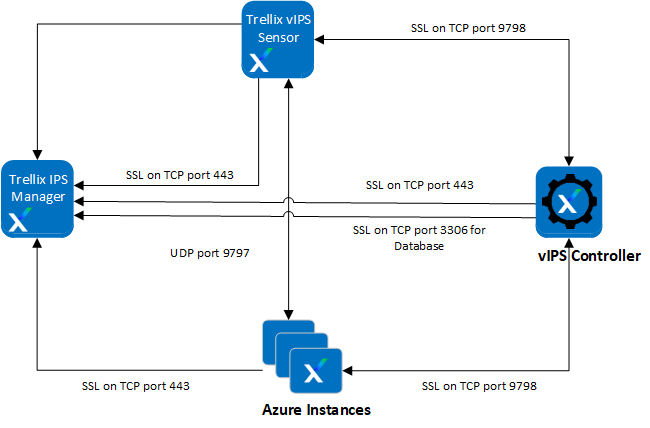
The following table lists the requirements to deploy vIPS in the Azure environment.
Requirement | Purpose | Role |
|---|---|---|
Azure GUI access | To launch Trellix vIPS and configure setup | Privilege: Contributor |
External Controller | To install External Controller | Privilege: Contributor |
Virtual IPS Sensor | To install Virtual IPS Sensor | Privilege: Contributor |
Web server (or) Virtual Machines to be protected | To install Virtual Probes | Privilege: OS Administrator |
IAM Role | To assign role permissions | Privilege: Owner |
The following table lists the requirements of vIPS solution components for the deployment of Trellix vIPS in the Azure environment.
Component | Azure Virtual Machine Type | Software Requirements | Network Requirements |
|---|---|---|---|
Trellix IPS Manager | D2s_v4 | Trellix IPS Manager image | 1 Network Interface (management subnet) |
External Controller | F4s_v2 | External Controller image | 1 Network Interface (management subnet) |
Virtual IPS Sensor | F4s_v2 | Virtual IPS Sensor image | 1 Network Interface for both management and data subnet |
Protected virtual machines | Any | Customer Supplied | 1 or more (see deployment) |
The following table lists the ports for network security group settings required to deploy Trellix vIPS in the Azure environment.
Important
For more information about ports and traffic destinations used by Trellix IPS, see KB59342.
Ports | Purpose | Source/Destination | ||
|---|---|---|---|---|
Manager | Inbound rules | 8501–8504, 8506–8510 | TCP ports used to install the Sensor, send alerts and packet captures to the Manager, and transfer files between them. | Sensor |
9798 | TCP port used to communicate Probe state and configuration. This is applicable only when the local Controller is used. | Probe, Sensor | ||
443 | TCP port used for:
| Sensor, Controller, Probe | ||
22 | TCP port used for Manager CLI access (via SSH). | --- | ||
3306 | TCP port used for database access by External Controllers to store and retrieve Probe data. This is applicable only when an External Controller is used. | Controller | ||
Outbound Rules | 443 | TCP port used:
| EC2 Endpoint | |
8500 | UDP port used by the Manager to make real-time configuration changes on the Sensor. | Sensor | ||
Local/External Controller | Inbound rules | 9798 | TCP port used to communicate Probe state and configuration. | Sensor, Probe |
22 | TCP port used for Controller CLI access. | --- | ||
Outbound Rules | 443 | TCP port used for:
| Manager, EC2 Endpoint | |
3306 | TCP port used for database access by External Controllers to store and retrieve Probe data. This is applicable only when an external Controller is used. | Manager | ||
Sensor | Inbound rules | 8500 | UDP port used by the Manager to make real-time configuration changes on the Sensor. | Manager |
9797 | UDP port used by Probes to forward traffic to the Sensor for inspection. | Probe | ||
22 | TCP port used for Sensor CLI access. | --- | ||
Outbound Rules | 8501-8504, 8506-8510 | TCP ports used to install the Sensor, send alerts and packet captures to the Manager, and transfer files between them. | Manager | |
443 | TCP port used to discover registered Controllers. | Manager | ||
9798 | TCP port used to communicate Probe state and configuration. | Controller | ||
Probe | Inbound rules | No ports required for inbound. | --- | --- |
Outbound Rules | 9797 | UDP port used by the Probe to forward traffic to Sensors for inspection. | Sensor | |
443 | TCP port used to discover registered Controllers and Sensors. | Manager | ||
9798 | TCP port used to communicate Probe state and configuration. | Controller |