This scenario involves using a SPAN monitoring port to inspect traffic between virtual machines on the same ESX. Similar to the SPAN mode deployment of a physical Sensor, the SPAN mode deployment of a Virtual IPS Sensor is also simple and non-intrusive.
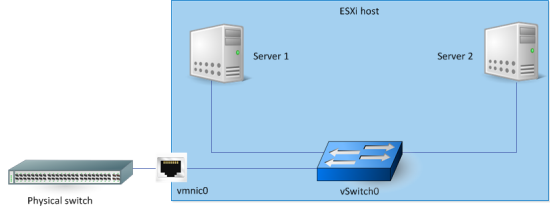
Scenario description before Virtual IPS Sensor deployment
The servers are installed on guest VMs on the ESX.
These servers are connected to a standard vSwitch — vSwitch0.
vSwitch0 has a physical adapter, which is connected to networks outside the ESX.
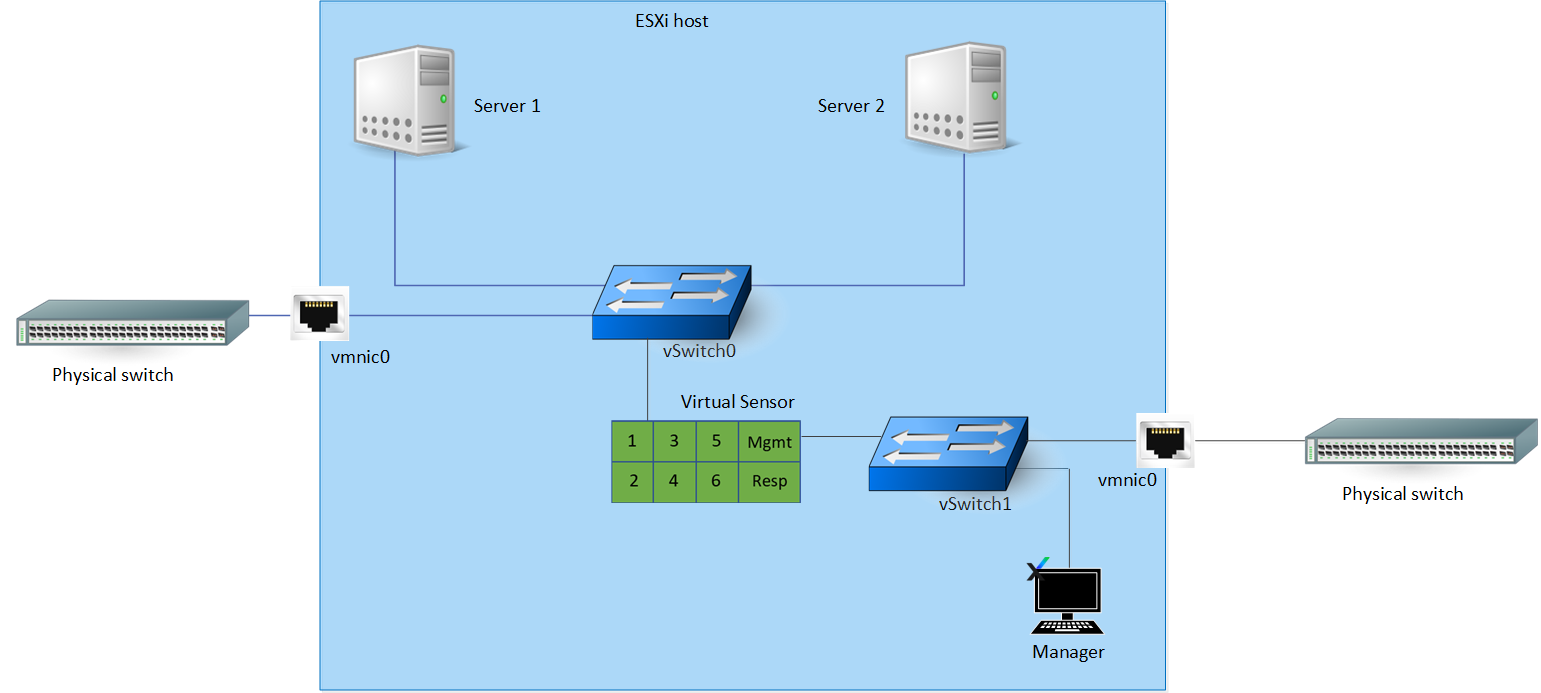
Scenario description after Virtual IPS Sensor deployment
Create a new switch port group set in promiscuous mode In vSwitch0.
The Virtual IPS Sensor is deployed on the ESX.
Consider that the Manager is installed on a VM connected to vSwitch1.
In this scenario, the Manager is connected to the management port of the Virtual IPS Sensor through vSwitch1. This vSwitch1 has a physical adapter vminc1. So, you can access the Manager and the Sensor from outside the ESX.
Monitoring port 1 of the Virtual IPS Sensor is in SPAN mode. This is connected to the promiscuous switch port group in vSwitch0. Therefore, a copy of all the packets of vSwitch0 are sent to port 1 for intrusion detection.