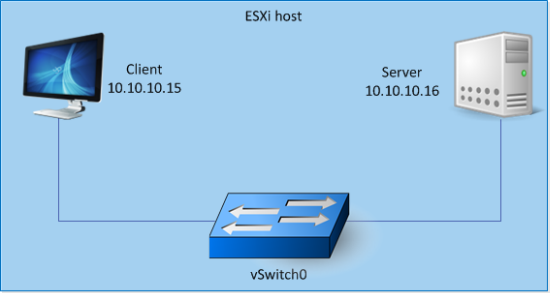
This scenario involves inspecting the traffic between virtual machines on the same ESX.
Scenario description before Virtual Sensor deployment
The clients and servers belong to the same subnet (10.10.10.x).
The clients and servers are connected to different virtual machine port groups within the same standard vSwitch (vSwitch0).
For the sake of this discussion, assume that the clients and servers have no access from outside the ESX. That is, there is no physical NIC associated with vSwitch0.
Scenario description after Virtual Sensor deployment
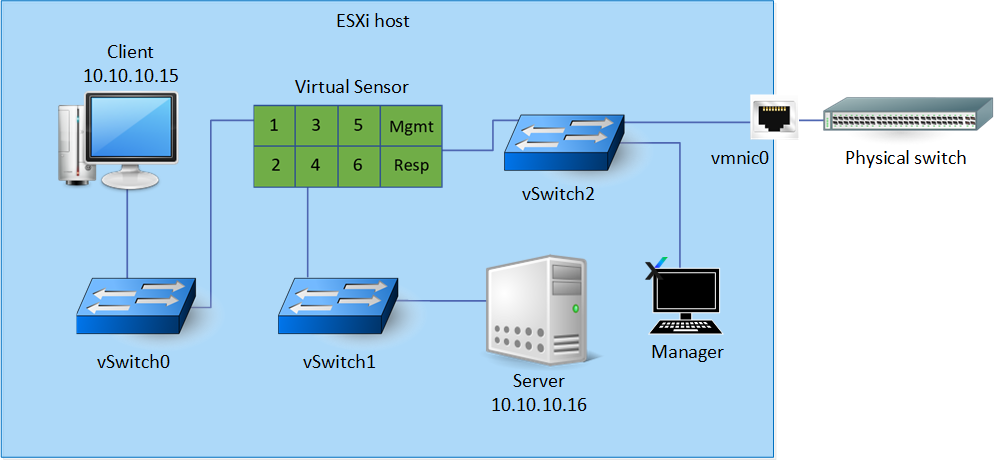
Two more standard vSwitches (vSwitch1 and vSwitch2) are now added.
The Virtual Sensor is deployed on the ESX.
In this scenario, the Manager is installed on a VM connected to vSwitch2.
In this scenario, the Manager is connected to the management port of the Virtual Sensor through vSwitch2. This vSwitch2 has a physical adapter vminc0. So, you can access the Manager and the Sensor from outside the ESX.
The monitoring port pair 1-2 of the Virtual Sensor is inline between the client and server.
The client and the monitoring port 1 are connected to two different port groups within vSwitch0. The port group to which the monitoring port is connected is set to promiscuous mode.
Similarly, the server and monitoring port 2 are connected to two different port groups within vSwitch1. Any traffic from the client to the server is inspected by the monitoring port pair 1-2.