In addition to virtual networks, you can use the Virtual Sensor to protect physical networks as well. This is typically used in very large networks, where space might be a constraint to install multiple physical Sensors.
Scenario description before Virtual Sensor deployment
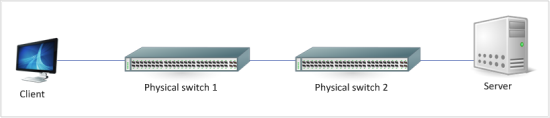
The clients and servers are connected to different physical switches.
For the sake of simplicity, assume that the client and servers are on the same VLAN.
The two switches are connected through their trunk ports. Since all the machines are assumed to be on the same VLAN, no routing is required.
Scenario description after Virtual Sensor deployment
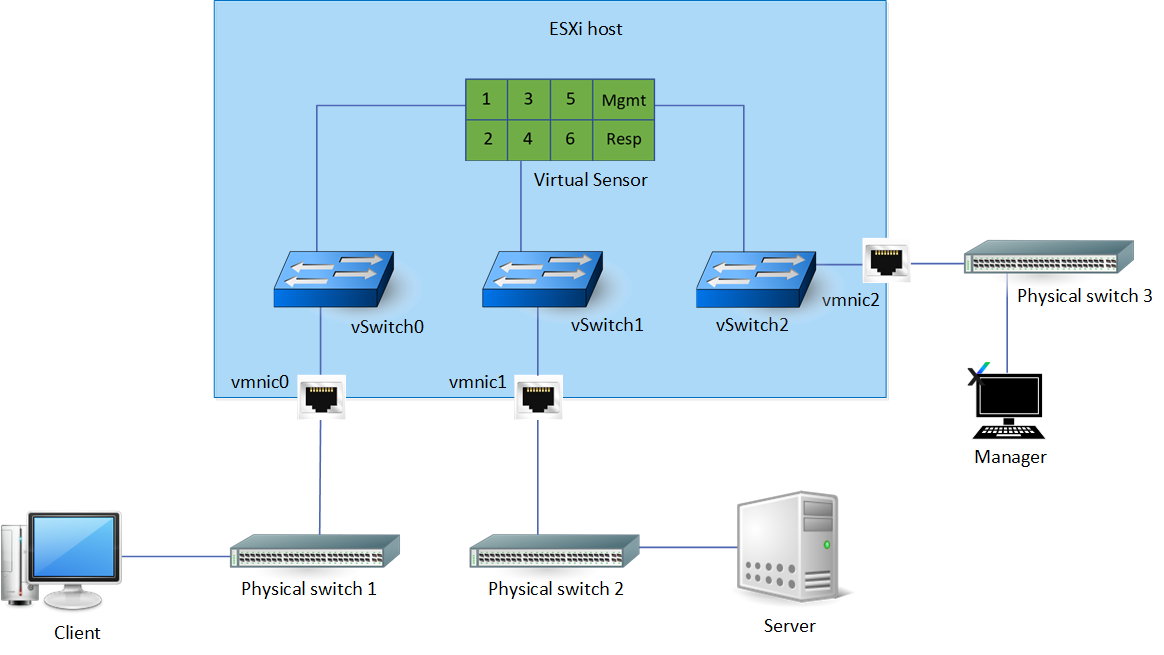
The trunk ports of the two switches are connected two physical NICs on the ESX.
These NICs are connected to two different vSwitches, which are in turn connected to monitoring port pair 1-2.
vSwitch2 is used to connect the management port, which in turn is connected to a Manager on a physical machine.
The monitoring port pair 1-2 of the Virtual Sensor is now inline between the client and the server.