---
title: "SDK API Access"
slug: "sdk-api-access"
tags: ["Reference", "IPS 10.1.10"]
updated: 2026-09-23T09:35:43Z
published: 2026-09-23T09:35:43Z
canonical: "docs.trellix.com/sdk-api-access"
---
> ## Documentation Index
> Fetch the complete documentation index at: https://docs.trellix.com/llms.txt
> Use this file to discover all available pages before exploring further.
# SDK API Access
The NSM REST SDK user must authenticate with the Trellix IPS Manager by creating a unique "session" resource URL first to make API calls. The session information is then embedded in subsequent API calls to authenticate them.
The steps below walk you through downloading a REST client, creating an API session in the IPS Manager and using the session information to make an API call.
1. To download the Advanced REST client (ARC), which is a free, browser-based REST client, go to [https://install.advancedrestclient.com/#/install](https://install.advancedrestclient.com/#/install).
2. Click
**Download**.
3. Once the setup file is downloaded, install it like any setup file installation.
4. Once installed, go to the folder location where the file is downloaded and open
**ARC** (Advanced REST client).
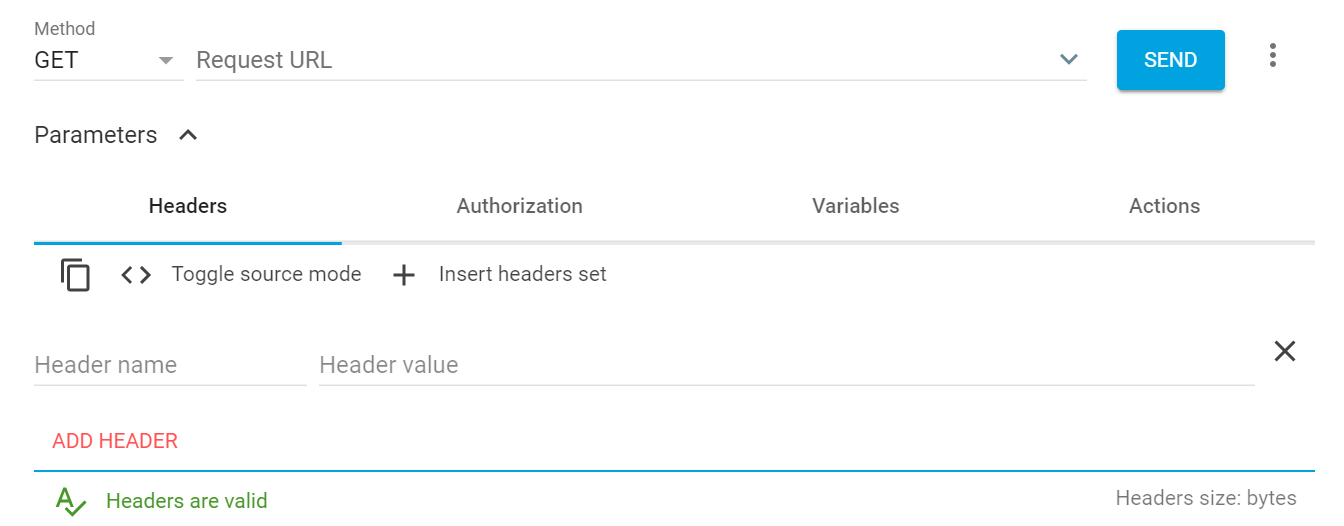
5. Select
GET from the
**Method** drop-down list.
6. In
**Request URL**, type
https://<nsm_ip>/sdkapi/session.
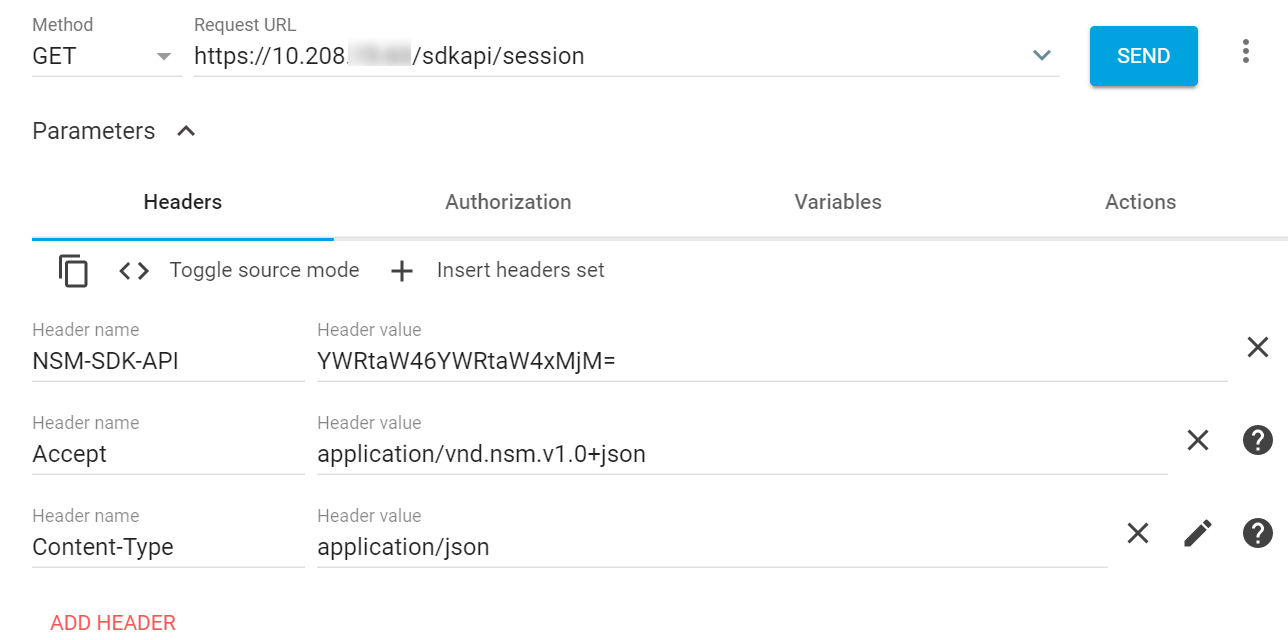
7. For Session resource URL, add the following three headers:
> [!NOTE]
> Note
>
> For more headers, select **ADD HEADER**.
| Header Name | Header Value |
| --- | --- |
| NSM-SDK-API | username:userpassword> > [!NOTE] > Note > > Base 64 encoded values can be generated at [https://www.base64encoder.io](https://www.base64encoder.io). For example, the base 64 encoded value of admin:admin123 is YWRtaW46YWRtaW4xMjM= > [!NOTE] > Note > > To make API calls, the user should have the role of a super user in the Manager. |
| Accept | application/vnd.nsm.v1.0+json |
| Content-Type | application/json |
8. Click
**Send**.
**Response**
```
{
"session":
"userId": "1"
}
```
9. For other resource urls, In
**Request URL**, type
https://<nsm_ip>/sdkapi/<Resource URL>.
10. Add the following three headers:
> [!NOTE]
> Note
>
> For more headers, select "**ADD HEADER**."
| Header Name | Header Value |
| --- | --- |
| NSM-SDK-API | Use the response details obtained in step 7 in [https://www.base64encoder.io](https://www.base64encoder.io) to change the header value of the NSM-SDK-API and access other Manager API resources. For example, the base 64 encoded value of ABC3AC9AB39EE322C261B733272FC49F:1> is QUJDM0FDOUFCMzlFRTMyMkMyNjFCNzMzMjcyRkM0OUY6MQ== > [!NOTE] > Note > > To make API calls, the user should have the role of a super user in the Manager. |
| Accept | application/vnd.nsm.v1.0+json > [!NOTE] > Note > > For a few resource URLs, the parameter value changes. Refer to the table below for different Accept values. |
| Content-Type | application/json > [!NOTE] > Note > > For a few resource URLs, the parameter value changes. Refer to the table below for different Content-Type values. |
For a few resource URLs, the Accept and Content-Type values also change with the NSM-SDK-API value. Hence, use the table given below for the URLs with different Accept and Content-Type values:
| Resource | Resource URL | Method | Content-type value | Accept value |
| --- | --- | --- | --- | --- |
| Import the Domain Name Exceptions to the Manager | POST /domainnameexceptions/import | POST | multipart/form-data; boundary= | |
| Import custom internal Web Server certificate | PUT /domain/sslconfiguration/importinternalwebservercerts | PUT | multipart/form-data; boundary= | |
| Get the list of importable IPS and Reconnaissance policies | PUT /domain//ipsreconpolicy/import | PUT | multipart/form-data; boundary= | |
| Import a custom re-sign certificate | PUT /domain/sslconfiguration/importresigncert | PUT | multipart/form-data; boundary= | |
| Nessus Scan Report Import | PUT domain//integration/vulnerability/importscanreport | PUT | multipart/form-data; boundary= | |
| Import a custom trusted CA certificate | PUT /domain/sslconfiguration/importtrustedcert | PUT | multipart/form-data; boundary= | |
| Import the Exceptions | POST /domain// exceptions/import | POST | multipart/form-data; boundary= | |
| Import the Firewall policies | POST /domain// firewallpolicy/import | POST | multipart/form-data; boundary= | |
| Import the IPS and Reconnaissance policies | POST /domain//ipsreconpolicy/import | POST | multipart/form-data; boundary= | |
| Import the Malware policies | POST /domain//malwarepolicy/import | POST | multipart/form-data; boundary= | |
| Import Custom Fingerprints | PUT /domain//filereputation/customfingerprints | PUT | multipart/form-data; boundary= | |
| Import Allowed Fingerprints | PUT /domain//filereputation/allowedfingerprints | PUT | multipart/form-data; boundary= | |
| Manual Device Software Import to Manager | PUT /devicesoftware/import/manual | PUT | multipart/form-data; boundary= | |
| Manual Botnet File Import to Manager | PUT /botnetdetectors/import/manual | PUT | multipart/form-data; boundary= | |
| Manual Gateway Anti-Malware File Import to Manager | PUT /gam/import/manual | PUT | multipart/form-data; boundary= | |
| Manual Signature Set Import to Manager | PUT /signatureset/import/manual | PUT | multipart/form-data; boundary= | |
| Import the Sensor Configuration | PUT /sensor//importconfiguration | PUT | multipart/form-data; boundary= | |
| Import SSL Key to the Manager | POST /sensor//action/sslkey | POST | multipart/form-data; boundary= | |
| Import License | PUT /vmips/license | PUT | multipart/form-data; boundary= | |
| Export the public key of the active re-sign certificate | GET /domain/sslconfiguration/exportresigncert | GET | | application/octet-stream |
| Export the PCAP file captured | PUT /sensor//packetcapturepcapfile/export | PUT | | application/octet-stream |
| Export the Diagnostic Trace file captured | PUT /sensor//diagnosticstrace/export | PUT | | application/octet-stream |
For example consider heartbeat resource, in **Request URL** give https://<nsm_ip>/sdkapi/heartbeat and NSM-SDK-API with QUJDM0FDOUFCMzlFRTMyMkMyNjFCNzMzMjcyRkM0OUY6MQ== 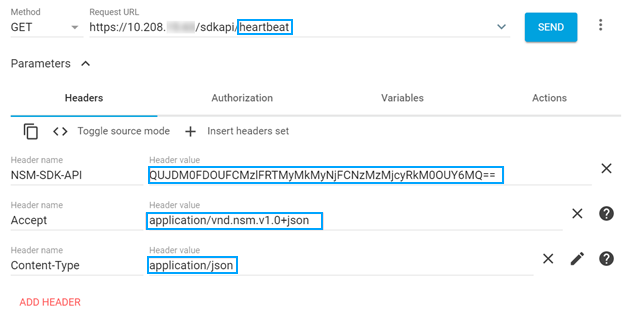
11. Click
**Send**.
The response of the resource URL is displayed.
Starting release 9.1, only SSL protocol TLS 1.2 is supported for connection with the Manager. All requests to API use TLS 1.2. On successful authentication, 'Session' resource URL returns the user ID and session ID in the response body. Every resource URL in the SDK is required to pass these credentials for validation and authorization in NSM-SDK-API custom header.