Users can be alerted by email or email pager when a fault occurs that matches a specified severity.
Note
You must also identify a mail server for email notifications.
Note
Email and pager notifications are configured per admin domain.
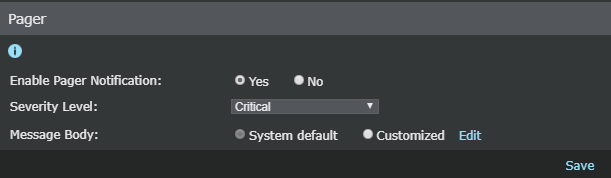
To enable email or pager fault notification, do the following:
Task
- Select Manager → <Admin Domain Name> → Setup → Notification → Faults → E-mail or Manager → <Admin Domain Name> → Setup → Notification → Faults → Pager (same for Central Manager).
- Select the enabled status (Enable E-mail / Pager Notification). Yes is enabled; No is disabled.
-
Select a fault
Severity Level
to be notified of:
Field Description Informational and above Notifies for all faults. Warning and above Notifies for Warning, Error, and Critical faults. Error and above Notifies for Error and Critical faults. Critical Notifies only for Critical faults. -
Select a
Message body. The message body is a preset response sent with the notification with information pertaining to the fault.
-
System Default — The system default message provides the notified admin with the most basic fault details so that an immediate response can be made. Details include the fault type (severity) and the component source. The subject line of the default message contains the fault name.
Note
You cannot edit the System Default message.
-
Customized — Type a message and select (click) the parameters for the desired attack identification format. The following figure displays a custom message. You can type custom text in the
Subject field or
Message Body section, as well as click one or more of the provided elements at
Subject Line Variables or
Content-Specific Variables to add to the description. When you are finished formatting your message template, click
Save. The
Customized button is selected if you have customized the message.
Customize Email Notification Messages window 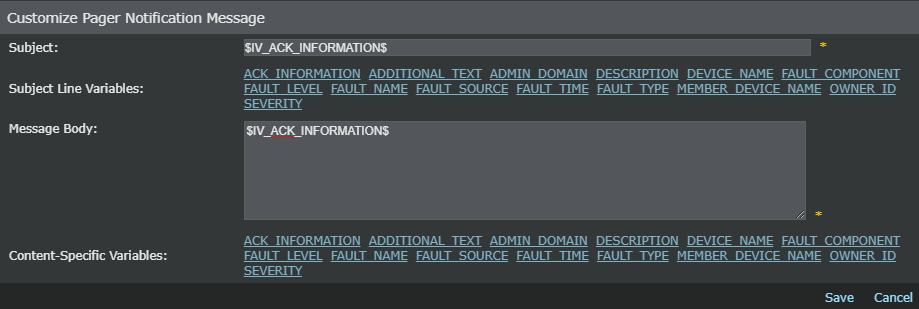
-
System Default — The system default message provides the notified admin with the most basic fault details so that an immediate response can be made. Details include the fault type (severity) and the component source. The subject line of the default message contains the fault name.
- Click Save, to save your notification settings.
- Specify the email or pager address of the intended recipient(s).
-
Scroll to the bottom of the
E-mail or
Pager page.
-
Click
.png) .
.
- In SMTP Address, type an email address or email pager address.
- Click Save when complete.
- Repeat steps a through d to add additional recipient addresses.
-
Click