---
title: "Sensor CLI commands related to Trellix Intelligent Sandbox integration"
slug: "sensor-cli-commands-related-to-trellix-intelligent-sandbox-integration"
tags: ["Integration", "IPS 10.1.10"]
updated: 2026-09-21T08:19:33Z
published: 2026-09-21T08:19:33Z
canonical: "docs.trellix.com/sensor-cli-commands-related-to-trellix-intelligent-sandbox-integration"
---
> ## Documentation Index
> Fetch the complete documentation index at: https://docs.trellix.com/llms.txt
> Use this file to discover all available pages before exploring further.
# Sensor CLI commands related to Trellix Intelligent Sandbox integration
The following are the Sensor CLI commands that show information related to Trellix Intelligent Sandbox integration.
- The
status command additionally shows information related to the integration.
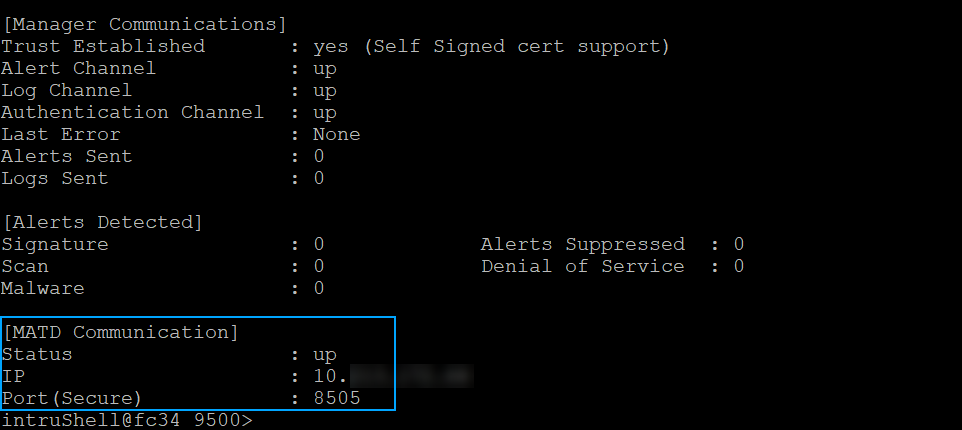
- Status — Shows whether the communication channel between the Sensor and
Trellix Intelligent Sandbox is up or down
- IP — The IP address of the
Trellix Intelligent Sandbox appliance with which the Sensor is integrated
- Port — The port number used for the communication
- From the debug mode, the
switch matd channel command enables to select TCP or SSL channel for communication with
Trellix Intelligent Sandbox.
- The
show malwareenginestats command additionally shows the statistics for the
Trellix Intelligent Sandbox engine.
- A Sensor, for its connections through its management port with a
Trellix Intelligent Sandbox appliance, uses AES128-GCM-SHA256 cipher by default. To know if the connection is currently encrypted, use
show amchannelencryption status on the Sensor CLI.
> [!NOTE]
> Note
>
> SSL encryption when enabled can have performance degradation, which may impact the analysis of large files and high-volume of files. To transfer large files, switch to TCP channel on the Sensor and Trellix Intelligent Sandbox. Use command switch matd channel tcp on Sensor CLI and set nsp-tcp-channel enable on Trellix Intelligent Sandbox.
For more information on these commands, refer to Trellix Intrusion Prevention System Product Guide.