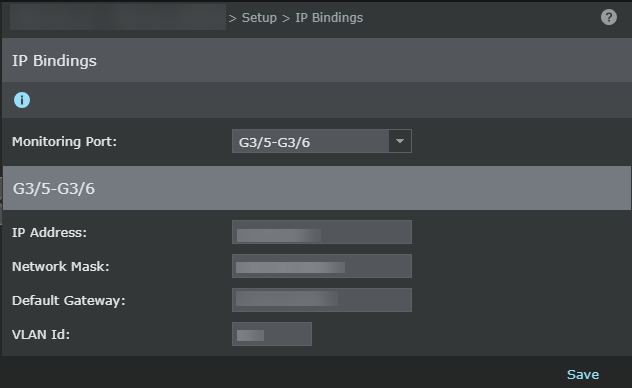
If your advanced Firewall policies have a require-authentication rule, the Sensor redirects the users to its Guest Portal if it cannot determine whether they have valid AD logon credentials. For this redirection, you must configure the IP address and related details to the Sensor monitoring ports.
- You can configure the IP details regardless of the port deployment mode, but redirection to Guest Portal is effective only with inline ports. These settings apply to both the ports of the monitoring port pair. The monitoring port IPs that you configure must be reachable to the hosts being monitored.
- Each monitoring port pair used for Firewall must have a unique IP address. For Sensors in failover, you must configure the IP settings separately for both the Sensors. Also, you must use unique IP addresses.
- In case of XC Cluster, configuring the IP details for monitoring ports is not supported. Therefore, redirection to Guest Portal is not supported for XC Cluster deployments.
Task
- Click the Devices tab.
- Select the domain from the Domain drop-down list.
- On the left pane, click the Devices tab.
- Select the device from the Device drop-down list.
-
For standalone Sensors, select
Setup → IP Bindings.
For Sensors in a stack, select Member Sensors → <Stackname-node id> → Setup → IP Bindings.
-
For Sensors in failover, select
<Device Name> → Member Sensors → <Sensorname-node id> → Setup → IP Bindings.
For a stack of Sensors in failover, select <Device Name> → Member Sensors → <Stackname-node id> → Setup → IP Bindings.In case of failover Sensors, use the steps below to configure the IP details for the corresponding ports of the peer Sensor.
-
Enter the IP details in the corresponding fields.
Option Definition Monitoring Port Select the port pair for which you want to configure the IP bindings. IP Address Enter the IPv4 address that the Sensor can use for the monitoring port pair. Network Mask Enter the corresponding network mask for the IP address that you entered. Default Gateway Enter the corresponding network gateway for the IP address that you entered. VLAN Id Specify the VLAN ID only if the monitoring ports are connected to trunk ports. Save When you click, the Manager automatically updates the Sensor with these settings. Save is displayed only if you have entered valid details. Cancel Clears the details you have entered in the IP Bindings page. - Click Save.