Following diagram shows the communications between Sensor, Manager and File Reputation Server.
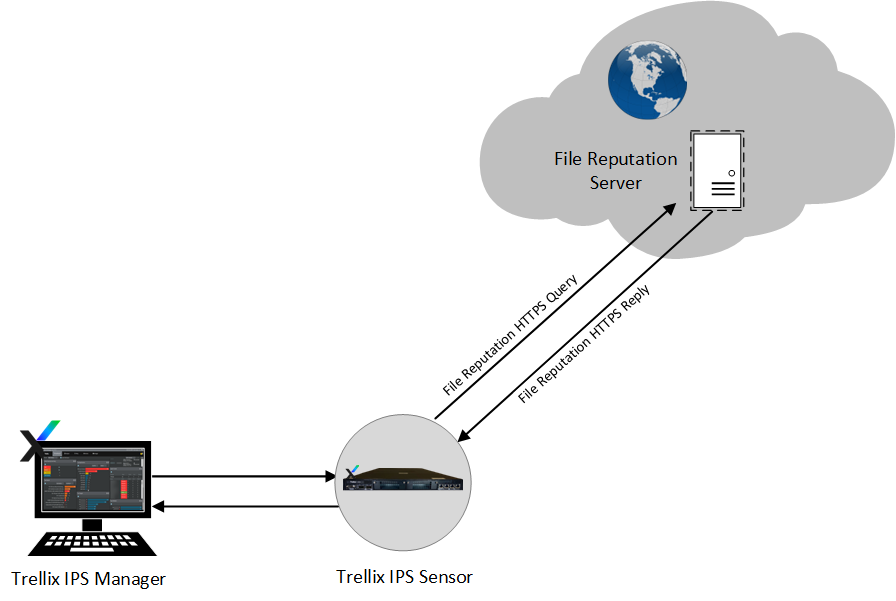
File Reputation uses the Internet REST infrastructure to communicate and cache information related to the file downloads in the user systems.
As mentioned earlier, the Sensor detects file downloads, and classifies them as suspicious as defined in the protocol specification. For example, HTTP downloads of type .exe, .dll, .scr and a maximum file size of 1 MB (for signature set 7.5.13.7 and lower) and 4 MB (for signature set 7.5.14.25 and higher) are classified as "suspicious".
The Sensor creates a fingerprint (MD5 hash value) of the file, embeds the fingerprint in a standard HTTPS Request in REST JSON format, and sends it to File Reputation server. The Sensor exchanges HTTPS queries and responses directly with the File Reputation Server.
Note
Ensure that your firewall is configured so that the Sensor can send the request and receive the response from the File Reputation server.
The Sensor management port can handle multiple HTTPS requests and responses. File Reputation HTTPS Queries (which are TCP Requests) are sent out from the Management port of the Sensor to the File Reputation Server directly and it receives direct replies. File Reputation responses are encoded in the standard HTTPS responses.
Response actions for File Reputation alerts are now part of the policy and one can configure response actions, such as block/reset in Policy Editor, or in the Attack Log for Malware attacks.
The Sensor takes a response action (alert/block or both) on the file as per the Response Action. If the Response Action is set to Alert, the alerts are raised in the Attack Log but the file download is not blocked. If the Response Action is set to Alert and Block, the alerts are raised in the Attack Log, and the file download is blocked.
Response actions are not persisted after Sensor reboot as this is part of the policy now. Only GTI Server, Sensitivity level and time out are persisted after reboot.
The alerts raised in Attack Log display the MD5 hash value of the malware, and the URL from where the malware was downloaded.
You can enable three types of detection in the Manager: File Reputation only, Custom, or both.
Custom fingerprint detection takes precedence over File Reputation detection type.
Also note that IPS attack detection takes precedence over User-defined fingerprint detection in the Sensor. When the traffic contains both IPS attack and malware content detected by Trellix IPS-File Reputation integration, the attack is detected as IPS attack, and not as a malware attack. The blocking of the attack takes place as per IPS attack definition.
Note
The DNS Server IP addresses, custom Response Action and Detection type settings are persisted even after a Sensor reboot. But the entries are cleared if you execute a resetconfig command on the Sensor.
Note that malicious files are detected and responded with the Trellix IPS-File Reputation integration for traffic types, such as fragmented, segmented, or tunneled traffic. Files are also detected with different HTTP versions (for example 1.0, 1.1, etc) of the browser.
File Reputation in different Sensor modes
In this integration, the Sensor provides malware detection in all the operating modes — inline, tap, and SPAN. In the inline mode, malware is detected in both Inline fail-open and Inline fail-closed modes.
Trellix IPS-File Reputation integration in a Manager Disaster Recovery (MDR) setup
Once the MDR is created, and all the Sensors have established trust with both Primary and Secondary Managers, same malware configuration is available in Secondary (Standby) Manager.
When there is a switchover and the Secondary Manager becomes active, it will continue the File Reputation scanning function as before. In case the Primary Manager switches back to the active mode, the changes made in the Secondary are retrieved and updated accordingly in the Primary Manager.
The Sensor File Reputation Alerts are sent to both Primary and Secondary Managers.