Trellix IPS integrates with File Reputation, which is a cloud-based service that provides real-time protection from malicious file downloads.
Trellix IPS also provides users the option to upload custom fingerprints to the Manager which can be used for File Reputation instead of GTI lookups or to complement them.
Trellix IPS provides the following functionalities through this enhanced integration:
- Response actions for detected malware (for example, raise alerts, send a TCP reset or block the file)
- Enabling Trellix IPS administrators to upload custom fingerprints for File Reputation
- Reports on File Reputation detection, and other related statistical data
Following diagram gives an overview of Trellix IPS-File Reputation integration.
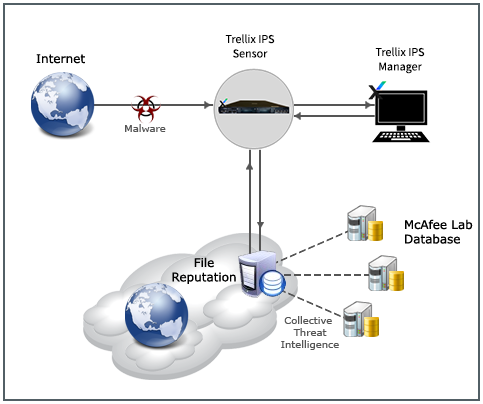
When a file download is detected over HTTP traffic, the file type is checked. If the file type matches the list of file types for which the malware is checked, the Sensor creates a fingerprint (MD5 hash value) of the file, embeds the fingerprint in a standard HTTPS request, and sends it to GTI cloud server. The list of file types to be checked for GTI fingerprints is defined in the signature set (read-only). You can enable or disable GTI fingerprints scanning for different supported file types in the malware policy.
The cloud server compares the fingerprint against the threat database maintained by Trellix Labs. If the fingerprint is identified as a known malware, the cloud server notifies the Sensor and it enforces a response action for the malware. Note that the alerts for the malware can be viewed in Attack Log.
Note
The fingerprint is a short-bit string (MD5 hash value) that uniquely identifies the original file.