Trellix IPS has been integrated with Vulnerability Manager Enterprise vulnerability scanner.
There are two main components to this enhanced integration. First, users can schedule the import of Vulnerability Manager scan data into Trellix IPS, to provide automated updating of IPS-event data relevancy. Second, users can initiate a Vulnerability Manager scan of a single IP address from the Vulnerability Scanning option. This provides a simple way for security administrators to access near real-time updates of host vulnerability details, and improved focus on critical events.
The figure below gives an overview of the Trellix IPS-Vulnerability Manager integration.
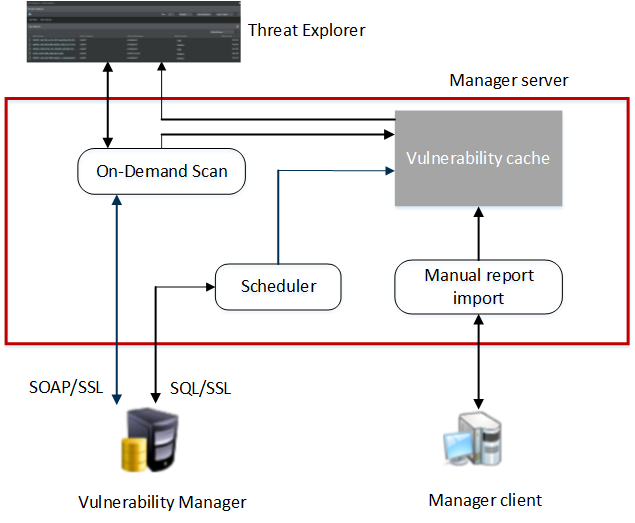
This integration provides the following major functionalities in Trellix IPS Manager:
On-demand scan
You can request a Vulnerability Manager scan from Threat Explorer, by selecting the Attacker/Target IP address of the host.
When you request a Vulnerability Manager on-demand scan, the selected host IP address is passed from the Threat Explorer to the Manager web-tier, which connects and establishes trust with the Vulnerability Manager engine. This initiates the scan for the requested endpoint IP address.
The Vulnerability Manager engine scans the host, and provides the vulnerability assessment data to the Manager. This data is processed and stored in the Manager database and have visibility to the recently invoked on-demand scans. For requesting an on-demand scan from Threat Explorer, you need to configure Vulnerability Manager settings in Manager.
If the scan traffic between the Vulnerability Manager server and the hosts being scanned passes through a Sensor monitoring port, the Sensor may consider it as attack traffic and take the corresponding response action such as quarantining the Vulnerability Manager server.
To prevent this:
- Create ACLs to exclude all traffic from the Vulnerability Manager server from attack inspection. For information on ACLs, see the section Configuring ACL rules in Trellix Intrusion Prevention System Product Guide.
- If you have configured Quarantine, add the Vulnerability Manager server to the quarantine exceptions list. This prevents the Vulnerability Manager server being quarantined.
Automatic import of Vulnerability Manager reports via the scheduler in Manager
The vulnerability report from Vulnerability Manager database can be imported via the Vulnerability Manager Scheduler in Manager. Reports can be scheduled on a daily or weekly basis. Imported vulnerability data will be stored in the Manager database, and also updated in the relevancy cache used for relevancy analysis of attacks.
Manual import of Vulnerability Manager reports via Manager
You can manually import reports from Vulnerability Manager, and store them in your local machine. Manager client passes the imported vulnerability data into the vulnerability assessment module in the Manager server. This data is processed and stored in the Manager database in Trellix IPS format.
Relevance analysis of attacks
Once you have imported vulnerability reports into the Manager database, you can determine the vulnerability relevance for the alerts.