Trellix vIPS for Azure is a probe-based solution that is capable of inspecting traffic flowing into and out of protected Azure instances. The solution has been designed to adapt to a public cloud environment and to scale with the requirements of your organization's network.
Deployment of Trellix vIPS can be fulfilled to suit your requirements based on the direction of traffic and inspection mode. In this section, we provide you with some scenarios which can serve as basic guidelines in your deployment.
Consider a scenario where Trellix vIPS is deployed to protect an organization's assets in the Azure environment. We assume that some of these assets to be protected are web servers with public IP addresses, and that you have performed the following steps as part of the deployment:
Ensure that the Manager is:
Installed in the Azure environment
Able to reach required Clusters in the Azure environment which will be setup
The Controller is installed by Trellix vIPS Technical Support and is able to reach the Manager.
The vIPS Connector is configured and the communication between the Manager and the Controller is successful.
A Cluster and the associated VM groups are configured in the Manager.
The vIPS Probes are installed on every machine that has to be secured by Trellix vIPS.
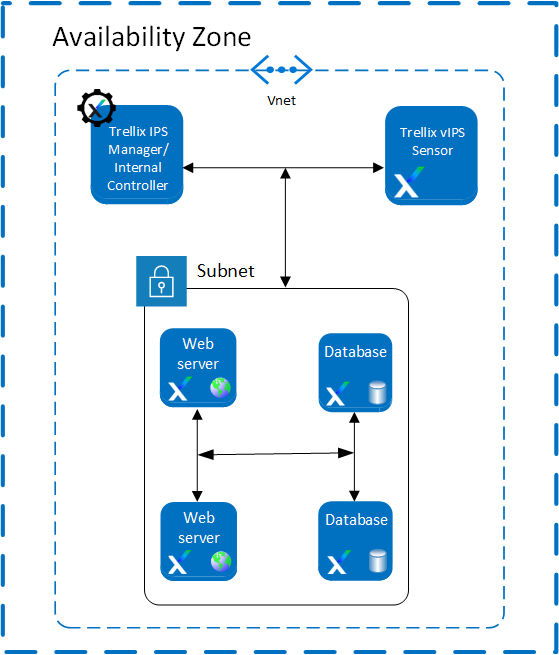
Scenario 1: Deployment of Virtual IPS Sensors with Local Controller
You can deploy the following components:
Manager
Sensor
Once the Manager is deployed, go to Devices → <Admin Domain Name> → Global → Device Manager and select vIPS Controllers tab. Configure the default Local Controller available on the vIPS Controllers tab.
For steps to configure the controller, see Configure a Controller in Azure.
Scenario 2: Deployment of Virtual IPS Sensors in IDS Mode
Virtual IPS Sensors detects the attacks in traffic. When the traffic first enters the network, it is directed to the required destination, for example, a web server. This traffic reaches the web server. A copy of the packet is sent to the Virtual IPS Sensor for inspection. If the Sensor detects malicious content in the traffic, it resets the TCP channels which evades the attack. An alert is generated in the Attack Log with the attack details.
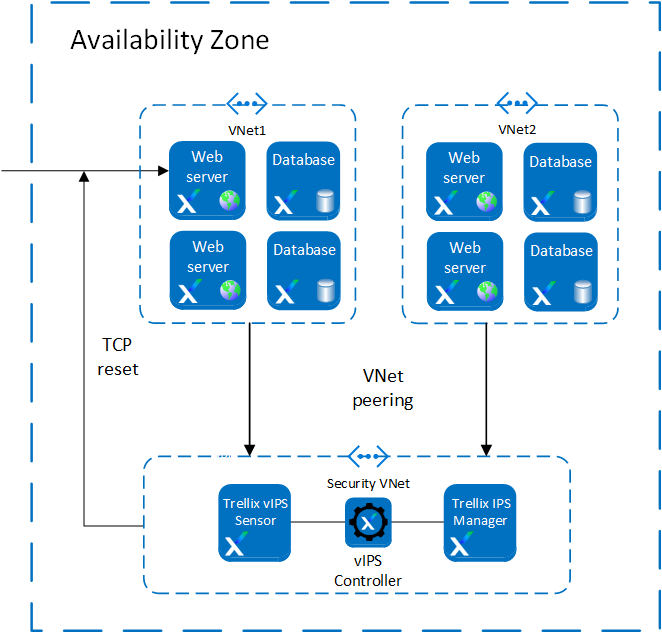
Scenario 3: Single Sensor per protected VNet deployment
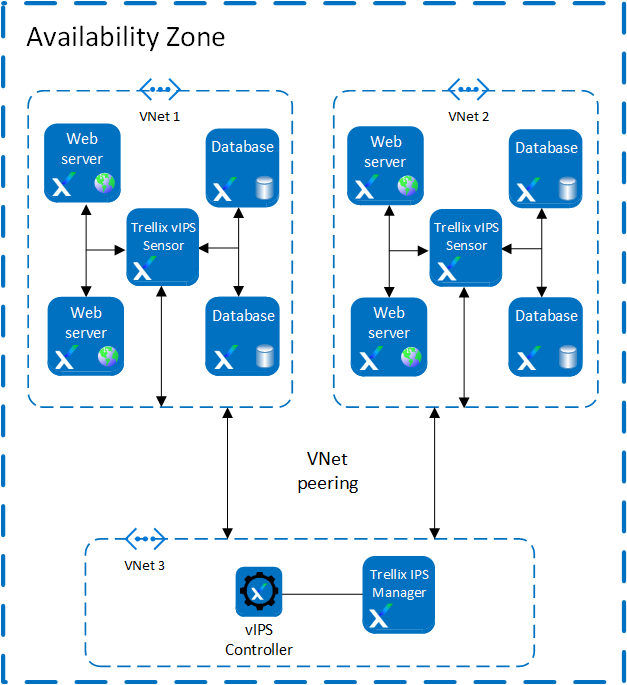
In an environment with a Virtual IPS Sensor Cluster deployed per VNet, traffic load on the individual Virtual IPS Sensor is reduced. The Virtual IPS Sensor is deployed within a VNet where instances must be protected. In such a scenario, the Virtual IPS Sensor inspects traffic from web servers that are present within that VNet. The Manager and the Controller are installed in a separate VNet. This way, traffic is only exchanged with the protected VNet.
Traffic entering the Azure environment is directed to the web server. The vIPS Probe installed on the protected web servers intercepts the traffic and routes it to the Virtual IPS Sensors. In case of malicious traffic, an alert is generated in the Manager, and the configured response action is taken. If traffic is non-malicious, it is directed back to the web servers. VNet peering must be enabled between the protected VNet and the VNet that contains the Manager and the Controller.
Note
A single Sensor can handle traffic up to 1 Gbps.
Scenario 4: Multi-zone deployment with auto scaling of Virtual IPS Sensors
With the Manager Disaster Recovery and Controller high availability features, failover functionality is supported in the network. Failover functionality is possible between two Availability zones. You can create two Availability zones which are managed by separate Managers that are an MDR pair. This is, in turn, connected to two Controllers deployed in high availability mode. In such a setup, there are a Manager and Controller that are always in Active mode. When one Availability zone fails, the traffic is directed through the other Availability zone which has both the Manager and Controller. Due to this, the traffic flow is not disrupted.
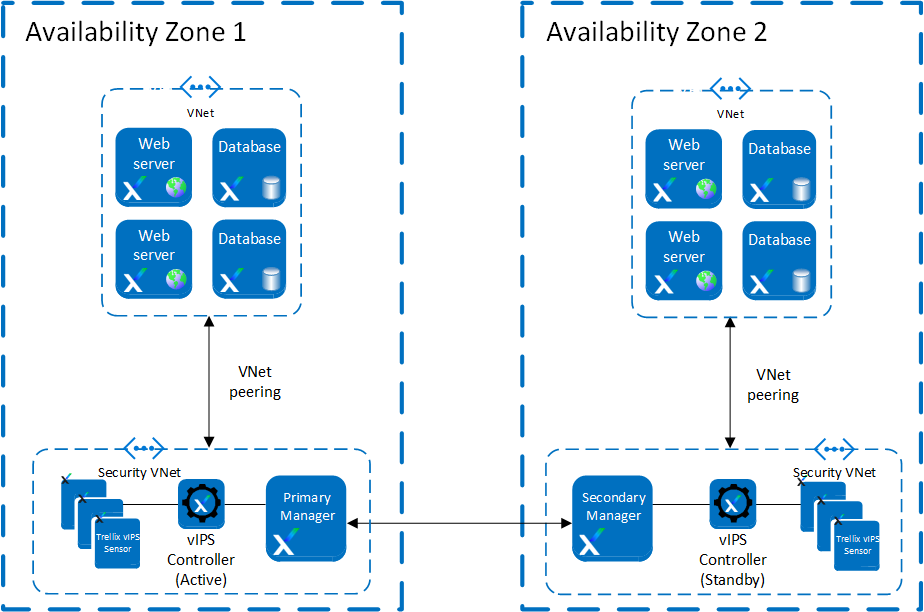
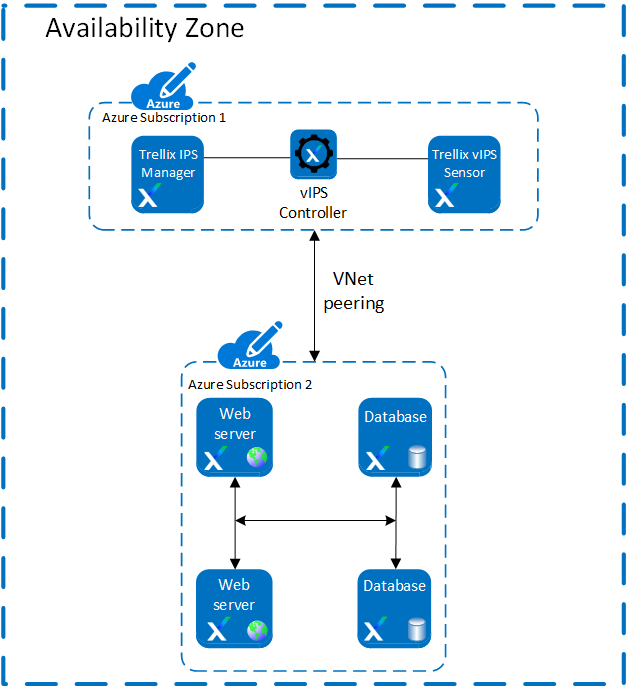
Scenario 5: Securing multiple Azure subscriptions where the Sensor is in another subscription with the instances
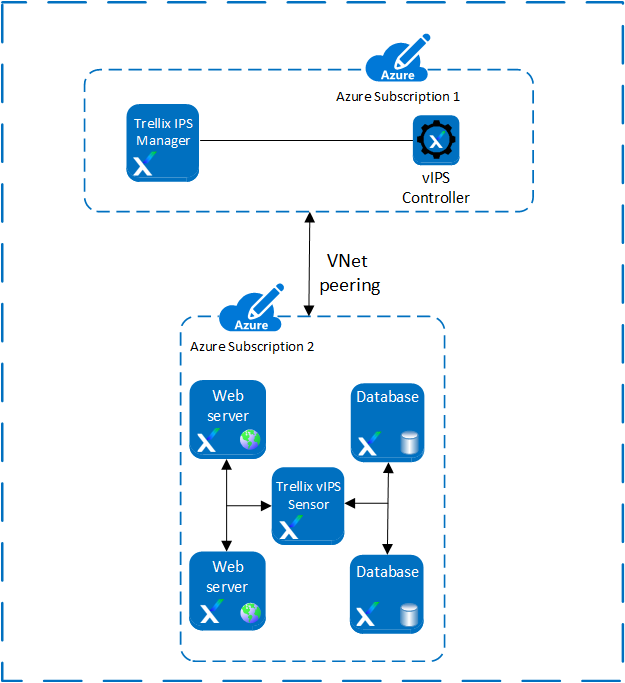
When you want to secure your resources distributed across multiple Azure subscriptions, you can protect your resources by using Virtual Private Network (VNet) peering.
Note
Trellix recommends you to deploy the Sensor in the same Availability zone, or set as your instances that are to be secured.
You can deploy the following components in one subscription:
Manager
Controller
You can deploy the following components in other subscription:
Virtual IPS Sensor
Instances
While configuring the Controller in the Azure portal, you can add the IAM role for the second subscription. Once the Controller is configured, the Azure instances in the second subscription will also be protected by the Controller.
Scenario 6: Securing multiple Azure subscriptions
When you want to secure your resources distributed across multiple Azure subscriptions, you can protect your resources by using VNet peering.
You can deploy the following components in one subscription:
Manager
Controller
Sensor
Deploy the instances in the second Azure subscription and connect the subscriptions using VNet peering.