Before you begin
You need access to the Manager installation folder on the Manager server to view the generated .csv file.
Task
- Log on to the Manager using a supported browser.
-
After successful logon, duplicate the Manager session.
For example, open the same browser that you used to log on in the previous step and enter the Manager URL.
-
In the duplicate Manager session, enter the following URL:
https://<Manager server IP or name>/intruvert/device_profile_csv.jsp
If the script runs successfully, a message is displayed in the browser.
Running the device-profile script 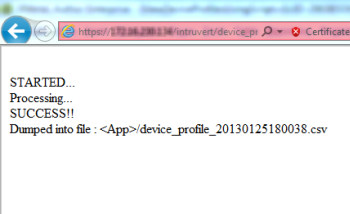
-
In the Manager server, go to
%programfiles%\Trellix\IPS Manager\App and open the .csv file named device_profile_<time stamp>.csv.
Device profiles in a .csv file 
- Host IP: This is the IP address of the host. Only one row is maintained per IP address.
- Device: This is the type of the host. General Purpose Computing Device refers to desktops, laptops, and so on. Some other types are Android Device, Apple iOS Device, and HTC Device.
- OS: This is the operating system detected on the host.
- Source: This refers to the source of the profile - IPS Sensor, NTBA Appliance, or ePolicy Orchestrator - On-prem
- Creation Time: The time the host was profiled first.
- Last Modification Time: The time when the profile was last updated.