Recall that Trellix IPS provides some pre-defined IPS Policies. The IPS page displays the pre-defined IPS Policies and the user-defined IPS Policies available for the selected admin domain.
Task
- In the Manager, click Policy and then select the required Domain.
-
Go to
Intrusion Prevention → Policy Types → IPS.
The IPS page is displayed.
IPS page 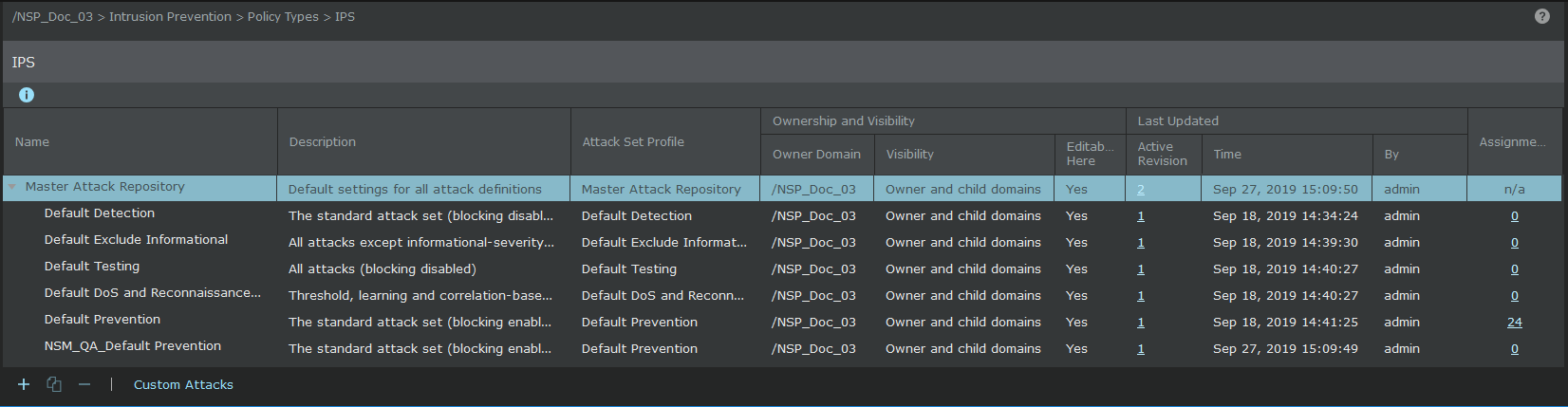
The options on this page are as follows:
Option Definition Name Displays the name of the policy. Description Displays the description of the policy. Attack Set Profile Ownership and Visibility Owner Domain — Indicates the admin domain to which an attack set profile belongs. Visibility — Displays the admin domains to which the policy is visible.
Editable here — Indicates whether you can edit or delete an attack set profile from the current admin domain. You can edit but not delete the pre-defined attack set profile. You can edit or delete a user-defined attack set profile only from the admin domain from which it was created.Yes indicates that the attack set profile belongs to the current admin domain. If it is No, you cannot edit the attack set profile because it is defined at a parent admin domain.
Last Updated Active Revision — Revision number of the policy that is currently applied. Time — Displays the time when the attack set profile was last updated.
By — Displays the user who modified the attack set profile.
Assignments Number of interfaces to which the policy is assigned. .png)
Click to create an attack set profile. The
Properties and
Attack Definitions tabs are explained in the sections that follow.
.png)
Select an attack set profile and click to copy it. This is helpful especially if you want to use a non-editable attack set profile with slight changes.
.png)
Select any of the listed attack set profile and click to edit or view the details. To edit in bulk, select more than one attack set profile and click
to effect the same changes in all the selected attack set profiles.
.png)
Select an eligible attack set profile and click to delete.