Similar to viewing the specific details for other malware engines, you can also view the specific results returned by
Trellix Intelligent Sandbox. In the
Malware Files page, click
.png) next to the confidence level for
Trellix Intelligent Sandbox.
next to the confidence level for
Trellix Intelligent Sandbox.
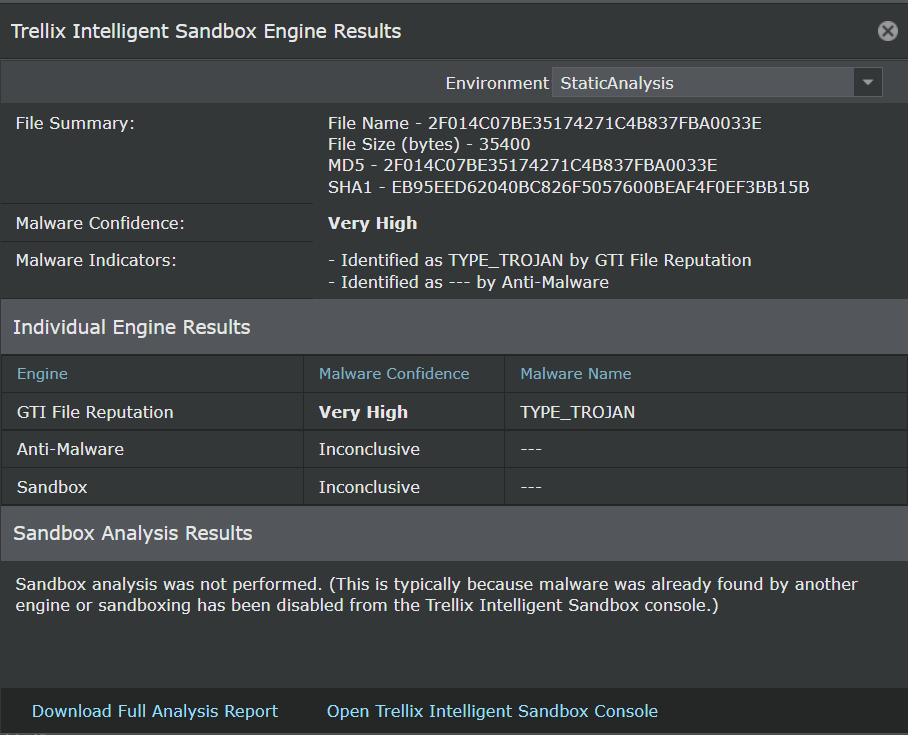
| Field | Description |
|---|---|
| Environment | The VM profile that was used by Trellix Intelligent Sandbox to dynamically analyze the file. This indicates the operating system on which the file was executed. |
| File Summary | The name of the file, its size, and hash values are displayed. |
| Malware Confidence | The highest malware severity as returned by the components of Trellix Intelligent Sandbox |
| Malware Indicators | The summary of the reports from various analysis methods employed by Trellix Intelligent Sandbox |
| Individual Engine Results | This section lists the analysis methods available in Trellix Intelligent Sandbox. Here, they are referred to as Engine. The severity level returned by each method and the name for the malware are also displayed. If a particular method is not used, it indicates that it is not selected in the analyzer profile used for the Sensor. |
| Sandbox Analysis Results | This section displays the details if the file was dynamically analyzed by Trellix Intelligent Sandbox. This includes the details of the analyzer VM, the time and duration of the dynamic analysis, behavior during dynamic analysis, and so on. |
| Analysis Environment | This indicates the operating system on which the file was executed along with the build number of Trellix Intelligent Sandbox. |
| Download Full Analysis Report | Downloads a zip file that contains all the reports for the malware from Trellix Intelligent Sandbox. This is equivalent to downloading the reports zip file from the Trellix Intelligent Sandbox web application. This zip file contains the reports for each analysis. The contents of this zip file are explained beneath this table. |
| Open Trellix Intelligent Sandbox Console | Click to open the logon page of the Trellix Intelligent Sandbox that analyzed the file. |
| Close | Closes the Trellix Intelligent Sandbox Engine Results window |
Download the <file hash>.zip file to the desired location. The files in this zip are created and stored with a standard naming convention. Based on the reports selected in the analyzer profile used for the analysis, the zip contains the following results:
- <file hash>_summary.html (.json, .txt, .xml): This is the same as the Analysis Summary report in the Trellix Intelligent Sandbox web application. There are four file formats for the same summary report in the zip file. The html and txt files are mainly for end-users to review the analysis report. The .json and .xml files provide well-known malware behavior tags for high-level programming script to extract key information.
- <file hash>.log: This file captures the Windows user-level DLL API calling activities during dynamic analysis. You must thoroughly examine this file to understand the complete API calling sequence as well as the input and output parameters. This is the same as the User API Log report in the Trellix Intelligent Sandbox web application.
- <file hash>ntv.txt: This file captures the Windows native services API calling activities during dynamic analysis.
- <file hash>.txt: This file shows the PE header information of the submitted sample.
- <file hash>_detail.asm: This is the same as the Disassembly Results report in the Trellix Intelligent Sandbox web application. This file contains reverse-engineering disassembly listing of the sample after it has been unpacked or decrypted.
- <file hash>_logicpath.gml: This file is the graphical representation of cross-reference of function calls discovered during dynamic analysis. This is the same as the Logic Path Graph report in the Trellix Intelligent Sandbox web application. Use a graph editor, such as yWorks yEd Graph Editor, to view this file.
- log.zip: This file contains all the run-time log files for all processes affected by the sample during the dynamic analysis. If the sample generated any console output text, the output text messages are captured in the ConsoleOutput.log file zipped up in the log.zip file. Use any regular unzip utility to see the content of all files inside the log.zip file.
- dump.zip: This file contains the memory dump (dump.bin) of binary code of the sample during dynamic analysis. This file is password protected. The password is virus.
- dropfiles.zip: This is the same as the Dropped Files report in the Analysis Results page of Trellix Intelligent Sandbox web application. The dropfiles.zip file contains all files created or touched by the sample during the dynamic analysis. It is also password protected like dump.zip.
For a detailed explanation of all these files and Trellix Intelligent Sandbox reports, see the Trellix Intelligent Sandbox Product Guide.